2022-03-11 09:52:18 +01:00

<sub>logo credits [j4ckr3d ](https://github.com/j4ckr3d )<sub>
2022-01-02 18:13:31 +01:00
# Distrobox
2022-01-19 10:35:18 +01:00

2022-03-15 12:02:13 +01:00
[](https://github.com/89luca89/distrobox/actions/workflows/compatibility.yml)
2022-01-29 18:47:56 +01:00
[](../COPYING.md)
2022-01-19 10:35:18 +01:00
[](https://github.com/89luca89/distrobox/releases/latest)
2022-03-31 13:05:11 +02:00
[](https://repology.org/project/distrobox/versions)
2022-01-29 18:47:56 +01:00
[](https://github.com/89luca89/distrobox/issues?q=is%3Aissue+is%3Aopen+label%3A%22help+wanted%22)
[](https://github.com/89luca89/distrobox/issues?q=is%3Aissue+is%3Aopen+label%3A%22bug%22)
2022-04-05 17:12:42 +02:00
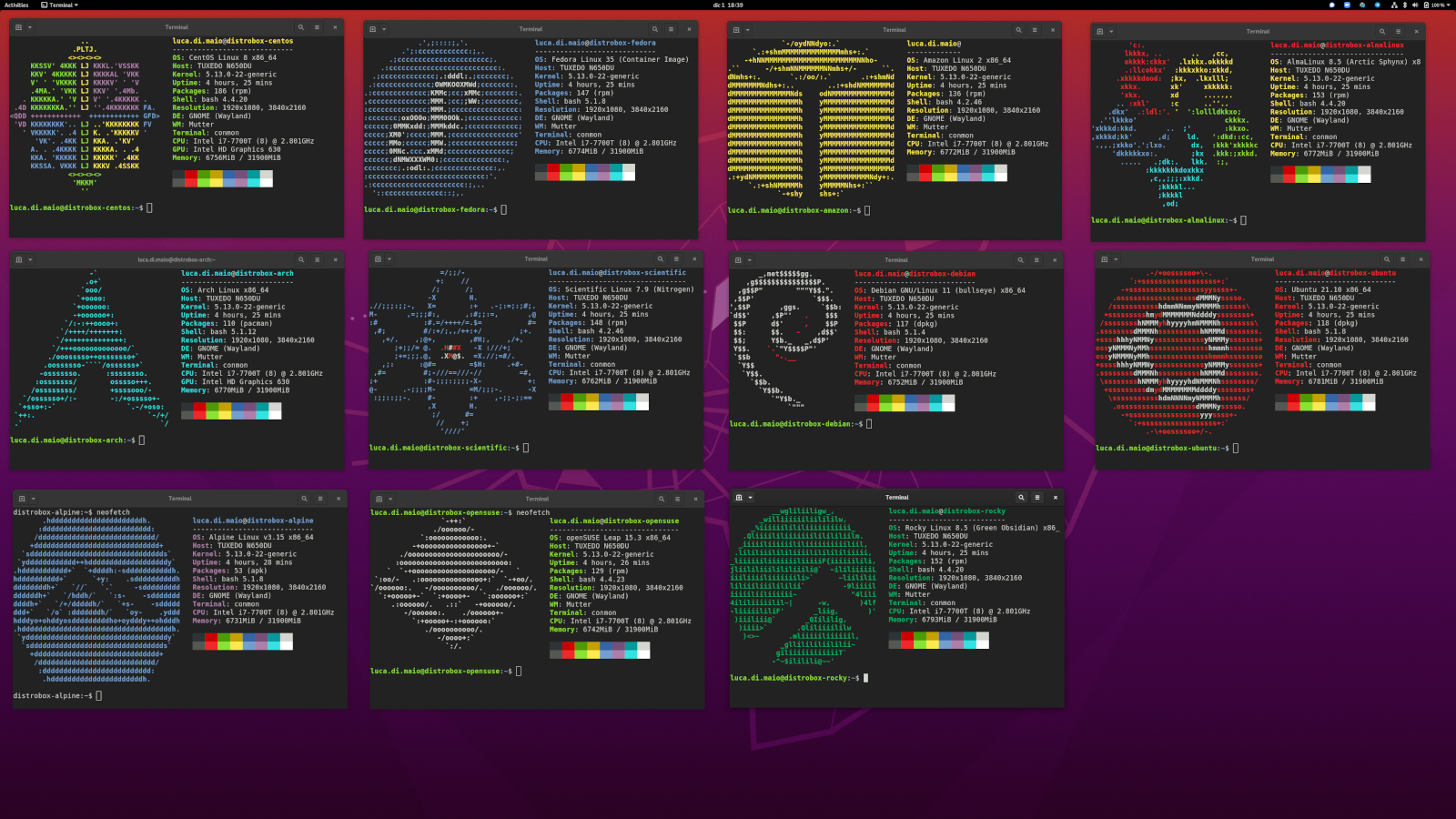
Use any Linux distribution inside your terminal. Enable both backward and forward
compatibility with software and freedom to use whatever distribution you’
comfortable with.
Distrobox uses `podman` or `docker` to create containers using the Linux distribution
of your choice.
The created container will be tightly integrated with the host, allowing sharing
of the HOME directory of the user, external storage, external USB devices and
2022-01-02 18:13:31 +01:00
graphical apps (X11/Wayland), and audio.
---
2022-05-02 19:39:09 +02:00
[Documentation ](https://distrobox.privatedns.org/#distrobox ) -
[Matrix Room ](https://matrix.to/#/%23distrobox:matrix.org ) -
[Telegram Group ](https://t.me/distrobox )
---
2022-01-02 18:13:31 +01:00
---
- [Distrobox ](#distrobox )
2022-04-05 17:12:42 +02:00
- [What it does ](#what-it-does )
2022-04-04 15:14:39 +02:00
- [See it in action ](#see-it-in-action )
2022-04-18 23:12:26 +03:00
- [Why? ](#why )
2022-04-04 15:14:39 +02:00
- [Aims ](#aims )
2022-01-02 18:13:31 +01:00
- [Installation ](#installation )
2022-08-17 17:38:50 +02:00
- [Alternative methods ](#alternative-methods )
- [Curl ](#curl )
- [Git ](#git )
- [Flatpak ](#flatpak )
- [Dependencies ](#dependencies )
2022-09-05 23:32:08 +02:00
- [Install Podman without root ](compatibility.md#install-podman-in-a-static-manner )
2022-04-04 15:14:39 +02:00
- [Uninstallation ](#uninstallation )
2022-01-02 19:07:31 +01:00
- [Compatibility ](compatibility.md )
2022-04-04 15:14:39 +02:00
- [Supported container managers ](compatibility.md#supported-container-managers )
- [Host Distros ](compatibility.md#host-distros )
- [Containers Distros ](compatibility.md#containers-distros )
2022-01-13 19:23:12 +01:00
- [Usage ](usage/usage.md )
2022-04-18 23:12:26 +03:00
- [Outside the distrobox ](usage/usage.md#outside-the-distrobox )
2022-04-04 15:14:39 +02:00
- [distrobox-create ](usage/distrobox-create.md )
- [distrobox-enter ](usage/distrobox-enter.md )
2022-06-28 05:50:03 +08:00
- [distrobox-ephemeral ](usage/distrobox-ephemeral.md )
2022-04-04 15:14:39 +02:00
- [distrobox-list ](usage/distrobox-list.md )
- [distrobox-rm ](usage/distrobox-rm.md )
- [distrobox-stop ](usage/distrobox-stop.md )
2022-04-18 23:12:26 +03:00
- [Inside the distrobox ](usage/usage.md#inside-the-distrobox )
2022-04-04 15:14:39 +02:00
- [distrobox-export ](usage/distrobox-export.md )
2022-05-25 13:14:44 +02:00
- [distrobox-host-exec ](usage/distrobox-host-exec.md )
2022-04-04 15:14:39 +02:00
- [distrobox-init ](usage/distrobox-init.md )
2022-04-05 17:12:42 +02:00
- [Configure distrobox ](#configure-distrobox )
2022-01-02 19:07:31 +01:00
- [Useful tips ](useful_tips.md )
2022-04-04 15:14:39 +02:00
- [Execute complex commands directly from distrobox-enter ](useful_tips.md#execute-complex-commands-directly-from-distrobox-enter )
- [Create a distrobox with a custom HOME directory ](useful_tips.md#create-a-distrobox-with-a-custom-home-directory )
- [Mount additional volumes in a distrobox ](useful_tips.md#mount-additional-volumes-in-a-distrobox )
- [Use a different shell than the host ](useful_tips.md#use-a-different-shell-than-the-host )
- [Duplicate an existing distrobox ](useful_tips.md#duplicate-an-existing-distrobox )
- [Export to the host ](useful_tips.md#export-to-the-host )
- [Execute commands on the host ](useful_tips.md#execute-commands-on-the-host )
- [Enable SSH X-Forwarding when SSH-ing in a distrobox ](useful_tips.md#enable-ssh-x-forwarding-when-ssh-ing-in-a-distrobox )
- [Use distrobox to install different flatpaks from the host ](useful_tips.md#use-distrobox-to-install-different-flatpaks-from-the-host )
- [Using podman inside a distrobox ](useful_tips.md#using-podman-inside-a-distrobox )
- [Using docker inside a distrobox ](useful_tips.md#using-docker-inside-a-distrobox )
- [Using init system inside a distrobox ](useful_tips.md#using-init-system-inside-a-distrobox )
- [Using distrobox as main cli ](useful_tips.md#using-distrobox-as-main-cli )
2022-05-28 19:53:09 +02:00
- [Using a different architecture ](useful_tips.md#using-a-different-architecture )
2022-04-04 15:14:39 +02:00
- [Improve distrobox-enter performance ](useful_tips.md#improve-distrobox-enter-performance )
- [Slow creation on podman and image size getting bigger with distrobox-create ](useful_tips.md#slow-creation-on-podman-and-image-size-getting-bigger-with-distrobox-create )
- [Container save and restore ](useful_tips.md#container-save-and-restore )
- [Check used resources ](useful_tips.md#check-used-resources )
- [Build a Gentoo distrobox container ](distrobox_gentoo.md )
- [Build a Dedicated distrobox container ](distrobox_custom.md )
2022-01-10 09:52:17 +01:00
- [Posts ](posts/posts.md )
2022-04-18 23:12:26 +03:00
- [Run latest GNOME and KDE Plasma using distrobox ](posts/run_latest_gnome_kde_on_distrobox.md )
2022-04-04 15:14:39 +02:00
- [Integrate VSCode and Distrobox ](posts/integrate_vscode_distrobox.md )
- [Execute a command on the Host ](posts/execute_commands_on_host.md )
2022-01-02 19:20:01 +01:00
- [Featured Articles ](featured_articles.md )
2022-05-01 09:07:44 +02:00
- [Articles ](featured_articles.md#articles )
- [Run Distrobox on Fedora Linux - Fedora Magazine ](https://fedoramagazine.org/run-distrobox-on-fedora-linux/ )
- [DistroBox – ](https://www.tecmint.com/distrobox-run-any-linux-distribution/ )
2022-06-17 18:36:29 +02:00
- [Distrobox: Try Multiple Linux Distributions via the Terminal - It's FOSS ](https://itsfoss.com/distrobox/ )
2022-05-01 09:07:44 +02:00
- [Distrobox - How to quickly deploy a Linux distribution with GUI applications via a container ](https://www.techrepublic.com/article/how-to-quickly-deploy-a-linux-distribution-with-gui-applications-via-a-container/ )
- [Using Distrobox To Augment The Package Selection On Clear Linux - Phoronix ](https://www.phoronix.com/scan.php?page=news_item&px=Distrobox-Clear-Linux )
- [Benchmark: benefits of Clear Linux containers (distrobox) - Phoronix ](https://www.phoronix.com/forums/forum/phoronix/latest-phoronix-articles/1305326-clear-linux-container-performance-continues-showing-sizable-gains )
- [Distrobox - A great item in the Linux toolbelt - phmurphy's blog ](https://phmurphy.com/posts/distrobox-toolbelt/ )
2022-06-17 18:36:29 +02:00
- [Distrobox: Run (pretty much) any Linux distro under almost any other - TheRegister ](https://www.theregister.com/2022/05/31/distrobox_130_released/ )
2022-05-01 09:07:44 +02:00
- [Day-to-day differences between Fedora Silverblue and Ubuntu - castrojo's blog ](https://www.ypsidanger.com/day-to-day-advantages-of-fedora-silverblue/ )
2022-05-15 10:50:45 +02:00
- [Distrobox is Awesome - Running Window Manager and Desktop environments using Distrobox ](https://cloudyday.tech.blog/2022/05/14/distrobox-is-awesome/ )
2022-06-17 18:36:29 +02:00
- [Japanese input on Clear Linux with Mozc via Ubuntu container with Distrobox ](https://impsbl.hatenablog.jp/entry/JapaneseInputOnClearLinuxWithMozc_en )
- [MID (MaXX Interactive Desktop) on Clear Linux via Ubuntu container with Distrobox ](https://impsbl.hatenablog.jp/entry/MIDonClearLinuxWithDistrobox_en )
- [Running Other Linux Distros with Distrobox on Fedora Linux - bandithijo's blog ](featured_articles.md )
2022-05-01 09:07:44 +02:00
- [Talks ](featured_articles.md#talks )
- [Linux App Summit 2022 - Distrobox: Run Any App On Any Distro - BoF ](https://github.com/89luca89/distrobox/files/8598433/distrobox-las-talk.pdf )
2022-06-17 18:36:29 +02:00
- [A "Box" Full of Tools and Distros - Dario Faggioli @ OpenSUSE Conference 2022 ](https://www.youtube.com/watch?v=_RzARte80SQ )
2022-04-04 15:14:39 +02:00
- [Podcasts ](featured_articles.md#podcasts )
2022-01-02 18:13:31 +01:00
2022-01-04 02:18:23 +01:00
---
2022-01-02 18:13:31 +01:00
## What it does
2022-04-05 17:12:42 +02:00
Simply put it's a fancy wrapper around `podman` or `docker` to create and start
containers highly integrated with the hosts.
2022-01-02 18:13:31 +01:00
The distrobox environment is based on an OCI image.
2022-04-05 17:12:42 +02:00
This image is used to create a container that seamlessly integrates with the
rest of the operating system by providing access to the user's home directory,
the Wayland and X11 sockets, networking, removable devices (like USB sticks),
systemd journal, SSH agent, D-Bus,
2022-01-02 18:13:31 +01:00
ulimits, /dev and the udev database, etc...
2022-04-05 17:12:42 +02:00
It implements the same concepts introduced by <https://github.com/containers/toolbox>
but in a simplified way using POSIX sh and aiming at broader compatibility.
2022-01-02 18:13:31 +01:00
All the props go to them as they had the great idea to implement this stuff.
2022-08-31 20:11:58 +02:00
It is divided into 10 commands:
2022-01-02 18:13:31 +01:00
- `distrobox-create` - creates the container
- `distrobox-enter` - to enter the container
- `distrobox-list` - to list containers created with distrobox
- `distrobox-rm` - to delete a container created with distrobox
2022-03-10 22:48:49 +01:00
- `distrobox-stop` - to stop a running container created with distrobox
2022-08-31 20:11:58 +02:00
- `distrobox-upgrade` - to upgrade one or more running containers created with distrobox at once
2022-08-28 19:15:18 +02:00
- `distrobox-generate-entry` - to create an entry of a created container in the applications list
2022-04-05 17:12:42 +02:00
- `distrobox-init` - the entrypoint of the container (not meant to be used manually)
- `distrobox-export` - it is meant to be used inside the container,
useful to export apps and services from the container to the host
2022-05-25 13:14:44 +02:00
- `distrobox-host-exec` - to run commands/programs from the host, while inside
of the container
2022-01-02 18:13:31 +01:00
2022-04-05 17:12:42 +02:00
It also includes a little wrapper to launch commands with `distrobox COMMAND`
instead of calling the single files.
2022-01-02 18:13:31 +01:00
2022-05-02 19:39:09 +02:00
Please check [the usage docs here ](usage/usage.md ) and [see some handy tips on how to use it ](useful_tips.md )
2022-02-11 23:42:06 +01:00
### See it in action
2022-04-05 17:12:42 +02:00
Thanks to [castrojo ](https://github.com/castrojo ), you can see Distrobox in
action in this explanatory video on his setup with Distrobox, Toolbx,
Fedora Silverblue on his project [ublue ](https://github.com/castrojo/ublue )
(check it out!)
2022-02-11 23:42:06 +01:00
[](https://www.youtube.com/watch?v=Q2PrISAOtbY)
2022-04-04 15:14:39 +02:00
## Why
2022-01-02 18:13:31 +01:00
2022-09-05 23:32:08 +02:00
- Provide a mutable environment on an immutable OS, like [Endless OS,
2022-09-09 14:24:56 +02:00
Fedora Silverblue, OpenSUSE MicroOS](compatibility.md#host -distros) or [SteamOS3 ](posts/install_on_steamos.md )
2022-04-05 17:12:42 +02:00
- Provide a locally privileged environment for sudoless setups
(eg. company-provided laptops, security reasons, etc...)
- To mix and match a stable base system (eg. Debian Stable, Ubuntu LTS, RedHat)
with a bleeding-edge environment for development or gaming
(eg. Arch, OpenSUSE Tumbleweed or Fedora with latest Mesa)
- Leverage high abundance of curated distro images for docker/podman to
manage multiple environments
2022-01-02 18:13:31 +01:00
2022-04-05 17:12:42 +02:00
Refer to the compatiblity list for an overview of supported host's distro
[HERE ](compatibility.md#host-distros ) and container's distro [HERE ](compatibility.md#containers-distros ).
2022-01-03 18:01:05 +01:00
2022-01-02 18:13:31 +01:00
### Aims
2022-04-05 17:12:42 +02:00
This project aims to bring **any distro userland to any other distro**
supporting podman or docker.
It has been written in POSIX sh to be as portable as possible and not have
problems with dependencies and glibc version's compatibility.
2022-01-03 18:01:05 +01:00
2022-04-05 17:12:42 +02:00
Refer [HERE ](compatibility.md#supported-container-managers ) for a list of
supported container managers and minimum supported versions.
2022-01-02 18:13:31 +01:00
2022-04-05 17:12:42 +02:00
It also aims to enter the container **as fast as possible** , every millisecond
adds up if you use the container as your default environment for your terminal:
2022-01-02 18:13:31 +01:00
2022-04-05 17:12:42 +02:00
These are some sample results of `distrobox-enter` on the same container on my
2022-08-30 10:56:14 +02:00
weak laptop:
2022-01-02 18:13:31 +01:00
2022-08-30 10:56:14 +02:00
```console
~$ hyperfine --warmup 3 --runs 100 "distrobox enter bench -- whoami"
Benchmark 1: distrobox enter bench -- whoami
Time (mean ± σ
Range (min … max): 297.3 ms … 408.9 ms 100 runs
2022-01-02 18:13:31 +01:00
```
2022-03-17 18:31:27 +00:00
#### Security implications
2022-04-13 08:54:52 -07:00
Isolation and sandboxing is **not** the main aim of the project, on the contrary
it aims to tightly integrate the container with the host.
2022-04-05 17:12:42 +02:00
The container will have complete access to your home, pen drives and so on,
so do not expect it to be highly sandboxed like a plain
2022-03-17 18:31:27 +00:00
docker/podman container or a flatpak.
2022-08-30 10:56:14 +02:00
⚠️ **BE CAREFUL** :⚠️ if you use docker, or you use podman with the `--root/-r` flag,
2022-05-01 08:03:03 +02:00
the containers will run as root, so **root inside the rootful container can modify
system stuff outside the container**,
2022-04-05 17:12:42 +02:00
if you have security concern for this, **use podman that runs in rootless mode** .
Rootless docker is still not working as intended and will be included in the future
when it will be complete.
2022-03-31 13:05:11 +02:00
2022-04-05 17:12:42 +02:00
That said, it is in the works to implement some sort of decoupling with the host,
as discussed here: [#28 Sandboxed mode ](https://github.com/89luca89/distrobox/issues/28 )
2022-03-17 18:31:27 +00:00
2022-01-04 01:23:00 +01:00
---
2022-03-17 19:13:43 +00:00
# Basic usage
Create a new distrobox:
`distrobox create -n test`
Enter created distrobox:
`distrobox enter test`
2022-08-29 16:09:07 -04:00
Add [various ](https://github.com/89luca89/distrobox/blob/main/docs/compatibility.md#host-distros )
distroboxes, eg Ubuntu 20.04:
2022-08-31 20:11:58 +02:00
`distrobox create -i ubuntu:20.04`
2022-03-17 19:13:43 +00:00
Execute a command in a distrobox:
`distrobox enter test -- command-to-execute`
2022-08-31 20:11:58 +02:00
Upgrade all distroboxes at once:
`distrobox upgrade --all`
2022-03-17 19:13:43 +00:00
List running distroboxes:
`distrobox list`
Stop a running distrobox:
`distrobox stop test`
Remove a distrobox
`distrobox rm test`
2022-04-05 17:12:42 +02:00
You can check [HERE for more advanced usage ](usage/usage.md )
and check a [comprehensive list of useful tips HERE ](useful_tips.md )
2022-03-17 19:13:43 +00:00
2022-03-20 15:08:30 +01:00
# Configure Distrobox
Configuration files can be placed in the following paths, from the least important
to the most important:
- /usr/share/distrobox/distrobox.conf
2022-07-30 10:18:22 +02:00
- /usr/etc/distrobox/distrobox.conf
2022-03-20 15:08:30 +01:00
- /etc/distrobox/distrobox.conf
- ${HOME}/.config/distrobox/distrobox.conf
- ${HOME}/.distroboxrc
Example configuration file:
```conf
2022-05-26 00:15:03 +08:00
container_always_pull="1"
2022-03-20 15:08:30 +01:00
container_user_custom_home="/home/.local/share/container-home-test"
container_image="registry.opensuse.org/opensuse/toolbox:latest"
container_manager="docker"
container_name="test-name-1"
2022-09-12 09:08:29 +02:00
container_entry=0
2022-03-20 15:08:30 +01:00
non_interactive="1"
2022-05-27 11:29:46 +02:00
skip_workdir="0"
2022-03-20 15:08:30 +01:00
```
Alternatively it is possible to specify preferences using ENV variables:
2022-05-26 00:15:03 +08:00
- DBX_CONTAINER_ALWAYS_PULL
2022-05-27 11:29:46 +02:00
- DBX_CONTAINER_CUSTOM_HOME
2022-03-20 15:08:30 +01:00
- DBX_CONTAINER_IMAGE
2022-05-27 11:29:46 +02:00
- DBX_CONTAINER_MANAGER
2022-03-20 15:08:30 +01:00
- DBX_CONTAINER_NAME
2022-09-12 09:08:29 +02:00
- DBX_CONTAINER_ENTRY
2022-03-20 15:08:30 +01:00
- DBX_NON_INTERACTIVE
2022-05-27 11:29:46 +02:00
- DBX_SKIP_WORKDIR
2022-03-20 15:08:30 +01:00
---
# Installation
2022-04-05 17:12:42 +02:00
Distrobox is packaged in the following distributions, if your distribution is
on this list, you can refer to your repos for installation:
2022-03-31 13:05:11 +02:00
[](https://repology.org/project/distrobox/versions)
2022-03-20 15:08:30 +01:00
2022-04-05 17:12:42 +02:00
Thanks to the maintainers for their work: [M0Rf30 ](https://github.com/M0Rf30 ),
[alcir ](https://github.com/alcir ), [dfaggioli ](https://github.com/dfaggioli ),
2022-05-06 18:49:04 +02:00
[AtilaSaraiva ](https://github.com/AtilaSaraiva ), [michel-slm ](https://github.com/michel-slm )
2022-03-31 13:05:11 +02:00
2022-08-17 02:27:03 +02:00
## Alternative methods
Here is a list of alternative ways to install distrobox
### Curl
2022-04-05 17:12:42 +02:00
Else, if you like to live your life dangerously, or you want the latest release,
you can trust me and simply run this in your terminal:
2022-03-31 13:05:11 +02:00
2022-04-05 17:12:42 +02:00
```sh
2022-03-31 13:05:11 +02:00
curl -s https://raw.githubusercontent.com/89luca89/distrobox/main/install | sudo sh
```
2022-03-20 15:08:30 +01:00
or if you want to select a custom directory to install without sudo:
2022-04-05 17:12:42 +02:00
```sh
2022-03-31 13:05:11 +02:00
curl -s https://raw.githubusercontent.com/89luca89/distrobox/main/install | sh -s -- --prefix ~/.local
```
2022-03-20 15:08:30 +01:00
2022-06-10 10:44:32 +02:00
If you want to install the last development version, directly from last commit on git, you can use:
```sh
curl -s https://raw.githubusercontent.com/89luca89/distrobox/main/install | sudo sh -s -- --next
```
or:
```sh
curl -s https://raw.githubusercontent.com/89luca89/distrobox/main/install | sh -s -- --next --prefix ~/.local
```
2022-09-09 14:24:56 +02:00
> **Warning**
2022-09-12 09:04:30 +02:00
> Remember to add prefix-path-you-choose/bin to your PATH, to make it work.
2022-09-09 14:24:56 +02:00
2022-08-17 02:27:03 +02:00
### Git
2022-04-05 17:12:42 +02:00
Alternatively you can clone the project using `git clone` or using the latest
release [HERE ](https://github.com/89luca89/distrobox/releases/latest ).
2022-03-20 15:08:30 +01:00
2022-04-05 17:12:42 +02:00
Enter the directory and run `./install` , by default it will attempt to install
in `~/.local` but if you run the script as root, it will default to `/usr/local` .
You can specify a custom directory with the `--prefix` flag
such as `./install --prefix ~/.distrobox` .
2022-03-20 15:08:30 +01:00
2022-04-05 17:12:42 +02:00
Prefix explained: main distrobox files get installed to `${prefix}/bin` whereas
the manpages get installed to `${prefix}/share/man` .
2022-03-20 15:08:30 +01:00
2022-08-17 02:27:03 +02:00
### Flatpak
⚠️ ⚠️ ⚠️ This is experimental! ⚠️ ⚠️ ⚠️
You can find flatpak builds of distrobox here:
[io.github.luca.distrobox ](https://github.com/89luca89/io.github.luca.distrobox/releases )
Download the latest release flatpak and run
```sh
flatpak install io.github.luca.distrobox.flatpak
```
You can then run distrobox with:
```sh
flatpak run io.github.luca.distrobox create ...
flatpak run io.github.luca.distrobox enter ...
flatpak run io.github.luca.distrobox list ...
[ ...]
```
It will be handy to add an `alias distrobox="flatpak run io.github.luca.distrobox"` to your shell,
so that you can run distrobox commands normally.
Being experimental, please if you encounter problems, report them!
---
2022-04-05 17:12:42 +02:00
Check the [Host Distros ](compatibility.md#host-distros ) compatibility list for
distro-specific instructions.
2022-03-31 13:05:11 +02:00
2022-03-20 15:08:30 +01:00
## Dependencies
2022-04-05 17:12:42 +02:00
Distrobox depends on a container manager to work, you can choose to install
either podman or docker.
2022-09-05 23:32:08 +02:00
2022-04-05 17:12:42 +02:00
Please look in the [Compatibility Table ](compatibility.md#host-distros ) for your
distribution notes.
2022-03-20 15:08:30 +01:00
2022-09-05 23:32:08 +02:00
There are ways to install [Podman without root privileges and in home. ](compatibility.md#install-podman-in-a-static-manner )
This should play well with completely sudoless setups and with devices like the Stean Deck.
2022-03-17 19:13:43 +00:00
---
2022-01-13 19:46:08 +01:00
## Uninstallation
2022-01-04 00:04:32 +01:00
2022-04-05 17:12:42 +02:00
If you installed distrobox using the `install` script in the default install
directory use this:
2022-01-04 00:04:32 +01:00
2022-04-05 17:12:42 +02:00
```sh
2022-03-31 13:05:11 +02:00
curl -s https://raw.githubusercontent.com/89luca89/distrobox/main/uninstall | sudo sh
```
2022-01-04 00:04:32 +01:00
or if you specified a custom path:
2022-04-05 17:12:42 +02:00
```sh
2022-03-31 13:05:11 +02:00
curl -s https://raw.githubusercontent.com/89luca89/distrobox/main/uninstall | sh -s -- --prefix ~/.local
```
2022-01-04 00:04:32 +01:00
2022-04-05 17:12:42 +02:00
Else if cloned the project using `git clone` or using the latest archive release
from [HERE ](https://github.com/89luca89/distrobox/releases/latest ),
2022-01-04 00:04:32 +01:00
2022-04-05 17:12:42 +02:00
enter the directory and run `./uninstall` , by default it will assume the install
directory was `/usr/local` if ran as root or `~/.local` ,
you can specify another directory if needed with `./uninstall --prefix ~/.local`
2022-01-04 00:04:32 +01:00
2022-01-04 01:23:00 +01:00
---
2022-04-04 15:14:39 +02:00

2022-03-11 00:11:08 +01:00
2022-01-04 01:23:00 +01:00
---


