mirror of
https://github.com/ilya-zlobintsev/LACT.git
synced 2026-08-19 01:14:43 -05:00

407 lines
12 KiB
Markdown
407 lines
12 KiB
Markdown
# Linux GPU Control Application
|
|
<a href="https://translate.fedoraproject.org/engage/lact/">
|
|
<img src="https://translate.fedoraproject.org/widget/lact/svg-badge.svg" alt="Translation status" />
|
|
</a>
|
|
|
|
<img src="res/io.github.ilya_zlobintsev.LACT.png" alt="icon" width="100"/>
|
|
|
|
This application allows you to control your AMD, Nvidia or Intel GPU on a Linux
|
|
system.
|
|
|
|
| GPU info | Overclocking | Fan control |
|
|
| ----------------------------------| ----------------------------------| ----------------------------------|
|
|
|  |  |  |
|
|
| Software info | Historical data | |
|
|
|  |  | |
|
|
|
|
### Features:
|
|
|
|
- #### Detailed GPU information reporting
|
|
- Name and manufacturer
|
|
- VBIOS info
|
|
- VRAM info (Type/Manufacturer/Bus)
|
|
- Hardware unit info (CUs/SMs/EUs, ROP count)
|
|
- Resizable BAR status
|
|
- Vulkan features and extensions
|
|
- #### Monitoring
|
|
- Configurable historical charts for power/thermals/frequency
|
|
- Throttling info
|
|
- Data CSV export
|
|
- #### Power configuration
|
|
- Power cap
|
|
- Power states (AMD only)
|
|
- #### Thermals configuration
|
|
- Custom fan curves (AMD/Nvidia)
|
|
- GPU firmware thermal options such as thermal and acoustic target/limit (AMD RDNA3+ only)
|
|
- #### Overclocking
|
|
- GPU/VRAM clocks configuration
|
|
- GPU undervolting (via voltage offset on AMD, [indirectly](https://github.com/ilya-zlobintsev/LACT/wiki/Frequently-asked-questions#how-to-undervolt-nvidia-gpus) on Nvidia)
|
|
- #### Settings profiles
|
|
- Automatic profile activation based on running processes or gamemode status
|
|
- #### [OpenTelemetry metrics exporter](./docs/EXPORTER.md)
|
|
|
|
GPU configuration is handled by a system service that does not depend on a graphical session (Wayland/X11).
|
|
|
|
The service can also be used standalone with a config file, for example in headless scenarios.
|
|
|
|
# Quick links
|
|
|
|
- [Installation](#installation)
|
|
- [Hardware support](https://github.com/ilya-zlobintsev/LACT/wiki/Hardware-Support)
|
|
- [Frequently asked questions](https://github.com/ilya-zlobintsev/LACT/wiki/Frequently-asked-questions)
|
|
- [Enable overclocking on AMD](https://github.com/ilya-zlobintsev/LACT/wiki/Overclocking-(AMD))
|
|
- [Config file reference](./docs/CONFIG.md)
|
|
- [API](./docs/API.md)
|
|
- [Power profiles daemon note](#power-profiles-daemon-note)
|
|
- [Recovery from a bad overclock](https://github.com/ilya-zlobintsev/LACT/wiki/Recovering-from-a-bad-overclock)
|
|
- [Metrics exporter](./docs/EXPORTER.md)
|
|
- [Contribute code](./docs/CONTRIBUTING.md)
|
|
- [Contribute translations](#localization)
|
|
- [Support the project](#support-the-project)
|
|
|
|
# Installation
|
|
|
|
- Arch Linux: Install the package from official repositories: `pacman -S lact`
|
|
(or `lact-git` from AUR for development builds).
|
|
- Debian/Ubuntu/Derivatives: Download a .deb from
|
|
[releases](https://github.com/ilya-zlobintsev/LACT/releases/).
|
|
|
|
It is only available on Debian 12+ and Ubuntu 22.04+ as older versions don't
|
|
ship gtk4.
|
|
- Fedora: use the
|
|
[Copr repository](https://copr.fedorainfracloud.org/coprs/ilyaz/LACT/), or
|
|
download an RPM from
|
|
[releases](https://github.com/ilya-zlobintsev/LACT/releases/).
|
|
- Bazzite/Fedora Atomic: Use the Flatpak.
|
|
- Gentoo: Available in
|
|
[GURU](https://github.com/gentoo/guru/tree/master/sys-apps/lact).
|
|
- OpenSUSE: an RPM is available in
|
|
[releases](https://github.com/ilya-zlobintsev/LACT/releases/).
|
|
|
|
Only tumbleweed is supported as leap does not have the required dependencies
|
|
in the repos.
|
|
- NixOS: There is a package available in
|
|
[nixpkgs](https://search.nixos.org/packages?channel=unstable&from=0&size=50&sort=relevance&type=packages&query=lact).
|
|
- Flatpak (universal): Available on [Flathub](https://flathub.org/apps/io.github.ilya_zlobintsev.LACT) and in [releases](https://github.com/ilya-zlobintsev/LACT/releases/).
|
|
|
|
See the [Flatpak documentation](./flatpak/README.md) for additional notes.
|
|
- Docker (service only, no GUI): See [DOCKER.md](./docs/DOCKER.md)
|
|
- Build from source.
|
|
|
|
Note: Nvidia support requires the Nvidia proprietary driver with CUDA libraries
|
|
installed.
|
|
|
|
## Development builds
|
|
|
|
To get latest fixes or features that have not yet been released in a stable
|
|
version, there are packages built from the latest commit that you can install
|
|
from the
|
|
[test release](https://github.com/ilya-zlobintsev/LACT/releases/tag/test-build)
|
|
or using the `lact-git` AUR package on Arch-based distros.
|
|
|
|
Note: the date that GitHub shows next to the test release is not when the packages were built,
|
|
the actual date is specified next to the attached package files.
|
|
|
|
# Usage
|
|
|
|
Enable and start the service (otherwise you won't be able to change any
|
|
settings):
|
|
|
|
```
|
|
sudo systemctl enable --now lactd
|
|
```
|
|
|
|
You can now use the GUI to change settings and view information.
|
|
|
|
# Hardware support
|
|
|
|
See the
|
|
[Wiki page](https://github.com/ilya-zlobintsev/LACT/wiki/Hardware-Support)
|
|
|
|
# Configuration
|
|
|
|
There is a configuration file available in `/etc/lact/config.yaml`. Most of the
|
|
settings are accessible through the GUI, but some of them may be useful to be
|
|
edited manually (like `admin_group` and `admin_user` to specify who has access
|
|
to the daemon)
|
|
|
|
See [CONFIG.md](./docs/CONFIG.md) for more information.
|
|
|
|
**Socket permissions setup:**
|
|
|
|
By default, LACT uses either ether the `wheel` or `sudo` group (whichever is
|
|
available) for the ownership of the unix socket that the GUI needs to connect
|
|
to.
|
|
|
|
On most desktop configurations (such as the default setup on Arch-based, most
|
|
Debian-based or Fedora systems) this includes the default user, so you do not
|
|
need to configure this.
|
|
|
|
However, some systems may have different user configuration. In particular, this
|
|
has been reported to be a problem on OpenSUSE.
|
|
|
|
To fix socket permissions in such configurations, edit `/etc/lact/config.yaml`
|
|
and under the `daemon` section either:
|
|
|
|
- Set `admin_user` to your username
|
|
- Set `admin_group` to a group that your user is a part of Then restart the
|
|
service (`sudo systemctl restart lactd`).
|
|
|
|
# Overclocking (AMD)
|
|
|
|
Some functionality requires enabling an option in the amdgpu driver, see the
|
|
[wiki page](https://github.com/ilya-zlobintsev/LACT/wiki/Overclocking-(AMD)) for
|
|
more information.
|
|
|
|
## Power profiles daemon note!
|
|
|
|
If you are using `power-profiles-daemon` (which is installed by default on many
|
|
distributions), by default it may override the amdgpu performance level setting
|
|
according to its own profile.
|
|
|
|
When using LACT 0.7.5+ and power-profiles-daemon 0.30+, LACT will try to connect to power-profiles-daemon
|
|
and automatically disable the conflicting amdgpu action in ppd to avoid this conflict.
|
|
|
|
If running older versions, you can resolve this manually by creating a file at
|
|
`/etc/systemd/system/power-profiles-daemon.service.d/override.conf` with the
|
|
following contents:
|
|
|
|
```
|
|
[Service]
|
|
ExecStart=
|
|
ExecStart=/usr/libexec/power-profiles-daemon --block-action=amdgpu_dpm
|
|
```
|
|
|
|
Note: the `/usr/libexec` path might be different on your system, check it in
|
|
`systemctl status power-profiles-daemon`
|
|
|
|
See https://github.com/ilya-zlobintsev/LACT/issues/370 for more information.
|
|
|
|
# Suspend/Resume
|
|
|
|
As some of the GPU settings may get reset when suspending the system, LACT will
|
|
reload them on system resume. This may not work on distributions which don't use
|
|
systemd, as it relies on the `org.freedesktop.login2` DBus interface.
|
|
|
|
# Building from source
|
|
|
|
Dependencies:
|
|
|
|
- rust 1.93+
|
|
- gtk 4.6+
|
|
- libadwaita 1.5+
|
|
- git
|
|
- pkg-config
|
|
- clang
|
|
- make
|
|
- hwdata
|
|
- libdrm
|
|
|
|
Optional Dependencies:
|
|
- vulkan-tools
|
|
- clinfo
|
|
|
|
Command to install all dependencies:
|
|
|
|
- Fedora:
|
|
`sudo dnf install rust cargo make git clang gtk4-devel libadwaita-devel libdrm-devel vulkan-tools clinfo`
|
|
- Arch:
|
|
`sudo pacman -S --needed base-devel git clang make rust gtk4 libadwaita hwdata vulkan-tools clinfo`
|
|
|
|
Steps:
|
|
|
|
- `git clone https://github.com/ilya-zlobintsev/LACT && cd LACT`
|
|
- `make`
|
|
- `sudo make install`
|
|
|
|
It's possible to change which features LACT gets built with. To do so, replace
|
|
the `make` command with the following variation:
|
|
|
|
Headless build with no GUI:
|
|
|
|
```
|
|
make build-release-headless
|
|
```
|
|
|
|
# Remote management
|
|
|
|
It's possible to have the LACT daemon running on one machine, and then manage it
|
|
remotely from another.
|
|
|
|
This is disabled by default, as the TCP connection **does not have any
|
|
authentication or encryption mechanism!** Make sure to only use it in trusted
|
|
networks and/or set up appropriate firewall rules.
|
|
|
|
To enable it, edit `/etc/lact/config.yaml` and add `tcp_listen_address` with
|
|
your desired address and in the `daemon` section.
|
|
|
|
Example:
|
|
|
|
```yaml
|
|
daemon:
|
|
tcp_listen_address: 0.0.0.0:12853
|
|
log_level: info
|
|
admin_group: wheel
|
|
disable_clocks_cleanup: false
|
|
```
|
|
|
|
After this restart the service (`sudo systemctl restart lactd`).
|
|
|
|
To connect to a remote instance with the GUI, run it with
|
|
`lact gui --tcp-address 192.168.1.10:12853`.
|
|
|
|
# CLI
|
|
|
|
There is also a cli available.
|
|
|
|
- List system GPUs:
|
|
|
|
`lact cli list-gpus`
|
|
|
|
Example output:
|
|
|
|
```
|
|
10DE:2704-1462:5110-0000:09:00.0 (AD103 [GeForce RTX 4080])
|
|
```
|
|
- Getting GPU information:
|
|
|
|
`lact cli info`
|
|
|
|
Example output:
|
|
|
|
```
|
|
$ lact cli info
|
|
GPU 10DE:2704-1462:5110-0000:09:00.0:
|
|
=====================================
|
|
GPU Model: NVIDIA GeForce RTX 4080 (0x10DE:0x2704)
|
|
Card Manufacturer: Micro-Star International Co., Ltd. [MSI] (0x1462)
|
|
Card Model: Unknown (0x5110)
|
|
Driver Used: nvidia 570.124.04
|
|
VBIOS Version: 95.03.1E.00.60
|
|
VRAM Size: 16376 MiB
|
|
GPU Family: Ada
|
|
Cuda Cores: 9728
|
|
SM Count: 76
|
|
ROP Count: 112 (14 * 8)
|
|
VRAM Type: GDDR6x
|
|
VRAM Manufacturer: Micron
|
|
L2 Cache: 65536 KiB
|
|
Resizeable bar: Enabled
|
|
CPU Accessible VRAM: 16384
|
|
Link Speed: 8 GT/s PCIe gen 3 x8
|
|
```
|
|
|
|
- Profiles
|
|
`lact cli profile [COMMAND]`
|
|
|
|
- List profiles:
|
|
|
|
`lact cli profile list`
|
|
|
|
Example output:
|
|
|
|
```
|
|
Default
|
|
Gaming
|
|
Performance
|
|
Balanced
|
|
```
|
|
|
|
- Get current Profile:
|
|
|
|
`lact cli profile get` or `lact cli profile`
|
|
|
|
Example output:
|
|
|
|
```
|
|
Gaming
|
|
```
|
|
|
|
- Set Profile:
|
|
|
|
`lact cli profile set "Performance"`
|
|
|
|
Example output:
|
|
|
|
```
|
|
Performance
|
|
```
|
|
|
|
- Auto switch profiles
|
|
`lact cli profile auto-switch [COMMAND]`
|
|
|
|
- Get auto-switch state:
|
|
|
|
`lact cli profile auto-switch get` or `lact cli profile auto-switch`
|
|
|
|
Example output:
|
|
|
|
```
|
|
enabled
|
|
```
|
|
|
|
- Enable auto switch:
|
|
|
|
`lact cli profile auto-switch enable`
|
|
|
|
Example output:
|
|
|
|
```
|
|
enabled
|
|
```
|
|
|
|
- Disable auto switch:
|
|
|
|
`lact cli profile auto-switch disable`
|
|
|
|
Example output:
|
|
|
|
```
|
|
disabled
|
|
```
|
|
|
|
The functionality of the CLI is quite limited. If you want to integrate LACT
|
|
with some application/script, you should use the [API](./docs/API.md) instead.
|
|
|
|
# Reporting issues
|
|
|
|
When reporting issues, please include your system info and GPU model.
|
|
|
|
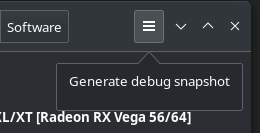
If you're having an issue with changing the GPU's configuration, it's highly
|
|
recommended to include a debug snapshot in the bug report. You can generate one
|
|
using the option in the dropdown menu:
|
|
|
|
|
|
|
|
The snapshot is an archive which includes the SysFS that LACT uses to interact
|
|
with the GPU.
|
|
|
|
If there's a crash, run `lact gui` from the command line to get GUI logs, check
|
|
daemon logs in `journalctl -u lactd` for errors, and see `dmesg` for kernel logs
|
|
that might include information about driver and system issues.
|
|
|
|
# Localization
|
|
|
|
You can contribute translations to LACT using [Weblate](https://translate.fedoraproject.org/engage/lact/).
|
|
|
|
# Support the project
|
|
|
|
If you wish to support the project, you can do so via Patreon:
|
|
https://www.patreon.com/IlyaZlobintsev
|
|
|
|
Or using cryptocurrency:
|
|
- BTC: `12FuTXZzd5peGb7QfoRkXaLnbJ1DNVW4pP`
|
|
- ETH: `0x80875173316aa6317641bfbc50644e7ca74d6b6d`
|
|
- XMR: `42E93NZXM7STBUsnMRGNyxKryFVgpHKNP6aza94C5hn17j2W7zUnFHe7ASQzB3KorYYnsaVzWUyHHVYfcTLQRtB63qkv5jE`
|
|
|
|
# Other tools
|
|
|
|
Here's a list of other useful tools for AMD GPUs on Linux:
|
|
|
|
- [CoreCtrl](https://gitlab.com/corectrl/corectrl) - direct alternative to LACT,
|
|
provides similar functionality in addition to CPU configuration with a Qt UI
|
|
- [amdgpu_top](https://github.com/Umio-Yasuno/amdgpu_top) - tool for detailed
|
|
real-time statistics on AMD GPUs
|
|
- [Tuxclocker](https://github.com/Lurkki14/tuxclocker) - Qt overclocking tool,
|
|
has support for AMD GPUs
|