 0cf7d5dd0a
* Circuit queue - lazy rendering by active tab

Only perform network requests for the active tab on the
circuit_queue.html page. Small to moderate performance
improvement, but it greatly reduces the time spent polling.

* Significantly optimize network and rendering performance of the queues funnel display.

* Substantially improve performance on the flows display by using msgpack with a dictionary.

* Remove some commented code

* Fetch circuit info via efficient msgpack

* Use MsgPack for circuit throughput

* Get rid of the monstrosity that was copying queue data over the bus in a raw JSON string, hideously wasteful. Instead, we now have a 'transit' series of objects in the bus definition for tight encoding. This also cleaned up some node manager code. It's mostly useful for the next stage, which will start to reduce the amount of data we are transmitting.

* A lot of the redundant network transport is culled.

* More unused fields culled.

* Elimate a HUGE amount of garbage collection by allocating and reusing a single object, and cleaning up the JS rendering. Still not good enough.

* Switch to an efficient msgpack transmission format.

* Cleanup handling of 'none' in msgpack

* Fix scale delays to ms

* Commit to send to payne

* Use WebGL for a slight rendering boost.

* Further reduce draw time of circuit page by using redraw commands.

* Finish previous commit

* Use redraw with preallocated/non-GC data for all ringbuffer renders.

* Fix a rare issue with reloading network.json that could cause a stall.

* Optimize RTT graphs with the reload system.

LibreQoS is a Quality of Experience (QoE) Smart Queue Management (SQM) system designed for Internet Service Providers to optimize the flow of their network traffic and thus reduce bufferbloat, keep the network responsive, and improve the end-user experience.
Servers running LibreQoS can shape traffic for many thousands of customers.
Learn more at LibreQoS.io!
Sponsors
Special thanks to Equinix for providing server resources to support the development of LibreQoS. Learn more about Equinix Metal here.
Support LibreQoS
Please support the continued development of LibreQoS by sponsoring us via GitHub Sponsors or Patreon.
Matrix Chat
Our Matrix chat channel is available at https://matrix.to/#/#libreqos:matrix.org.

Features
Flexible Hierarchical Shaping / Back-Haul Congestion Mitigation
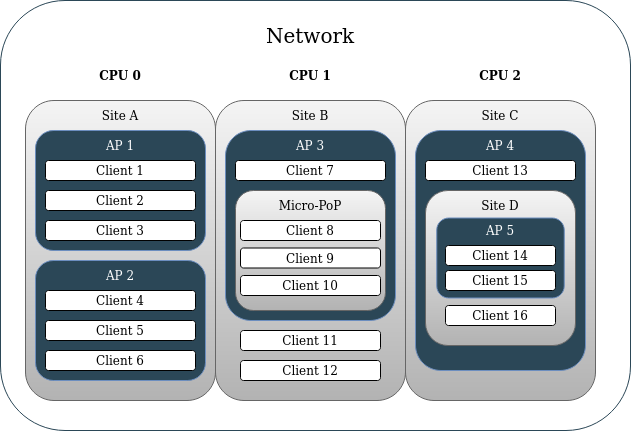
Starting in version v1.1+, operators can map their network hierarchy in LibreQoS. This enables both simple network hierarchies (Site>AP>Client) as well as much more complex ones (Site>Site>Micro-PoP>AP>Site>AP>Client). This can be used to ensure that a given site’s peak bandwidth will not exceed the capacity of its back-haul links (back-haul congestion control). Operators can support more users on the same network equipment with LibreQoS than with competing QoE solutions which only shape by AP and Client.
CAKE
CAKE is the product of nearly a decade of development efforts to improve on fq_codel. With the diffserv_4 parameter enabled – CAKE groups traffic in to Bulk, Best Effort, Video, and Voice. This means that without having to fine-tune traffic priorities as you would with DPI products – CAKE automatically ensures your clients’ OS update downloads will not disrupt their zoom calls. It allows for multiple video conferences to operate on the same connection which might otherwise “fight” for upload bandwidth causing call disruptions. With work-from-home, remote learning, and tele-medicine becoming increasingly common – minimizing video call disruptions can save jobs, keep students engaged, and help ensure equitable access to medical care.
XDP
Fast, multi-CPU queueing leveraging xdp-cpumap-tc and cpumap-pping. Currently tested in the real world past 11 Gbps (so far) with just 30% CPU use on a 16 core Intel Xeon Gold 6254. It's likely capable of 30Gbps or more.
Graphing
You can graph bandwidth and TCP RTT by client and node (Site, AP, etc), using InfluxDB.
CRM Integrations
- UISP
- Splynx
Server Recommendations
It is most cost-effective to buy a used server with specifications matching your unique requirements, as laid out in the System Requirements section below. For those who do not have the time to do that, here is a server config for up to 20 Gbps throughput:
- 20 Gbps | Dell R450 Config
The AsRock 1U4LW-B6502L2T can be a great lower-cost option as well.
System Requirements
VM or physical server
- For VMs, NIC passthrough is required for optimal throughput and latency (XDP vs generic XDP). Using Virtio / bridging is much slower than NIC passthrough. Virtio / bridging should not be used for large amounts of traffic.
CPU
- 2 or more CPU cores
- A CPU with solid single-thread performance within your budget. Queuing is very CPU-intensive, and requires high single-thread performance.
Single-thread CPU performance will determine the max throughput of a single HTB (cpu core), and in turn, what max speed plan you can offer customers.
| Customer Max Plan | Passmark Single-Thread |
|---|---|
| 100 Mbps | 1000 |
| 250 Mbps | 1500 |
| 500 Mbps | 2000 |
| 1 Gbps | 2500 |
| 2 Gbps | 3000 |
Below is a table of approximate aggregate throughput capacity, assuming a a CPU with a single thread performance of 2700 or greater:
| Aggregate Throughput | CPU Cores |
|---|---|
| 500 Mbps | 2 |
| 1 Gbps | 4 |
| 5 Gbps | 6 |
| 10 Gbps | 8 |
| 20 Gbps | 16 |
| 50 Gbps* | 32 |
(* Estimated)
So for example, an ISP delivering 1Gbps service plans with 10Gbps aggregate throughput would choose a CPU with a 2500+ single-thread score and 8 cores, such as the Intel Xeon E-2388G @ 3.20GHz.
Memory
- Minimum RAM = 2 + (0.002 x Subscriber Count) GB
- Recommended RAM:
| Subscribers | RAM |
|---|---|
| 100 | 4 GB |
| 1,000 | 8 GB |
| 5,000 | 16 GB |
| 10,000* | 18 GB |
| 50,000* | 24 GB |
(* Estimated)
Network Interface Requirements
- One management network interface completely separate from the traffic shaping interfaces. Usually this would be the Ethernet interface built in to the motherboard.
- Dedicated Network Interface Card for Shaping Interfaces
- NIC must have 2 or more interfaces for traffic shaping.
- NIC must have multiple TX/RX transmit queues. Here's how to check from the command line.
- Known supported cards:
- NVIDIA Mellanox MCX512A-ACAT
- NVIDIA Mellanox MCX416A-CCAT
- Intel X710
- Intel X520