
8.2 KiB
Install Intel® Distribution of OpenVINO™ Toolkit for Linux Using APT Repository
@sphinxdirective
With the OpenVINO™ 2023.0 release, you can install OpenVINO Runtime on Linux using the APT repository.
OpenVINO™ Development Tools can be installed via PyPI only.
See Installing Additional Components <step-3-optional-install-additional-components>__ for more information.
See the Release Notes <https://www.intel.com/content/www/us/en/developer/articles/release-notes/openvino-2022-3-lts-relnotes.html>__
for more information on updates in the latest release.
Installing OpenVINO Runtime from APT is recommended for C++ developers. If you are working with Python,
the PyPI package has everything needed for Python development and deployment on CPU and GPUs. Visit the
:doc:Install OpenVINO from PyPI <openvino_docs_install_guides_installing_openvino_pip> page for instructions
on how to install OpenVINO Runtime for Python using PyPI.
.. warning::
By downloading and using this container and the included software, you agree to the terms and
conditions of the
software license agreements <https://software.intel.com/content/dam/develop/external/us/en/documents/intel-openvino-license-agreements.pdf>__.
Prerequisites #######################################
.. tab:: System Requirements
| Full requirement listing is available in:
| System Requirements Page <https://www.intel.com/content/www/us/en/developer/tools/openvino-toolkit/system-requirements.html>__
.. tab:: Processor Notes
Processor graphics are not included in all processors.
See Product Specifications <https://ark.intel.com/>__ for information about your processor.
.. tab:: Software Requirements
CMake 3.13 or higher, 64-bit <https://cmake.org/download/>__- GCC 7.5.0 (for Ubuntu 18.04), GCC 9.3.0 (for Ubuntu 20.04) or GCC 11.3.0 (for Ubuntu 22.04)
Python 3.7 - 3.11, 64-bit <https://www.python.org/downloads/>__
Installing OpenVINO Runtime #######################################
Step 1: Set Up the OpenVINO Toolkit APT Repository +++++++++++++++++++++++++++++++++++++++++++++++++++++++++++
-
Install the GPG key for the repository
a. Download the
GPG-PUB-KEY-INTEL-SW-PRODUCTS.PUB <https://apt.repos.intel.com/intel-gpg-keys/GPG-PUB-KEY-INTEL-SW-PRODUCTS.PUB>__You can also use the following command:
.. code-block:: sh
wget https://apt.repos.intel.com/intel-gpg-keys/GPG-PUB-KEY-INTEL-SW-PRODUCTS.PUBb. Add this key to the system keyring:
.. code-block:: sh
sudo apt-key add GPG-PUB-KEY-INTEL-SW-PRODUCTS.PUB.. note::
You might need to install GnuPG: .. code-block:: sudo apt-get install gnupg -
Add the repository via the following command:
.. tab:: Ubuntu 22
.. code-block:: sh
echo "deb https://apt.repos.intel.com/openvino/2023 ubuntu22 main" | sudo tee /etc/apt/sources.list.d/intel-openvino-2023.list.. tab:: Ubuntu 20
.. code-block:: sh
echo "deb https://apt.repos.intel.com/openvino/2023 ubuntu20 main" | sudo tee /etc/apt/sources.list.d/intel-openvino-2023.list.. tab:: Ubuntu 18
.. code-block:: sh
echo "deb https://apt.repos.intel.com/openvino/2023 ubuntu18 main" | sudo tee /etc/apt/sources.list.d/intel-openvino-2023.list -
Update the list of packages via the update command:
.. code-block:: sh
sudo apt update
-
Verify that the APT repository is properly set up. Run the apt-cache command to see a list of all available OpenVINO packages and components:
.. code-block:: sh
apt-cache search openvino
Step 2: Install OpenVINO Runtime Using the APT Package Manager ++++++++++++++++++++++++++++++++++++++++++++++++++++++++++++++
Install OpenVINO Runtime
.. tab:: The Latest Version
Run the following command:
.. code-block:: sh
sudo apt install openvino
.. tab:: A Specific Version
#. Get a list of OpenVINO packages available for installation:
  .. code-block:: sh

     sudo apt-cache search openvino
#. Install a specific version of an OpenVINO package:
  .. code-block:: sh

     sudo apt install openvino-<VERSION>.<UPDATE>.<PATCH>

  For example:

  .. code-block:: sh

     sudo apt install openvino-2023.0.0
.. note::
You can use --no-install-recommends option to install only required packages.
Keep in mind that the build tools must be installed separately if you want to compile the samples.
Check for Installed Packages and Versions
Run the following command:
.. code-block:: sh
apt list --installed | grep openvino
Step 3 (Optional): Install Additional Components ++++++++++++++++++++++++++++++++++++++++++++++++
OpenVINO Development Tools is a set of utilities for working with OpenVINO and OpenVINO models. It provides tools like Model Optimizer, Benchmark Tool, Post-Training Optimization Tool, and Open Model Zoo Downloader. If you installed OpenVINO Runtime using APT, OpenVINO Development Tools must be installed separately.
See the For C++ Developers section on the :doc:Install OpenVINO Development Tools <openvino_docs_install_guides_install_dev_tools> page for instructions.
Step 4 (Optional): Configure Inference on Non-CPU Devices +++++++++++++++++++++++++++++++++++++++++++++++++++++++++
To enable the toolkit components to use processor graphics (GPU) on your system, follow the steps
in :doc:GPU Setup Guide <openvino_docs_install_guides_configurations_for_intel_gpu>.
Step 5: Build Samples +++++++++++++++++++++++++++++++++++++++++++++++++++++++++
To build the C++ or C sample applications for Linux, run the build_samples.sh script:
.. tab:: C++
.. code-block:: sh
/usr/share/openvino/samples/cpp/build_samples.sh
.. tab:: C
.. code-block:: sh
/usr/share/openvino/samples/c/build_samples.sh
For more information, refer to :ref:Build the Sample Applications on Linux <build-samples-linux>.
Uninstalling OpenVINO Runtime #######################################
To uninstall OpenVINO Runtime via APT, run the following command based on your needs:
.. tab:: The Latest Version
.. code-block:: sh
sudo apt autoremove openvino
.. tab:: A Specific Version
.. code-block:: sh
sudo apt autoremove openvino-<VERSION>.<UPDATE>.<PATCH>
For example:
.. code-block:: sh
sudo apt autoremove openvino-2023.0.0
What's Next? #######################################
Now that you've installed OpenVINO Runtime, you're ready to run your own machine learning applications! Learn more about how to integrate a model in OpenVINO applications by trying out the following tutorials:
-
Try the
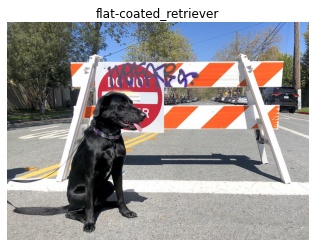
C++ Quick Start Example <openvino_docs_get_started_get_started_demos.html>_ for step-by-step instructions on building and running a basic image classification C++ application... image:: https://user-images.githubusercontent.com/36741649/127170593-86976dc3-e5e4-40be-b0a6-206379cd7df5.jpg :width: 400
-
Visit the :ref:
Samples <code samples>page for other C++ example applications to get you started with OpenVINO, such as:Basic object detection with the Hello Reshape SSD C++ sample <openvino_inference_engine_samples_hello_reshape_ssd_README.html>_Automatic speech recognition C++ sample <openvino_inference_engine_samples_speech_sample_README.html>_
You can also try the following:
- Learn more about :doc:
OpenVINO Workflow <openvino_workflow>. - To prepare your models for working with OpenVINO, see :doc:
Model Preparation <openvino_docs_model_processing_introduction>. - See pre-trained deep learning models in our :doc:
Open Model Zoo <model_zoo>. - Learn more about :doc:
Inference with OpenVINO Runtime <openvino_docs_OV_UG_OV_Runtime_User_Guide>. - See sample applications in :doc:
OpenVINO toolkit Samples Overview <openvino_docs_OV_UG_Samples_Overview>. - Take a glance at the OpenVINO product home page: https://software.intel.com/en-us/openvino-toolkit.
Additional Resources #######################################
OpenVINO Installation Selector Tool <https://www.intel.com/content/www/us/en/developer/tools/openvino-toolkit/download.html>__.
@endsphinxdirective