
3.4 KiB
Install OpenVINO™ Runtime from Conda Forge
@sphinxdirective
.. note::
Installing OpenVINO Runtime from Conda Forge is recommended for C++ developers, as it provides only the C++ Runtime API.
If you work with Python, consider :doc:installing OpenVINO from PyPI <openvino_docs_install_guides_installing_openvino_pip>
The current Anaconda package does not provide support for GPU inference.
.. tab:: System Requirements
| Full requirement listing is available in:
| System Requirements Page <https://www.intel.com/content/www/us/en/developer/tools/openvino-toolkit/system-requirements.html>__
.. comment to publish in the future, when gpu support comes back:
.. tab:: Processor Notes
    | Not all Intel CPUs include integrated graphics processors.
    | See `Product Specifications <https://ark.intel.com/>`__ for information about your hardware.
.. tab:: Software
There are many ways to work with Conda. Before you proceed, learn more about it on the
Anaconda distribution page <https://www.anaconda.com/products/individual/>__
Installing OpenVINO Runtime with Anaconda Package Manager ############################################################
-
Set up the Anaconda environment (Python 3.10 used as an example):
.. code-block:: sh
conda create --name py310 python=3.10
.. code-block:: sh
conda activate py310
-
Update it to the latest version:
.. code-block:: sh
conda update --all
-
Install the OpenVINO Runtime package:
.. code-block:: sh
conda install -c conda-forge openvino=2022.3.0
Congratulations! You have finished installing OpenVINO Runtime.
Uninstalling OpenVINO™ Runtime ###########################################################
Once OpenVINO Runtime is installed via Conda, you can remove it using the following command, with the proper OpenVINO version number:
.. code-block:: sh
conda remove openvino=2022.3.0
What's Next? ############################################################
Now that you've installed OpenVINO Runtime, you are ready to run your own machine learning applications! To learn more about how to integrate a model in OpenVINO applications, try out some tutorials and sample applications.
Try the :doc:C++ Quick Start Example <openvino_docs_get_started_get_started_demos> for step-by-step instructions
on building and running a basic image classification C++ application.
.. image:: https://user-images.githubusercontent.com/36741649/127170593-86976dc3-e5e4-40be-b0a6-206379cd7df5.jpg :width: 400
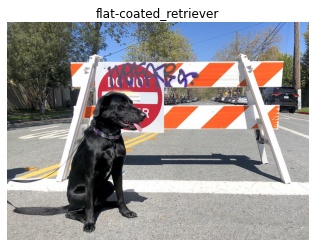
Visit the :doc:Samples <openvino_docs_OV_UG_Samples_Overview> page for other C++ example applications to get you started with OpenVINO, such as:
Basic object detection with the Hello Reshape SSD C++ sample <openvino_inference_engine_samples_hello_reshape_ssd_README.html>__Automatic speech recognition C++ sample <openvino_inference_engine_samples_speech_sample_README.html>__
Additional Resources ###########################################################
OpenVINO Runtime Conda Forge <https://anaconda.org/conda-forge/openvino>__- :doc:
OpenVINO™ Toolkit Samples Overview <openvino_docs_OV_UG_Samples_Overview> OpenVINO Installation Selector Tool <https://www.intel.com/content/www/us/en/developer/tools/openvino-toolkit/download.html>__
@endsphinxdirective