 4ae6258bed
* Added info on DockerHub CI Framework

* Feature/azaytsev/change layout (#3295)

* Changes according to feedback comments

* Replaced @ref's with html links

* Fixed links, added a title page for installing from repos and images, fixed formatting issues

* Added links

* minor fix

* Added DL Streamer to the list of components installed by default

* Link fixes

* Link fixes

* ovms doc fix (#2988)

* added OpenVINO Model Server

* ovms doc fixes

Co-authored-by: Trawinski, Dariusz <dariusz.trawinski@intel.com>

* Updated openvino_docs.xml

* Updated the link to software license agreements

* Revert "Updated the link to software license agreements"

This reverts commit 706dac500e.

* Docs to Sphinx (#8151)

* docs to sphinx

* Update GPU.md

* Update CPU.md

* Update AUTO.md

* Update performance_int8_vs_fp32.md

* update

* update md

* updates

* disable doc ci

* disable ci

* fix index.rst

Co-authored-by: Andrey Zaytsev <andrey.zaytsev@intel.com>
# Conflicts:
#	.gitignore
#	docs/CMakeLists.txt
#	docs/IE_DG/Deep_Learning_Inference_Engine_DevGuide.md
#	docs/IE_DG/Extensibility_DG/Custom_ONNX_Ops.md
#	docs/IE_DG/Extensibility_DG/VPU_Kernel.md
#	docs/IE_DG/InferenceEngine_QueryAPI.md
#	docs/IE_DG/Int8Inference.md
#	docs/IE_DG/Integrate_with_customer_application_new_API.md
#	docs/IE_DG/Model_caching_overview.md
#	docs/IE_DG/supported_plugins/GPU_RemoteBlob_API.md
#	docs/IE_DG/supported_plugins/HETERO.md
#	docs/IE_DG/supported_plugins/MULTI.md
#	docs/MO_DG/prepare_model/convert_model/Convert_Model_From_Caffe.md
#	docs/MO_DG/prepare_model/convert_model/Convert_Model_From_Kaldi.md
#	docs/MO_DG/prepare_model/convert_model/Convert_Model_From_MxNet.md
#	docs/MO_DG/prepare_model/convert_model/Convert_Model_From_ONNX.md
#	docs/MO_DG/prepare_model/convert_model/Converting_Model.md
#	docs/MO_DG/prepare_model/convert_model/Converting_Model_General.md
#	docs/MO_DG/prepare_model/convert_model/Cutting_Model.md
#	docs/MO_DG/prepare_model/convert_model/pytorch_specific/Convert_RNNT.md
#	docs/MO_DG/prepare_model/convert_model/tf_specific/Convert_EfficientDet_Models.md
#	docs/MO_DG/prepare_model/convert_model/tf_specific/Convert_WideAndDeep_Family_Models.md
#	docs/MO_DG/prepare_model/convert_model/tf_specific/Convert_YOLO_From_Tensorflow.md
#	docs/doxygen/Doxyfile.config
#	docs/doxygen/ie_docs.xml
#	docs/doxygen/ie_plugin_api.config
#	docs/doxygen/ngraph_cpp_api.config
#	docs/doxygen/openvino_docs.xml
#	docs/get_started/get_started_macos.md
#	docs/get_started/get_started_raspbian.md
#	docs/get_started/get_started_windows.md
#	docs/img/cpu_int8_flow.png
#	docs/index.md
#	docs/install_guides/VisionAcceleratorFPGA_Configure.md
#	docs/install_guides/VisionAcceleratorFPGA_Configure_Windows.md
#	docs/install_guides/deployment-manager-tool.md
#	docs/install_guides/installing-openvino-linux.md
#	docs/install_guides/installing-openvino-macos.md
#	docs/install_guides/installing-openvino-windows.md
#	docs/optimization_guide/dldt_optimization_guide.md
#	inference-engine/ie_bridges/c/include/c_api/ie_c_api.h
#	inference-engine/ie_bridges/python/docs/api_overview.md
#	inference-engine/ie_bridges/python/sample/ngraph_function_creation_sample/README.md
#	inference-engine/ie_bridges/python/sample/speech_sample/README.md
#	inference-engine/ie_bridges/python/src/openvino/inference_engine/ie_api.pyx
#	inference-engine/include/ie_api.h
#	inference-engine/include/ie_core.hpp
#	inference-engine/include/ie_version.hpp
#	inference-engine/samples/benchmark_app/README.md
#	inference-engine/samples/speech_sample/README.md
#	inference-engine/src/plugin_api/exec_graph_info.hpp
#	inference-engine/src/plugin_api/file_utils.h
#	inference-engine/src/transformations/include/transformations_visibility.hpp
#	inference-engine/tools/benchmark_tool/README.md
#	ngraph/core/include/ngraph/ngraph.hpp
#	ngraph/frontend/onnx_common/include/onnx_common/parser.hpp
#	ngraph/python/src/ngraph/utils/node_factory.py
#	openvino/itt/include/openvino/itt.hpp
#	thirdparty/ade
#	tools/benchmark/README.md

* Cherry-picked remove font-family (#8211)

* Cherry-picked: Update get_started_scripts.md (#8338)

* doc updates (#8268)

* Various doc changes

* theme changes

* remove font-family (#8211)

* fix  css

* Update uninstalling-openvino.md

* fix css

* fix

* Fixes for Installation Guides

Co-authored-by: Andrey Zaytsev <andrey.zaytsev@intel.com>
Co-authored-by: kblaszczak-intel <karol.blaszczak@intel.com>
# Conflicts:
#	docs/IE_DG/Bfloat16Inference.md
#	docs/IE_DG/InferenceEngine_QueryAPI.md
#	docs/IE_DG/OnnxImporterTutorial.md
#	docs/IE_DG/supported_plugins/AUTO.md
#	docs/IE_DG/supported_plugins/HETERO.md
#	docs/IE_DG/supported_plugins/MULTI.md
#	docs/MO_DG/prepare_model/convert_model/Convert_Model_From_Kaldi.md
#	docs/MO_DG/prepare_model/convert_model/tf_specific/Convert_YOLO_From_Tensorflow.md
#	docs/install_guides/installing-openvino-macos.md
#	docs/install_guides/installing-openvino-windows.md
#	docs/ops/opset.md
#	inference-engine/samples/benchmark_app/README.md
#	inference-engine/tools/benchmark_tool/README.md
#	thirdparty/ade

* Cherry-picked: doc script changes (#8568)

* fix openvino-sphinx-theme

* add linkcheck target

* fix

* change version

* add doxygen-xfail.txt

* fix

* AA

* fix

* fix

* fix

* fix

* fix
# Conflicts:
#	thirdparty/ade

* Cherry-pick: Feature/azaytsev/doc updates gna 2021 4 2 (#8567)

* Various doc changes

* Reformatted C++/Pythob sections. Updated with info from PR8490

* additional fix

* Gemini Lake replaced with Elkhart Lake

* Fixed links in IGs, Added 12th Gen
# Conflicts:
#	docs/IE_DG/supported_plugins/GNA.md
#	thirdparty/ade

* Cherry-pick: Feature/azaytsev/doc fixes (#8897)

* Various doc changes

* Removed the empty Learning path topic

* Restored the Gemini Lake CPIU list
# Conflicts:
#	docs/IE_DG/supported_plugins/GNA.md
#	thirdparty/ade

* Cherry-pick: sphinx copybutton doxyrest code blocks (#8992)

# Conflicts:
#	thirdparty/ade

* Cherry-pick: iframe video enable fullscreen (#9041)

# Conflicts:
#	thirdparty/ade

* Cherry-pick: fix untitled titles (#9213)

# Conflicts:
#	thirdparty/ade

* Cherry-pick: perf bench graph animation (#9045)

* animation

* fix
# Conflicts:
#	thirdparty/ade

* Cherry-pick: doc pytest (#8888)

* docs pytest

* fixes
# Conflicts:
#	docs/doxygen/doxygen-ignore.txt
#	docs/scripts/ie_docs.xml
#	thirdparty/ade

* Cherry-pick: restore deleted files (#9215)

* Added new operations to the doc structure (from removed ie_docs.xml)

* Additional fixes

* Update docs/IE_DG/InferenceEngine_QueryAPI.md

Co-authored-by: Helena Kloosterman <helena.kloosterman@intel.com>

* Update docs/IE_DG/Int8Inference.md

Co-authored-by: Helena Kloosterman <helena.kloosterman@intel.com>

* Update Custom_Layers_Guide.md

* Changes according to review  comments

* doc scripts fixes

* Update docs/IE_DG/Int8Inference.md

Co-authored-by: Helena Kloosterman <helena.kloosterman@intel.com>

* Update Int8Inference.md

* update xfail

* clang format

* updated xfail

Co-authored-by: Trawinski, Dariusz <dariusz.trawinski@intel.com>
Co-authored-by: Nikolay Tyukaev <nikolay.tyukaev@intel.com>
Co-authored-by: kblaszczak-intel <karol.blaszczak@intel.com>
Co-authored-by: Yury Gorbachev <yury.gorbachev@intel.com>
Co-authored-by: Helena Kloosterman <helena.kloosterman@intel.com>
9.6 KiB
nGraph Function Creation Python* Sample
This sample demonstrates how to execute an inference using nGraph function feature to create a network that uses weights from LeNet classification network, which is known to work well on digit classification tasks. So you don't need an XML file, the model will be created from the source code on the fly.
In addition to regular grayscale images with a digit, the sample also supports single-channel ubyte images as an input.
The following Inference Engine Python API is used in the application:
| Feature | API | Description |
|---|---|---|
| Network Operations | IENetwork, IENetwork.batch_size | Managing of network |
| nGraph Functions | ngraph.impl.Function, ngraph.parameter, ngraph.constant, ngraph.convolution, ngraph.add, ngraph.max_pool, ngraph.reshape, ngraph.matmul, ngraph.relu, ngraph.softmax, ngraph.result, ngraph.impl.Function.to_capsule | Description of a network using nGraph Python API |
Basic Inference Engine API is covered by Hello Classification Python* Sample.
| Options | Values |
|---|---|
| Validated Models | LeNet |
| Model Format | Network weights file (*.bin) |
| Validated images | The sample uses OpenCV* to read input grayscale image (*.bmp, *.png) or single-channel ubyte image |
| Supported devices | All |
| Other language realization | C++ |
How It Works
At startup, the sample application reads command-line parameters, prepares input data, creates a network using nGraph function feature and passed weights file, loads the network and image(s) to the Inference Engine plugin, performs synchronous inference, and processes output data, logging each step in a standard output stream.
You can see the explicit description of each sample step at Integration Steps section of "Integrate the Inference Engine with Your Application" guide.
Running
Run the application with the -h option to see the usage message:
python <path_to_sample>/ngraph_function_creation_sample.py -h
Usage message:
usage: ngraph_function_creation_sample.py [-h] -m MODEL -i INPUT [INPUT ...]
                                          [-d DEVICE] [--labels LABELS]
                                          [-nt NUMBER_TOP]

Options:
  -h, --help            Show this help message and exit.
  -m MODEL, --model MODEL
                        Required. Path to a file with network weights.
  -i INPUT [INPUT ...], --input INPUT [INPUT ...]
                        Required. Path to an image file.
  -d DEVICE, --device DEVICE
                        Optional. Specify the target device to infer on; CPU,
                        GPU, MYRIAD, HDDL or HETERO: is acceptable. The sample
                        will look for a suitable plugin for device specified.
                        Default value is CPU.
  --labels LABELS       Optional. Path to a labels mapping file.
  -nt NUMBER_TOP, --number_top NUMBER_TOP
                        Optional. Number of top results.
To run the sample, you need specify a model weights and image. You can use images from the media files collection available at https://storage.openvinotoolkit.org/data/test_data.
Note
:
This sample supports models with FP32 weights only.
The
lenet.binweights file was generated by the Model Optimizer tool from the public LeNet model with the--input_shape [64,1,28,28]parameter specified.The original model is available in the Caffe* repository on GitHub*.
The white over black images will be automatically inverted in color for a better predictions.
For example, you can do inference of 3.png using the pre-trained model on a GPU:
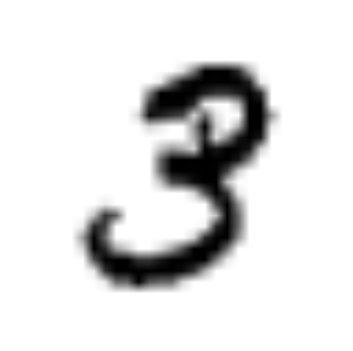
python <path_to_sample>/ngraph_function_creation_sample.py -m <path_to_sample>/lenet.bin -i <path_to_image>/3.png -d GPU
Sample Output
The sample application logs each step in a standard output stream and outputs top-10 inference results.
[ INFO ] Creating Inference Engine
[ INFO ] Loading the network using ngraph function with weights from c:\openvino\samples\python\ngraph_function_creation_sample\lenet.bin
[ INFO ] Configuring input and output blobs
[ INFO ] Loading the model to the plugin
[ WARNING ] Image c:\images\3.png is inverted to white over black
[ WARNING ] Image c:\images\3.png is resized from (351, 353) to (28, 28)
[ INFO ] Starting inference in synchronous mode
[ INFO ] Image path: c:\images\3.png
[ INFO ] Top 10 results:
[ INFO ] classid probability
[ INFO ] -------------------
[ INFO ] 3       1.0000000
[ INFO ] 9       0.0000000
[ INFO ] 8       0.0000000
[ INFO ] 7       0.0000000
[ INFO ] 6       0.0000000
[ INFO ] 5       0.0000000
[ INFO ] 4       0.0000000
[ INFO ] 2       0.0000000
[ INFO ] 1       0.0000000
[ INFO ] 0       0.0000000
[ INFO ]
[ INFO ] This sample is an API example, for any performance measurements please use the dedicated benchmark_app tool
See Also
- Integrate the Inference Engine with Your Application
- Using Inference Engine Samples
- [Model Downloader](@ref omz_tools_downloader)
- Model Optimizer