Compare commits
141 Commits
fs-glob
...
server-bas
| Author | SHA1 | Date | |
|---|---|---|---|

|
6162ecff04 | ||
|
|
19d859e047 | ||
|
|
049d62873e | ||
|
|
c162a7d3b1 | ||
|
|
d759d3dfee | ||
|
|
daecf4db14 | ||
|
|
1e8318598a | ||
|
|
53450d1160 | ||
|
|
c0049b3223 | ||
|
|
3ea9ce0270 | ||

|
bb18ffd9e7 | ||
|
|
1064c04ab8 | ||
|
|
2d84027a59 | ||
|
|
98680508d3 | ||
|
|
74cbec468f | ||

|
31e89b0868 | ||
|
|
c12a7a6319 | ||

|
82b0df6058 | ||
|
|
b6bd67b62f | ||
|
|
877226014d | ||
|
|
7572d306a0 | ||
|
|
f2f4573064 | ||
|
|
b1641edff6 | ||
|
|
b5147256e9 | ||
|
|
06f596adc6 | ||

|
1f3b54e0c4 | ||
|
|
2ddfbe8566 | ||
|
|
c61a118e4f | ||

|
d69e61a634 | ||
|
|
14f0cbaec6 | ||

|
b313eb14ee | ||
|
|
7b47e40244 | ||
|
|
b52204817d | ||
|
|
377552103e | ||
|
|
688b65ccde | ||

|
6cb4faf33d | ||
|
|
78b83bb901 | ||
|
|
9ff6f60b66 | ||
|
|
624e10ed15 | ||
|
|
19e10bbb53 | ||
|
|
cca945e05b | ||
|
|
21901f2a75 | ||
|
|
ef7f943eee | ||
|
|
ec1062f9f2 | ||

|
2f67ed3138 | ||
|
|
ce912db30e | ||
|
|
41d790f346 | ||
|
|
bf426e15ec | ||
|
|
e4403baeb9 | ||
|
|
61101b00a1 | ||
|
|
69f8ffcfeb | ||
|
|
6b8042291c | ||
|
|
ffc0c83b50 | ||
|
|
8ccd4c269a | ||
|
|
934ec86f93 | ||
|
|
23be38b5fa | ||
|
|
fe7f74e46b | ||
|
|
a3fd78f8e2 | ||
|
|
137bad6f7b | ||
|
|
17df6fc764 | ||
|
|
2e51c8a124 | ||
|
|
5588a46366 | ||
|
|
a8122f9add | ||
|
|
5568be91d2 | ||
|
|
a04bd6f93c | ||
|
|
56d63b10e4 | ||
|
|
2c97643b10 | ||

|
679f403648 | ||
|
|
d482c707f6 | ||
|
|
2ec9641783 | ||
|
|
dab1788a3b | ||
|
|
47bb79cce1 | ||
|
|
41dbc20be9 | ||
|
|
10a631ec96 | ||
|
|
830e5aed96 | ||
|
|
7db573885b | ||
|
|
a74d56ebc6 | ||
|
|
ff7d84297e | ||
|
|
3a76509fe9 | ||
|
|
ac4de9ab0f | ||
|
|
471f397418 | ||
|
|
73bbdf6d4e | ||
|
|
7f26aea585 | ||
|
|
1c767b709f | ||
|
|
0ced82c885 | ||
|
|
21dd195b0d | ||
|
|
6aa6cfba8e | ||
|
|
fd7d52d38b | ||
|
|
a47bb14364 | ||
|
|
d6e6fa5735 | ||
|
|
46da11a52e | ||
|
|
68e3dc21e4 | ||
|
|
7232cc45b4 | ||
|
|
be5a297248 | ||
|
|
257031b1bc | ||
|
|
c9db9fa17a | ||
|
|
13f961a422 | ||
|
|
3b38e0c4e1 | ||
|
|
07526efe61 | ||
|
|
8753c02adb | ||
|
|
6a0bbfa447 | ||
|
|
21faaeb33d | ||
|
|
0525fc5909 | ||
|
|
a1a53bb285 | ||
|
|
0c453c4415 | ||
|
|
d0406f9736 | ||
|
|
ba74b8603d | ||
|
|
c675a4d61d | ||
|
|
965c45bc70 | ||
|
|
139a22602a | ||
|
|
e0e4969198 | ||
|
|
08d69d95b3 | ||
|
|
4e6c507ba9 | ||
|
|
fd06374365 | ||
|
|
a07ebc636a | ||
|
|
4c151ac9aa | ||
|
|
05c425698f | ||
|
|
2a961979e6 | ||
|
|
211ede92cc | ||
|
|
256af03772 | ||
|
|
654fd5a4f9 | ||
|
|
541d90e49f | ||
|
|
974e7038e7 | ||
|
|
e2f5b30aa9 | ||
|
|
3483e7d9e0 | ||
|
|
56cb20a1af | ||
|
|
64929653dd | ||
|
|
c955da9bc6 | ||
|
|
291354fa8e | ||
|
|
905d736512 | ||
|
|
3406d6e2a9 | ||
|
|
fc10b5ffb9 | ||
|
|
f89c313166 | ||
|
|
7c734168d0 | ||
|
|
1e7bfec2ce | ||
|
|
1eb0603b4e | ||
|
|
4b32730ce8 | ||
|
|
ad083c1d9b | ||
|
|
b4f84c2de2 | ||
|
|
fc17443ce4 | ||
|
|
342ae06b21 |
@@ -21,7 +21,7 @@ module.exports = {
|
||||
|
||||
overrides: [
|
||||
{
|
||||
files: ['cli.js', '*-cli.js', 'packages/*cli*/**/*.js'],
|
||||
files: ['cli.js', '*-cli.js', '**/*cli*/**/*.js'],
|
||||
rules: {
|
||||
'no-console': 'off',
|
||||
},
|
||||
|
||||
@@ -35,7 +35,7 @@ Installation of the [npm package](https://npmjs.org/package/@xen-orchestra/async
|
||||
|
||||
## Contributions
|
||||
|
||||
Contributions are *very* welcomed, either on the documentation or on
|
||||
Contributions are _very_ welcomed, either on the documentation or on
|
||||
the code.
|
||||
|
||||
You may:
|
||||
|
||||
@@ -36,7 +36,7 @@
|
||||
"@babel/preset-env": "^7.0.0",
|
||||
"@babel/preset-flow": "^7.0.0",
|
||||
"babel-plugin-lodash": "^3.3.2",
|
||||
"cross-env": "^5.1.3",
|
||||
"cross-env": "^6.0.3",
|
||||
"rimraf": "^3.0.0"
|
||||
},
|
||||
"scripts": {
|
||||
|
||||
@@ -8,5 +8,8 @@
|
||||
"directory": "@xen-orchestra/babel-config",
|
||||
"type": "git",
|
||||
"url": "https://github.com/vatesfr/xen-orchestra.git"
|
||||
},
|
||||
"engines": {
|
||||
"node": ">=6"
|
||||
}
|
||||
}
|
||||
|
||||
32
@xen-orchestra/backups-cli/_composeCommands.js
Normal file
32
@xen-orchestra/backups-cli/_composeCommands.js
Normal file
@@ -0,0 +1,32 @@
|
||||
const getopts = require('getopts')
|
||||
|
||||
const { version } = require('./package.json')
|
||||
|
||||
module.exports = commands =>
|
||||
async function(args, prefix) {
|
||||
const opts = getopts(args, {
|
||||
alias: {
|
||||
help: 'h',
|
||||
},
|
||||
boolean: ['help'],
|
||||
stopEarly: true,
|
||||
})
|
||||
|
||||
const commandName = opts.help || args.length === 0 ? 'help' : args[0]
|
||||
const command = commands[commandName]
|
||||
if (command === undefined) {
|
||||
process.stdout.write(`Usage:
|
||||
|
||||
${Object.keys(commands)
|
||||
.filter(command => command !== 'help')
|
||||
.map(command => ` ${prefix} ${command} ${commands[command].usage || ''}`)
|
||||
.join('\n\n')}
|
||||
|
||||
xo-backups v${version}
|
||||
`)
|
||||
process.exitCode = commandName === 'help' ? 0 : 1
|
||||
return
|
||||
}
|
||||
|
||||
return command.main(args.slice(1), prefix + ' ' + commandName)
|
||||
}
|
||||
393
@xen-orchestra/backups-cli/commands/clean-vms.js
Normal file
393
@xen-orchestra/backups-cli/commands/clean-vms.js
Normal file
@@ -0,0 +1,393 @@
|
||||
#!/usr/bin/env node
|
||||
|
||||
// assigned when options are parsed by the main function
|
||||
let force
|
||||
|
||||
// -----------------------------------------------------------------------------
|
||||
|
||||
const assert = require('assert')
|
||||
const getopts = require('getopts')
|
||||
const lockfile = require('proper-lockfile')
|
||||
const { default: Vhd } = require('vhd-lib')
|
||||
const { curryRight, flatten } = require('lodash')
|
||||
const { dirname, resolve } = require('path')
|
||||
const { DISK_TYPE_DIFFERENCING } = require('vhd-lib/dist/_constants')
|
||||
const { pipe, promisifyAll } = require('promise-toolbox')
|
||||
|
||||
const fs = promisifyAll(require('fs'))
|
||||
const handler = require('@xen-orchestra/fs').getHandler({ url: 'file://' })
|
||||
|
||||
// -----------------------------------------------------------------------------
|
||||
|
||||
const asyncMap = curryRight((iterable, fn) =>
|
||||
Promise.all(
|
||||
Array.isArray(iterable) ? iterable.map(fn) : Array.from(iterable, fn)
|
||||
)
|
||||
)
|
||||
|
||||
const filter = (...args) => thisArg => thisArg.filter(...args)
|
||||
|
||||
const isGzipFile = async fd => {
|
||||
// https://tools.ietf.org/html/rfc1952.html#page-5
|
||||
const magicNumber = Buffer.allocUnsafe(2)
|
||||
assert.strictEqual(
|
||||
await fs.read(fd, magicNumber, 0, magicNumber.length, 0),
|
||||
magicNumber.length
|
||||
)
|
||||
return magicNumber[0] === 31 && magicNumber[1] === 139
|
||||
}
|
||||
|
||||
// TODO: better check?
|
||||
//
|
||||
// our heuristic is not good enough, there has been some false positives
|
||||
// (detected as invalid by us but valid by `tar` and imported with success),
|
||||
// either THOUGH THEY MAY HAVE BEEN COMPRESSED FILES:
|
||||
// - these files were normal but the check is incorrect
|
||||
// - these files were invalid but without data loss
|
||||
// - these files were invalid but with silent data loss
|
||||
//
|
||||
// maybe reading the end of the file looking for a file named
|
||||
// /^Ref:\d+/\d+\.checksum$/ and then validating the tar structure from it
|
||||
//
|
||||
// https://github.com/npm/node-tar/issues/234#issuecomment-538190295
|
||||
const isValidTar = async (size, fd) => {
|
||||
if (size <= 1024 || size % 512 !== 0) {
|
||||
return false
|
||||
}
|
||||
|
||||
const buf = Buffer.allocUnsafe(1024)
|
||||
assert.strictEqual(
|
||||
await fs.read(fd, buf, 0, buf.length, size - buf.length),
|
||||
buf.length
|
||||
)
|
||||
return buf.every(_ => _ === 0)
|
||||
}
|
||||
|
||||
// TODO: find an heuristic for compressed files
|
||||
const isValidXva = async path => {
|
||||
try {
|
||||
const fd = await fs.open(path, 'r')
|
||||
try {
|
||||
const { size } = await fs.fstat(fd)
|
||||
if (size < 20) {
|
||||
// neither a valid gzip not tar
|
||||
return false
|
||||
}
|
||||
|
||||
return (await isGzipFile(fd))
|
||||
? true // gzip files cannot be validated at this time
|
||||
: await isValidTar(size, fd)
|
||||
} finally {
|
||||
fs.close(fd).catch(noop)
|
||||
}
|
||||
} catch (error) {
|
||||
// never throw, log and report as valid to avoid side effects
|
||||
console.error('isValidXva', path, error)
|
||||
return true
|
||||
}
|
||||
}
|
||||
|
||||
const noop = Function.prototype
|
||||
|
||||
const readDir = path =>
|
||||
fs.readdir(path).then(
|
||||
entries => {
|
||||
entries.forEach((entry, i) => {
|
||||
entries[i] = `${path}/${entry}`
|
||||
})
|
||||
|
||||
return entries
|
||||
},
|
||||
error => {
|
||||
// a missing dir is by definition empty
|
||||
if (error != null && error.code === 'ENOENT') {
|
||||
return []
|
||||
}
|
||||
throw error
|
||||
}
|
||||
)
|
||||
|
||||
// -----------------------------------------------------------------------------
|
||||
|
||||
// chain is an array of VHDs from child to parent
|
||||
//
|
||||
// the whole chain will be merged into parent, parent will be renamed to child
|
||||
// and all the others will deleted
|
||||
async function mergeVhdChain(chain) {
|
||||
assert(chain.length >= 2)
|
||||
|
||||
const child = chain[0]
|
||||
const parent = chain[chain.length - 1]
|
||||
const children = chain.slice(0, -1).reverse()
|
||||
|
||||
console.warn('Unused parents of VHD', child)
|
||||
chain
|
||||
.slice(1)
|
||||
.reverse()
|
||||
.forEach(parent => {
|
||||
console.warn(' ', parent)
|
||||
})
|
||||
force && console.warn(' merging…')
|
||||
console.warn('')
|
||||
if (force) {
|
||||
// `mergeVhd` does not work with a stream, either
|
||||
// - make it accept a stream
|
||||
// - or create synthetic VHD which is not a stream
|
||||
return console.warn('TODO: implement merge')
|
||||
// await mergeVhd(
|
||||
// handler,
|
||||
// parent,
|
||||
// handler,
|
||||
// children.length === 1
|
||||
// ? child
|
||||
// : await createSyntheticStream(handler, children)
|
||||
// )
|
||||
}
|
||||
|
||||
await Promise.all([
|
||||
force && fs.rename(parent, child),
|
||||
asyncMap(children.slice(0, -1), child => {
|
||||
console.warn('Unused VHD', child)
|
||||
force && console.warn(' deleting…')
|
||||
console.warn('')
|
||||
return force && handler.unlink(child)
|
||||
}),
|
||||
])
|
||||
}
|
||||
|
||||
const listVhds = pipe([
|
||||
vmDir => vmDir + '/vdis',
|
||||
readDir,
|
||||
asyncMap(readDir),
|
||||
flatten,
|
||||
asyncMap(readDir),
|
||||
flatten,
|
||||
filter(_ => _.endsWith('.vhd')),
|
||||
])
|
||||
|
||||
async function handleVm(vmDir) {
|
||||
const vhds = new Set()
|
||||
const vhdParents = { __proto__: null }
|
||||
const vhdChildren = { __proto__: null }
|
||||
|
||||
// remove broken VHDs
|
||||
await asyncMap(await listVhds(vmDir), async path => {
|
||||
try {
|
||||
const vhd = new Vhd(handler, path)
|
||||
await vhd.readHeaderAndFooter()
|
||||
vhds.add(path)
|
||||
if (vhd.footer.diskType === DISK_TYPE_DIFFERENCING) {
|
||||
const parent = resolve(dirname(path), vhd.header.parentUnicodeName)
|
||||
vhdParents[path] = parent
|
||||
if (parent in vhdChildren) {
|
||||
const error = new Error(
|
||||
'this script does not support multiple VHD children'
|
||||
)
|
||||
error.parent = parent
|
||||
error.child1 = vhdChildren[parent]
|
||||
error.child2 = path
|
||||
throw error // should we throw?
|
||||
}
|
||||
vhdChildren[parent] = path
|
||||
}
|
||||
} catch (error) {
|
||||
console.warn('Error while checking VHD', path)
|
||||
console.warn(' ', error)
|
||||
if (error != null && error.code === 'ERR_ASSERTION') {
|
||||
force && console.warn(' deleting…')
|
||||
console.warn('')
|
||||
force && (await handler.unlink(path))
|
||||
}
|
||||
}
|
||||
})
|
||||
|
||||
// remove VHDs with missing ancestors
|
||||
{
|
||||
const deletions = []
|
||||
|
||||
// return true if the VHD has been deleted or is missing
|
||||
const deleteIfOrphan = vhd => {
|
||||
const parent = vhdParents[vhd]
|
||||
if (parent === undefined) {
|
||||
return
|
||||
}
|
||||
|
||||
// no longer needs to be checked
|
||||
delete vhdParents[vhd]
|
||||
|
||||
deleteIfOrphan(parent)
|
||||
|
||||
if (!vhds.has(parent)) {
|
||||
vhds.delete(vhd)
|
||||
|
||||
console.warn('Error while checking VHD', vhd)
|
||||
console.warn(' missing parent', parent)
|
||||
force && console.warn(' deleting…')
|
||||
console.warn('')
|
||||
force && deletions.push(handler.unlink(vhd))
|
||||
}
|
||||
}
|
||||
|
||||
// > A property that is deleted before it has been visited will not be
|
||||
// > visited later.
|
||||
// >
|
||||
// > -- https://developer.mozilla.org/en-US/docs/Web/JavaScript/Reference/Statements/for...in#Deleted_added_or_modified_properties
|
||||
for (const child in vhdParents) {
|
||||
deleteIfOrphan(child)
|
||||
}
|
||||
|
||||
await Promise.all(deletions)
|
||||
}
|
||||
|
||||
const [jsons, xvas] = await readDir(vmDir).then(entries => [
|
||||
entries.filter(_ => _.endsWith('.json')),
|
||||
new Set(entries.filter(_ => _.endsWith('.xva'))),
|
||||
])
|
||||
|
||||
await asyncMap(xvas, async path => {
|
||||
// check is not good enough to delete the file, the best we can do is report
|
||||
// it
|
||||
if (!(await isValidXva(path))) {
|
||||
console.warn('Potential broken XVA', path)
|
||||
console.warn('')
|
||||
}
|
||||
})
|
||||
|
||||
const unusedVhds = new Set(vhds)
|
||||
const unusedXvas = new Set(xvas)
|
||||
|
||||
// compile the list of unused XVAs and VHDs, and remove backup metadata which
|
||||
// reference a missing XVA/VHD
|
||||
await asyncMap(jsons, async json => {
|
||||
const metadata = JSON.parse(await fs.readFile(json))
|
||||
const { mode } = metadata
|
||||
if (mode === 'full') {
|
||||
const linkedXva = resolve(vmDir, metadata.xva)
|
||||
|
||||
if (xvas.has(linkedXva)) {
|
||||
unusedXvas.delete(linkedXva)
|
||||
} else {
|
||||
console.warn('Error while checking backup', json)
|
||||
console.warn(' missing file', linkedXva)
|
||||
force && console.warn(' deleting…')
|
||||
console.warn('')
|
||||
force && (await handler.unlink(json))
|
||||
}
|
||||
} else if (mode === 'delta') {
|
||||
const linkedVhds = (() => {
|
||||
const { vhds } = metadata
|
||||
return Object.keys(vhds).map(key => resolve(vmDir, vhds[key]))
|
||||
})()
|
||||
|
||||
// FIXME: find better approach by keeping as much of the backup as
|
||||
// possible (existing disks) even if one disk is missing
|
||||
if (linkedVhds.every(_ => vhds.has(_))) {
|
||||
linkedVhds.forEach(_ => unusedVhds.delete(_))
|
||||
} else {
|
||||
console.warn('Error while checking backup', json)
|
||||
const missingVhds = linkedVhds.filter(_ => !vhds.has(_))
|
||||
console.warn(
|
||||
' %i/%i missing VHDs',
|
||||
missingVhds.length,
|
||||
linkedVhds.length
|
||||
)
|
||||
missingVhds.forEach(vhd => {
|
||||
console.warn(' ', vhd)
|
||||
})
|
||||
force && console.warn(' deleting…')
|
||||
console.warn('')
|
||||
force && (await handler.unlink(json))
|
||||
}
|
||||
}
|
||||
})
|
||||
|
||||
// TODO: parallelize by vm/job/vdi
|
||||
const unusedVhdsDeletion = []
|
||||
{
|
||||
// VHD chains (as list from child to ancestor) to merge indexed by last
|
||||
// ancestor
|
||||
const vhdChainsToMerge = { __proto__: null }
|
||||
|
||||
const toCheck = new Set(unusedVhds)
|
||||
|
||||
const getUsedChildChainOrDelete = vhd => {
|
||||
if (vhd in vhdChainsToMerge) {
|
||||
const chain = vhdChainsToMerge[vhd]
|
||||
delete vhdChainsToMerge[vhd]
|
||||
return chain
|
||||
}
|
||||
|
||||
if (!unusedVhds.has(vhd)) {
|
||||
return [vhd]
|
||||
}
|
||||
|
||||
// no longer needs to be checked
|
||||
toCheck.delete(vhd)
|
||||
|
||||
const child = vhdChildren[vhd]
|
||||
if (child !== undefined) {
|
||||
const chain = getUsedChildChainOrDelete(child)
|
||||
if (chain !== undefined) {
|
||||
chain.push(vhd)
|
||||
return chain
|
||||
}
|
||||
}
|
||||
|
||||
console.warn('Unused VHD', vhd)
|
||||
force && console.warn(' deleting…')
|
||||
console.warn('')
|
||||
force && unusedVhdsDeletion.push(handler.unlink(vhd))
|
||||
}
|
||||
|
||||
toCheck.forEach(vhd => {
|
||||
vhdChainsToMerge[vhd] = getUsedChildChainOrDelete(vhd)
|
||||
})
|
||||
|
||||
Object.keys(vhdChainsToMerge).forEach(key => {
|
||||
const chain = vhdChainsToMerge[key]
|
||||
if (chain !== undefined) {
|
||||
unusedVhdsDeletion.push(mergeVhdChain(chain))
|
||||
}
|
||||
})
|
||||
}
|
||||
|
||||
await Promise.all([
|
||||
unusedVhdsDeletion,
|
||||
asyncMap(unusedXvas, path => {
|
||||
console.warn('Unused XVA', path)
|
||||
force && console.warn(' deleting…')
|
||||
console.warn('')
|
||||
return force && handler.unlink(path)
|
||||
}),
|
||||
])
|
||||
}
|
||||
|
||||
// -----------------------------------------------------------------------------
|
||||
|
||||
module.exports = async function main(args) {
|
||||
const opts = getopts(args, {
|
||||
alias: {
|
||||
force: 'f',
|
||||
},
|
||||
boolean: ['force'],
|
||||
default: {
|
||||
force: false,
|
||||
},
|
||||
})
|
||||
|
||||
;({ force } = opts)
|
||||
await asyncMap(opts._, async vmDir => {
|
||||
vmDir = resolve(vmDir)
|
||||
|
||||
// TODO: implement this in `xo-server`, not easy because not compatible with
|
||||
// `@xen-orchestra/fs`.
|
||||
const release = await lockfile.lock(vmDir)
|
||||
try {
|
||||
await handleVm(vmDir)
|
||||
} catch (error) {
|
||||
console.error('handleVm', vmDir, error)
|
||||
} finally {
|
||||
await release()
|
||||
}
|
||||
})
|
||||
}
|
||||
13
@xen-orchestra/backups-cli/index.js
Executable file
13
@xen-orchestra/backups-cli/index.js
Executable file
@@ -0,0 +1,13 @@
|
||||
#!/usr/bin/env node
|
||||
|
||||
require('./_composeCommands')({
|
||||
'clean-vms': {
|
||||
get main() {
|
||||
return require('./commands/clean-vms')
|
||||
},
|
||||
usage: '[--force] xo-vm-backups/*',
|
||||
},
|
||||
})(process.argv.slice(2), 'xo-backups').catch(error => {
|
||||
console.error('main', error)
|
||||
process.exitCode = 1
|
||||
})
|
||||
28
@xen-orchestra/backups-cli/package.json
Normal file
28
@xen-orchestra/backups-cli/package.json
Normal file
@@ -0,0 +1,28 @@
|
||||
{
|
||||
"bin": {
|
||||
"xo-backups": "index.js"
|
||||
},
|
||||
"bugs": "https://github.com/vatesfr/xen-orchestra/issues",
|
||||
"dependencies": {
|
||||
"@xen-orchestra/fs": "^0.10.2",
|
||||
"getopts": "^2.2.5",
|
||||
"lodash": "^4.17.15",
|
||||
"promise-toolbox": "^0.14.0",
|
||||
"proper-lockfile": "^4.1.1",
|
||||
"vhd-lib": "^0.7.2"
|
||||
},
|
||||
"engines": {
|
||||
"node": ">=7.10.1"
|
||||
},
|
||||
"homepage": "https://github.com/vatesfr/xen-orchestra/tree/master/@xen-orchestra/backups-cli",
|
||||
"name": "@xen-orchestra/backups-cli",
|
||||
"repository": {
|
||||
"directory": "@xen-orchestra/backups-cli",
|
||||
"type": "git",
|
||||
"url": "https://github.com/vatesfr/xen-orchestra.git"
|
||||
},
|
||||
"scripts": {
|
||||
"postversion": "npm publish --access public"
|
||||
},
|
||||
"version": "0.0.0"
|
||||
}
|
||||
@@ -16,7 +16,7 @@
|
||||
},
|
||||
"dependencies": {
|
||||
"golike-defer": "^0.4.1",
|
||||
"xen-api": "^0.27.2"
|
||||
"xen-api": "^0.27.3"
|
||||
},
|
||||
"scripts": {
|
||||
"postversion": "npm publish"
|
||||
|
||||
@@ -16,7 +16,6 @@ Installation of the [npm package](https://npmjs.org/package/@xen-orchestra/cron)
|
||||
<minute> <hour> <day of month> <month> <day of week>
|
||||
```
|
||||
|
||||
|
||||
Each entry can be:
|
||||
|
||||
- a single value
|
||||
@@ -29,12 +28,12 @@ A wildcard (`*`) can be used as a shortcut for the whole range
|
||||
Step values can be used in conjunctions with ranges. For instance,
|
||||
`1-7/2` is the same as `1,3,5,7`.
|
||||
|
||||
| Field | Allowed values |
|
||||
|------------------|----------------|
|
||||
| minute | 0-59 |
|
||||
| hour | 0-23 |
|
||||
| day of the month | 1-31 or 3-letter names (`jan`, `feb`, …) |
|
||||
| month | 0-11 |
|
||||
| Field | Allowed values |
|
||||
| ---------------- | ------------------------------------------------------------------ |
|
||||
| minute | 0-59 |
|
||||
| hour | 0-23 |
|
||||
| day of the month | 1-31 or 3-letter names (`jan`, `feb`, …) |
|
||||
| month | 0-11 |
|
||||
| day of week | 0-7 (0 and 7 both mean Sunday) or 3-letter names (`mon`, `tue`, …) |
|
||||
|
||||
> Note: the month range is 0-11 to be compatible with
|
||||
@@ -131,7 +130,7 @@ job.stop()
|
||||
|
||||
## Contributions
|
||||
|
||||
Contributions are *very* welcomed, either on the documentation or on
|
||||
Contributions are _very_ welcomed, either on the documentation or on
|
||||
the code.
|
||||
|
||||
You may:
|
||||
|
||||
@@ -1,6 +1,6 @@
|
||||
{
|
||||
"name": "@xen-orchestra/cron",
|
||||
"version": "1.0.4",
|
||||
"version": "1.0.6",
|
||||
"license": "ISC",
|
||||
"description": "Focused, well maintained, cron parser/scheduler",
|
||||
"keywords": [
|
||||
@@ -46,7 +46,7 @@
|
||||
"@babel/core": "^7.0.0",
|
||||
"@babel/preset-env": "^7.0.0",
|
||||
"@babel/preset-flow": "^7.0.0",
|
||||
"cross-env": "^5.1.3",
|
||||
"cross-env": "^6.0.3",
|
||||
"rimraf": "^3.0.0"
|
||||
},
|
||||
"scripts": {
|
||||
|
||||
@@ -5,14 +5,21 @@ import parse from './parse'
|
||||
|
||||
const MAX_DELAY = 2 ** 31 - 1
|
||||
|
||||
function nextDelay(schedule) {
|
||||
const now = schedule._createDate()
|
||||
return next(schedule._schedule, now) - now
|
||||
}
|
||||
|
||||
class Job {
|
||||
constructor(schedule, fn) {
|
||||
let scheduledDate
|
||||
const wrapper = () => {
|
||||
const now = Date.now()
|
||||
if (scheduledDate > now) {
|
||||
// we're early, delay
|
||||
//
|
||||
// no need to check _isEnabled, we're just delaying the existing timeout
|
||||
//
|
||||
// see https://github.com/vatesfr/xen-orchestra/issues/4625
|
||||
this._timeout = setTimeout(wrapper, scheduledDate - now)
|
||||
return
|
||||
}
|
||||
|
||||
this._isRunning = true
|
||||
|
||||
let result
|
||||
@@ -32,7 +39,9 @@ class Job {
|
||||
this._isRunning = false
|
||||
|
||||
if (this._isEnabled) {
|
||||
const delay = nextDelay(schedule)
|
||||
const now = schedule._createDate()
|
||||
scheduledDate = +next(schedule._schedule, now)
|
||||
const delay = scheduledDate - now
|
||||
this._timeout =
|
||||
delay < MAX_DELAY
|
||||
? setTimeout(wrapper, delay)
|
||||
|
||||
@@ -2,12 +2,24 @@
|
||||
|
||||
import { createSchedule } from './'
|
||||
|
||||
const wrap = value => () => value
|
||||
|
||||
describe('issues', () => {
|
||||
let originalDateNow
|
||||
beforeAll(() => {
|
||||
originalDateNow = Date.now
|
||||
})
|
||||
afterAll(() => {
|
||||
Date.now = originalDateNow
|
||||
originalDateNow = undefined
|
||||
})
|
||||
|
||||
test('stop during async execution', async () => {
|
||||
let nCalls = 0
|
||||
let resolve, promise
|
||||
|
||||
const job = createSchedule('* * * * *').createJob(() => {
|
||||
const schedule = createSchedule('* * * * *')
|
||||
const job = schedule.createJob(() => {
|
||||
++nCalls
|
||||
|
||||
// eslint-disable-next-line promise/param-names
|
||||
@@ -18,6 +30,7 @@ describe('issues', () => {
|
||||
})
|
||||
|
||||
job.start()
|
||||
Date.now = wrap(+schedule.next(1)[0])
|
||||
jest.runAllTimers()
|
||||
|
||||
expect(nCalls).toBe(1)
|
||||
@@ -35,7 +48,8 @@ describe('issues', () => {
|
||||
let nCalls = 0
|
||||
let resolve, promise
|
||||
|
||||
const job = createSchedule('* * * * *').createJob(() => {
|
||||
const schedule = createSchedule('* * * * *')
|
||||
const job = schedule.createJob(() => {
|
||||
++nCalls
|
||||
|
||||
// eslint-disable-next-line promise/param-names
|
||||
@@ -46,6 +60,7 @@ describe('issues', () => {
|
||||
})
|
||||
|
||||
job.start()
|
||||
Date.now = wrap(+schedule.next(1)[0])
|
||||
jest.runAllTimers()
|
||||
|
||||
expect(nCalls).toBe(1)
|
||||
@@ -56,6 +71,7 @@ describe('issues', () => {
|
||||
resolve()
|
||||
await promise
|
||||
|
||||
Date.now = wrap(+schedule.next(1)[0])
|
||||
jest.runAllTimers()
|
||||
expect(nCalls).toBe(2)
|
||||
})
|
||||
|
||||
@@ -1,13 +1,13 @@
|
||||
# ${pkg.name} [](https://travis-ci.org/${pkg.shortGitHubPath})
|
||||
# @xen-orchestra/defined [](https://travis-ci.org/${pkg.shortGitHubPath})
|
||||
|
||||
> ${pkg.description}
|
||||
|
||||
## Install
|
||||
|
||||
Installation of the [npm package](https://npmjs.org/package/${pkg.name}):
|
||||
Installation of the [npm package](https://npmjs.org/package/@xen-orchestra/defined):
|
||||
|
||||
```
|
||||
> npm install --save ${pkg.name}
|
||||
> npm install --save @xen-orchestra/defined
|
||||
```
|
||||
|
||||
## Usage
|
||||
@@ -35,15 +35,15 @@ Installation of the [npm package](https://npmjs.org/package/${pkg.name}):
|
||||
|
||||
## Contributions
|
||||
|
||||
Contributions are *very* welcomed, either on the documentation or on
|
||||
Contributions are _very_ welcomed, either on the documentation or on
|
||||
the code.
|
||||
|
||||
You may:
|
||||
|
||||
- report any [issue](${pkg.bugs})
|
||||
- report any [issue](https://github.com/vatesfr/xen-orchestra/issues)
|
||||
you've encountered;
|
||||
- fork and create a pull request.
|
||||
|
||||
## License
|
||||
|
||||
${pkg.license} © [${pkg.author.name}](${pkg.author.url})
|
||||
ISC © [Vates SAS](https://vates.fr)
|
||||
|
||||
@@ -34,7 +34,7 @@
|
||||
"@babel/preset-env": "^7.0.0",
|
||||
"@babel/preset-flow": "^7.0.0",
|
||||
"babel-plugin-lodash": "^3.3.2",
|
||||
"cross-env": "^5.1.3",
|
||||
"cross-env": "^6.0.3",
|
||||
"rimraf": "^3.0.0"
|
||||
},
|
||||
"scripts": {
|
||||
|
||||
@@ -19,7 +19,7 @@ import emitAsync from '@xen-orchestra/emit-async'
|
||||
const ee = new EE()
|
||||
ee.emitAsync = emitAsync
|
||||
|
||||
ee.on('start', async function () {
|
||||
ee.on('start', async function() {
|
||||
// whatever
|
||||
})
|
||||
|
||||
@@ -29,11 +29,14 @@ await ee.emitAsync('start')
|
||||
|
||||
// by default, it will rejects as soon as one listener reject, you can customise
|
||||
// error handling though:
|
||||
await ee.emitAsync({
|
||||
onError (error) {
|
||||
console.warn(error)
|
||||
}
|
||||
}, 'start')
|
||||
await ee.emitAsync(
|
||||
{
|
||||
onError(error) {
|
||||
console.warn(error)
|
||||
},
|
||||
},
|
||||
'start'
|
||||
)
|
||||
```
|
||||
|
||||
## Development
|
||||
@@ -57,15 +60,15 @@ await ee.emitAsync({
|
||||
|
||||
## Contributions
|
||||
|
||||
Contributions are *very* welcomed, either on the documentation or on
|
||||
Contributions are _very_ welcomed, either on the documentation or on
|
||||
the code.
|
||||
|
||||
You may:
|
||||
|
||||
- report any [issue](${pkg.bugs})
|
||||
- report any [issue](https://github.com/vatesfr/xen-orchestra/issues)
|
||||
you've encountered;
|
||||
- fork and create a pull request.
|
||||
|
||||
## License
|
||||
|
||||
${pkg.license} © [${pkg.author.name}](${pkg.author.url})
|
||||
ISC © [Vates SAS](https://vates.fr)
|
||||
|
||||
@@ -33,7 +33,7 @@
|
||||
"@babel/core": "^7.0.0",
|
||||
"@babel/preset-env": "^7.0.0",
|
||||
"babel-plugin-lodash": "^3.3.2",
|
||||
"cross-env": "^5.1.3",
|
||||
"cross-env": "^6.0.3",
|
||||
"rimraf": "^3.0.0"
|
||||
},
|
||||
"scripts": {
|
||||
|
||||
@@ -1,6 +1,6 @@
|
||||
{
|
||||
"name": "@xen-orchestra/fs",
|
||||
"version": "0.10.1",
|
||||
"version": "0.10.2",
|
||||
"license": "AGPL-3.0",
|
||||
"description": "The File System for Xen Orchestra backups.",
|
||||
"keywords": [],
|
||||
@@ -18,19 +18,19 @@
|
||||
"dist/"
|
||||
],
|
||||
"engines": {
|
||||
"node": ">=6"
|
||||
"node": ">=8.10"
|
||||
},
|
||||
"dependencies": {
|
||||
"@marsaud/smb2": "^0.14.0",
|
||||
"@sindresorhus/df": "^2.1.0",
|
||||
"@sindresorhus/df": "^3.1.1",
|
||||
"@xen-orchestra/async-map": "^0.0.0",
|
||||
"decorator-synchronized": "^0.5.0",
|
||||
"execa": "^1.0.0",
|
||||
"execa": "^3.2.0",
|
||||
"fs-extra": "^8.0.1",
|
||||
"get-stream": "^4.0.0",
|
||||
"get-stream": "^5.1.0",
|
||||
"limit-concurrency-decorator": "^0.4.0",
|
||||
"lodash": "^4.17.4",
|
||||
"promise-toolbox": "^0.13.0",
|
||||
"promise-toolbox": "^0.14.0",
|
||||
"readable-stream": "^3.0.6",
|
||||
"through2": "^3.0.0",
|
||||
"tmp": "^0.1.0",
|
||||
@@ -46,7 +46,7 @@
|
||||
"@babel/preset-flow": "^7.0.0",
|
||||
"async-iterator-to-stream": "^1.1.0",
|
||||
"babel-plugin-lodash": "^3.3.2",
|
||||
"cross-env": "^5.1.3",
|
||||
"cross-env": "^6.0.3",
|
||||
"dotenv": "^8.0.0",
|
||||
"index-modules": "^0.3.0",
|
||||
"rimraf": "^3.0.0"
|
||||
|
||||
@@ -1,38 +0,0 @@
|
||||
import escapeRegExp from 'lodash/escapeRegExp'
|
||||
|
||||
const compileFragment = pattern =>
|
||||
new RegExp(
|
||||
`^${pattern
|
||||
.split('*')
|
||||
.map(escapeRegExp)
|
||||
.join('[^]*')}$`
|
||||
)
|
||||
|
||||
export function parseGlob(pattern) {
|
||||
const parts = []
|
||||
while (pattern.length !== 0) {
|
||||
const i = pattern.indexOf('*')
|
||||
if (i === -1) {
|
||||
parts.push(pattern)
|
||||
break
|
||||
}
|
||||
|
||||
let fragmentStart = pattern.lastIndexOf('/', i)
|
||||
if (fragmentStart === -1) {
|
||||
fragmentStart = 0
|
||||
} else {
|
||||
parts.push(pattern.slice(0, fragmentStart))
|
||||
++fragmentStart
|
||||
}
|
||||
|
||||
let fragmentEnd = pattern.indexOf('/', i)
|
||||
if (fragmentEnd === -1) {
|
||||
fragmentEnd = pattern.length
|
||||
}
|
||||
|
||||
parts.push(compileFragment(pattern.slice(fragmentStart, fragmentEnd)))
|
||||
|
||||
pattern = pattern.slice(fragmentEnd + 1)
|
||||
}
|
||||
return parts
|
||||
}
|
||||
@@ -1,12 +0,0 @@
|
||||
/* eslint-env jest */
|
||||
|
||||
import { parseGlob } from './_parseGlob'
|
||||
|
||||
describe('parseGlob', () => {
|
||||
it.each([['foo/*/bar*baz/qux', ['foo', /^[^]*$/, /^bar[^]*baz$/, 'qux']]])(
|
||||
'parse %j correctly',
|
||||
(pattern, result) => {
|
||||
expect(parseGlob(pattern)).toEqual(result)
|
||||
}
|
||||
)
|
||||
})
|
||||
@@ -14,7 +14,6 @@ import { type Readable, type Writable } from 'stream'
|
||||
|
||||
import normalizePath from './_normalizePath'
|
||||
import { createChecksumStream, validChecksumOfReadStream } from './checksum'
|
||||
import { parseGlob } from './_parseGlob'
|
||||
|
||||
const { dirname } = path.posix
|
||||
|
||||
@@ -259,12 +258,6 @@ export default class RemoteHandlerAbstract {
|
||||
)
|
||||
}
|
||||
|
||||
// basic glob support, only `*` is supported
|
||||
async glob(pattern) {
|
||||
const parts = parseGlob(pattern)
|
||||
// TODO
|
||||
}
|
||||
|
||||
async list(
|
||||
dir: string,
|
||||
{
|
||||
@@ -396,7 +389,7 @@ export default class RemoteHandlerAbstract {
|
||||
async test(): Promise<Object> {
|
||||
const SIZE = 1024 * 1024 * 10
|
||||
const testFileName = normalizePath(`${Date.now()}.test`)
|
||||
const data = await fromCallback(cb => randomBytes(SIZE, cb))
|
||||
const data = await fromCallback(randomBytes, SIZE)
|
||||
let step = 'write'
|
||||
try {
|
||||
const writeStart = process.hrtime()
|
||||
|
||||
@@ -86,7 +86,7 @@ handlers.forEach(url => {
|
||||
describe('#createOutputStream()', () => {
|
||||
it('creates parent dir if missing', async () => {
|
||||
const stream = await handler.createOutputStream('dir/file')
|
||||
await fromCallback(cb => pipeline(createTestDataStream(), stream, cb))
|
||||
await fromCallback(pipeline, createTestDataStream(), stream)
|
||||
await expect(await handler.readFile('dir/file')).toEqual(TEST_DATA)
|
||||
})
|
||||
})
|
||||
@@ -106,7 +106,7 @@ handlers.forEach(url => {
|
||||
describe('#createWriteStream()', () => {
|
||||
testWithFileDescriptor('file', 'wx', async ({ file, flags }) => {
|
||||
const stream = await handler.createWriteStream(file, { flags })
|
||||
await fromCallback(cb => pipeline(createTestDataStream(), stream, cb))
|
||||
await fromCallback(pipeline, createTestDataStream(), stream)
|
||||
await expect(await handler.readFile('file')).toEqual(TEST_DATA)
|
||||
})
|
||||
|
||||
|
||||
@@ -47,8 +47,19 @@ export default class LocalHandler extends RemoteHandlerAbstract {
|
||||
})
|
||||
}
|
||||
|
||||
_getInfo() {
|
||||
return df.file(this._getFilePath('/'))
|
||||
async _getInfo() {
|
||||
// df.file() resolves with an object with the following properties:
|
||||
// filesystem, type, size, used, available, capacity and mountpoint.
|
||||
// size, used, available and capacity may be `NaN` so we remove any `NaN`
|
||||
// value from the object.
|
||||
const info = await df.file(this._getFilePath('/'))
|
||||
Object.keys(info).forEach(key => {
|
||||
if (Number.isNaN(info[key])) {
|
||||
delete info[key]
|
||||
}
|
||||
})
|
||||
|
||||
return info
|
||||
}
|
||||
|
||||
async _getSize(file) {
|
||||
|
||||
@@ -15,7 +15,7 @@ Installation of the [npm package](https://npmjs.org/package/@xen-orchestra/log):
|
||||
Everywhere something should be logged:
|
||||
|
||||
```js
|
||||
import createLogger from '@xen-orchestra/log'
|
||||
import { createLogger } from '@xen-orchestra/log'
|
||||
|
||||
const log = createLogger('my-module')
|
||||
|
||||
@@ -42,6 +42,7 @@ log.error('could not join server', {
|
||||
Then, at application level, configure the logs are handled:
|
||||
|
||||
```js
|
||||
import { createLogger } from '@xen-orchestra/log'
|
||||
import { configure, catchGlobalErrors } from '@xen-orchestra/log/configure'
|
||||
import transportConsole from '@xen-orchestra/log/transports/console'
|
||||
import transportEmail from '@xen-orchestra/log/transports/email'
|
||||
@@ -50,13 +51,10 @@ const transport = transportEmail({
|
||||
service: 'gmail',
|
||||
auth: {
|
||||
user: 'jane.smith@gmail.com',
|
||||
pass: 'H&NbECcpXF|pyXe#%ZEb'
|
||||
pass: 'H&NbECcpXF|pyXe#%ZEb',
|
||||
},
|
||||
from: 'jane.smith@gmail.com',
|
||||
to: [
|
||||
'jane.smith@gmail.com',
|
||||
'sam.doe@yahoo.com'
|
||||
]
|
||||
to: ['jane.smith@gmail.com', 'sam.doe@yahoo.com'],
|
||||
})
|
||||
|
||||
configure([
|
||||
@@ -66,19 +64,19 @@ configure([
|
||||
// matched against the namespace of the logs
|
||||
filter: process.env.DEBUG,
|
||||
|
||||
transport: transportConsole()
|
||||
transport: transportConsole(),
|
||||
},
|
||||
{
|
||||
// only levels >= warn
|
||||
level: 'warn',
|
||||
|
||||
transport
|
||||
}
|
||||
transport,
|
||||
},
|
||||
])
|
||||
|
||||
// send all global errors (uncaught exceptions, warnings, unhandled rejections)
|
||||
// to this transport
|
||||
catchGlobalErrors(transport)
|
||||
// to this logger
|
||||
catchGlobalErrors(createLogger('app'))
|
||||
```
|
||||
|
||||
### Transports
|
||||
@@ -104,18 +102,17 @@ Configuration:
|
||||
```js
|
||||
import transportEmail from '@xen-orchestra/log/transports/email'
|
||||
|
||||
configure(transportEmail({
|
||||
service: 'gmail',
|
||||
auth: {
|
||||
user: 'jane.smith@gmail.com',
|
||||
pass: 'H&NbECcpXF|pyXe#%ZEb'
|
||||
},
|
||||
from: 'jane.smith@gmail.com',
|
||||
to: [
|
||||
'jane.smith@gmail.com',
|
||||
'sam.doe@yahoo.com'
|
||||
]
|
||||
}))
|
||||
configure(
|
||||
transportEmail({
|
||||
service: 'gmail',
|
||||
auth: {
|
||||
user: 'jane.smith@gmail.com',
|
||||
pass: 'H&NbECcpXF|pyXe#%ZEb',
|
||||
},
|
||||
from: 'jane.smith@gmail.com',
|
||||
to: ['jane.smith@gmail.com', 'sam.doe@yahoo.com'],
|
||||
})
|
||||
)
|
||||
```
|
||||
|
||||
#### Syslog
|
||||
@@ -159,7 +156,7 @@ configure(transportSyslog('tcp://syslog.company.lan'))
|
||||
|
||||
## Contributions
|
||||
|
||||
Contributions are *very* welcomed, either on the documentation or on
|
||||
Contributions are _very_ welcomed, either on the documentation or on
|
||||
the code.
|
||||
|
||||
You may:
|
||||
|
||||
@@ -31,14 +31,14 @@
|
||||
},
|
||||
"dependencies": {
|
||||
"lodash": "^4.17.4",
|
||||
"promise-toolbox": "^0.13.0"
|
||||
"promise-toolbox": "^0.14.0"
|
||||
},
|
||||
"devDependencies": {
|
||||
"@babel/cli": "^7.0.0",
|
||||
"@babel/core": "^7.0.0",
|
||||
"@babel/preset-env": "^7.0.0",
|
||||
"babel-plugin-lodash": "^3.3.2",
|
||||
"cross-env": "^5.1.3",
|
||||
"cross-env": "^6.0.3",
|
||||
"index-modules": "^0.3.0",
|
||||
"rimraf": "^3.0.0"
|
||||
},
|
||||
@@ -48,7 +48,7 @@
|
||||
"dev": "cross-env NODE_ENV=development babel --watch --source-maps --out-dir=dist/ src/",
|
||||
"prebuild": "yarn run clean",
|
||||
"predev": "yarn run prebuild",
|
||||
"prepublishOnly": "yarn run build",
|
||||
"prepare": "yarn run build",
|
||||
"postversion": "npm publish"
|
||||
}
|
||||
}
|
||||
|
||||
@@ -1,13 +1,13 @@
|
||||
# ${pkg.name} [](https://travis-ci.org/${pkg.shortGitHubPath})
|
||||
# @xen-orchestra/mixin [](https://travis-ci.org/${pkg.shortGitHubPath})
|
||||
|
||||
> ${pkg.description}
|
||||
|
||||
## Install
|
||||
|
||||
Installation of the [npm package](https://npmjs.org/package/${pkg.name}):
|
||||
Installation of the [npm package](https://npmjs.org/package/@xen-orchestra/mixin):
|
||||
|
||||
```
|
||||
> npm install --save ${pkg.name}
|
||||
> npm install --save @xen-orchestra/mixin
|
||||
```
|
||||
|
||||
## Usage
|
||||
@@ -35,15 +35,15 @@ Installation of the [npm package](https://npmjs.org/package/${pkg.name}):
|
||||
|
||||
## Contributions
|
||||
|
||||
Contributions are *very* welcomed, either on the documentation or on
|
||||
Contributions are _very_ welcomed, either on the documentation or on
|
||||
the code.
|
||||
|
||||
You may:
|
||||
|
||||
- report any [issue](${pkg.bugs})
|
||||
- report any [issue](https://github.com/vatesfr/xen-orchestra/issues)
|
||||
you've encountered;
|
||||
- fork and create a pull request.
|
||||
|
||||
## License
|
||||
|
||||
${pkg.license} © [${pkg.author.name}](${pkg.author.url})
|
||||
ISC © [Vates SAS](https://vates.fr)
|
||||
|
||||
@@ -36,7 +36,7 @@
|
||||
"@babel/preset-env": "^7.0.0",
|
||||
"babel-plugin-dev": "^1.0.0",
|
||||
"babel-plugin-lodash": "^3.3.2",
|
||||
"cross-env": "^5.1.3",
|
||||
"cross-env": "^6.0.3",
|
||||
"rimraf": "^3.0.0"
|
||||
},
|
||||
"scripts": {
|
||||
|
||||
@@ -13,16 +13,19 @@ Installation of the [npm package](https://npmjs.org/package/@xen-orchestra/templ
|
||||
Create a string replacer based on a pattern and a list of rules.
|
||||
|
||||
```js
|
||||
const myReplacer = compileTemplate('{name}_COPY_\{name}_{id}_%\%', {
|
||||
const myReplacer = compileTemplate('{name}_COPY_{name}_{id}_%%', {
|
||||
'{name}': vm => vm.name_label,
|
||||
'{id}': vm => vm.id,
|
||||
'%': (_, i) => i
|
||||
'%': (_, i) => i,
|
||||
})
|
||||
|
||||
const newString = myReplacer({
|
||||
name_label: 'foo',
|
||||
id: 42,
|
||||
}, 32)
|
||||
const newString = myReplacer(
|
||||
{
|
||||
name_label: 'foo',
|
||||
id: 42,
|
||||
},
|
||||
32
|
||||
)
|
||||
|
||||
newString === 'foo_COPY_{name}_42_32%' // true
|
||||
```
|
||||
@@ -48,7 +51,7 @@ newString === 'foo_COPY_{name}_42_32%' // true
|
||||
|
||||
## Contributions
|
||||
|
||||
Contributions are *very* welcomed, either on the documentation or on
|
||||
Contributions are _very_ welcomed, either on the documentation or on
|
||||
the code.
|
||||
|
||||
You may:
|
||||
|
||||
@@ -28,7 +28,7 @@
|
||||
"@babel/cli": "^7.0.0",
|
||||
"@babel/core": "^7.0.0",
|
||||
"@babel/preset-env": "^7.0.0",
|
||||
"cross-env": "^5.1.3",
|
||||
"cross-env": "^6.0.3",
|
||||
"rimraf": "^3.0.0"
|
||||
},
|
||||
"scripts": {
|
||||
|
||||
125
CHANGELOG.md
125
CHANGELOG.md
@@ -8,14 +8,131 @@
|
||||
|
||||
### Released packages
|
||||
|
||||
- xo-server v5.51.0
|
||||
## **5.41.0** (2019-11-29)
|
||||
|
||||

|
||||
|
||||
### Highlights
|
||||
|
||||
- [Backup NG] Make report recipients configurable in the backup settings [#4581](https://github.com/vatesfr/xen-orchestra/issues/4581) (PR [#4646](https://github.com/vatesfr/xen-orchestra/pull/4646))
|
||||
- [Host] Advanced Live Telemetry (PR [#4680](https://github.com/vatesfr/xen-orchestra/pull/4680))
|
||||
- [Plugin] [Web hooks](https://xen-orchestra.com/docs/web-hooks.html) [#1946](https://github.com/vatesfr/xen-orchestra/issues/1946) (PR [#3155](https://github.com/vatesfr/xen-orchestra/pull/3155))
|
||||
|
||||
### Enhancements
|
||||
|
||||
- [SAML] Setting to disable requested authentication context (helps with _Active Directory_) (PR [#4675](https://github.com/vatesfr/xen-orchestra/pull/4675))
|
||||
- The default sign-in page can be configured via `authentication.defaultSignInPage` (PR [#4678](https://github.com/vatesfr/xen-orchestra/pull/4678))
|
||||
- [SR] Allow import of VHD and VMDK disks [#4137](https://github.com/vatesfr/xen-orchestra/issues/4137) (PR [#4138](https://github.com/vatesfr/xen-orchestra/pull/4138) )
|
||||
|
||||
### Bug fixes
|
||||
|
||||
- [Metadata backup] Add 10 minutes timeout to avoid stuck jobs [#4657](https://github.com/vatesfr/xen-orchestra/issues/4657) (PR [#4666](https://github.com/vatesfr/xen-orchestra/pull/4666))
|
||||
- [Metadata backups] Fix out-of-date listing for 1 minute due to cache (PR [#4672](https://github.com/vatesfr/xen-orchestra/pull/4672))
|
||||
- [Delta backup] Limit the number of merged deltas per run to avoid interrupted jobs (PR [#4674](https://github.com/vatesfr/xen-orchestra/pull/4674))
|
||||
|
||||
### Released packages
|
||||
|
||||
- vhd-lib v0.7.2
|
||||
- xo-vmdk-to-vhd v0.1.8
|
||||
- xo-server-auth-ldap v0.6.6
|
||||
- xo-server-auth-saml v0.7.0
|
||||
- xo-server-backup-reports v0.16.4
|
||||
- xo-server-web-hooks v0.1.0
|
||||
- @xen-orchestra/fs v0.10.2
|
||||
- xo-server v5.53.0
|
||||
- xo-web v5.53.3
|
||||
|
||||
## **5.40.2** (2019-11-22)
|
||||
|
||||

|
||||
|
||||
### Enhancements
|
||||
|
||||
- [Logs] Ability to report a bug with attached log (PR [#4201](https://github.com/vatesfr/xen-orchestra/pull/4201))
|
||||
- [Backup] Reduce _VDI chain protection error_ occurrence by being more tolerant (configurable via `xo-server`'s `xapiOptions.maxUncoalescedVdis` setting) [#4124](https://github.com/vatesfr/xen-orchestra/issues/4124) (PR [#4651](https://github.com/vatesfr/xen-orchestra/pull/4651))
|
||||
- [Tables] Always put the tables' search in the URL [#4542](https://github.com/vatesfr/xen-orchestra/issues/4542) (PR [#4637](https://github.com/vatesfr/xen-orchestra/pull/4637))
|
||||
|
||||
### Bug fixes
|
||||
|
||||
- [SDN controller] Prevent private network creation on bond slave PIF (Fixes https://github.com/xcp-ng/xcp/issues/300) (PR [4633](https://github.com/vatesfr/xen-orchestra/pull/4633))
|
||||
- [Metadata backup] Fix failed backup reported as successful [#4596](https://github.com/vatesfr/xen-orchestra/issues/4596) (PR [#4598](https://github.com/vatesfr/xen-orchestra/pull/4598))
|
||||
- [Backup NG] Fix "task cancelled" error when the backup job timeout exceeds 596 hours [#4662](https://github.com/vatesfr/xen-orchestra/issues/4662) (PR [#4663](https://github.com/vatesfr/xen-orchestra/pull/4663))
|
||||
- Fix `promise rejected with non-error` warnings in logs (PR [#4659](https://github.com/vatesfr/xen-orchestra/pull/4659))
|
||||
|
||||
### Released packages
|
||||
|
||||
- xen-api v0.27.3
|
||||
- xo-server-backup-reports v0.16.3
|
||||
- vhd-lib v0.7.1
|
||||
- xo-server v5.52.1
|
||||
- xo-web v5.52.0
|
||||
|
||||
## **5.40.1** (2019-10-29)
|
||||
|
||||
### Bug fixes
|
||||
|
||||
- [XOSAN] Fix "Install Cloud plugin" warning (PR [#4631](https://github.com/vatesfr/xen-orchestra/pull/4631))
|
||||
|
||||
### Released packages
|
||||
|
||||
- xo-web v5.51.1
|
||||
|
||||
## **5.40.0** (2019-10-29)
|
||||
|
||||
### Breaking changes
|
||||
|
||||
- `xo-server` requires Node 8.
|
||||
|
||||
### Highlights
|
||||
|
||||
- [Backup NG] Offline backup feature [#3449](https://github.com/vatesfr/xen-orchestra/issues/3449) (PR [#4470](https://github.com/vatesfr/xen-orchestra/pull/4470))
|
||||
- [Menu] Remove legacy backup entry [#4467](https://github.com/vatesfr/xen-orchestra/issues/4467) (PR [#4476](https://github.com/vatesfr/xen-orchestra/pull/4476))
|
||||
- [Hub] Ability to update existing template (PR [#4613](https://github.com/vatesfr/xen-orchestra/pull/4613))
|
||||
- [Support] Ability to open and close support tunnel from the user interface [#4513](https://github.com/vatesfr/xen-orchestra/issues/4513) (PR [#4616](https://github.com/vatesfr/xen-orchestra/pull/4616))
|
||||
|
||||
### Enhancements
|
||||
|
||||
- [Hub] Ability to select SR in hub VM installation (PR [#4571](https://github.com/vatesfr/xen-orchestra/pull/4571))
|
||||
- [Hub] Display more info about downloadable templates (PR [#4593](https://github.com/vatesfr/xen-orchestra/pull/4593))
|
||||
- [xo-server-transport-icinga2] Add support of [icinga2](https://icinga.com/docs/icinga2/latest/doc/12-icinga2-api/) for reporting services status [#4563](https://github.com/vatesfr/xen-orchestra/issues/4563) (PR [#4573](https://github.com/vatesfr/xen-orchestra/pull/4573))
|
||||
|
||||
### Bug fixes
|
||||
|
||||
- [SR] Fix `[object HTMLInputElement]` name after re-attaching a SR [#4546](https://github.com/vatesfr/xen-orchestra/issues/4546) (PR [#4550](https://github.com/vatesfr/xen-orchestra/pull/4550))
|
||||
- [Schedules] Prevent double runs [#4625](https://github.com/vatesfr/xen-orchestra/issues/4625) (PR [#4626](https://github.com/vatesfr/xen-orchestra/pull/4626))
|
||||
- [Schedules] Properly enable/disable on config import (PR [#4624](https://github.com/vatesfr/xen-orchestra/pull/4624))
|
||||
|
||||
### Released packages
|
||||
|
||||
- @xen-orchestra/cron v1.0.6
|
||||
- xo-server-transport-icinga2 v0.1.0
|
||||
- xo-server-sdn-controller v0.3.1
|
||||
- xo-server v5.51.1
|
||||
- xo-web v5.51.0
|
||||
|
||||
### Dropped packages
|
||||
|
||||
- xo-server-cloud : this package was useless for OpenSource installations because it required a complete XOA environment
|
||||
|
||||
|
||||
## **5.39.1** (2019-10-11)
|
||||
|
||||
### Enhancements
|
||||
|
||||
- [Support] Ability to check the XOA on the user interface [#4513](https://github.com/vatesfr/xen-orchestra/issues/4513) (PR [#4574](https://github.com/vatesfr/xen-orchestra/pull/4574))
|
||||
|
||||
### Bug fixes
|
||||
|
||||
- [VM/new-vm] Fix template selection on creating new VM for resource sets [#4565](https://github.com/vatesfr/xen-orchestra/issues/4565) (PR [#4568](https://github.com/vatesfr/xen-orchestra/pull/4568))
|
||||
- [VM] Clearer invalid cores per socket error [#4120](https://github.com/vatesfr/xen-orchestra/issues/4120) (PR [#4187](https://github.com/vatesfr/xen-orchestra/pull/4187))
|
||||
|
||||
### Released packages
|
||||
|
||||
- xo-web v5.50.3
|
||||
|
||||
|
||||
## **5.39.0** (2019-09-30)
|
||||
|
||||

|
||||
|
||||
### Highlights
|
||||
|
||||
- [VM/console] Add a button to connect to the VM via the local SSH client (PR [#4415](https://github.com/vatesfr/xen-orchestra/pull/4415))
|
||||
@@ -69,8 +186,6 @@
|
||||
|
||||
## **5.38.0** (2019-08-29)
|
||||
|
||||

|
||||
|
||||
### Enhancements
|
||||
|
||||
- [VM/Attach disk] Display confirmation modal when VDI is already attached [#3381](https://github.com/vatesfr/xen-orchestra/issues/3381) (PR [#4366](https://github.com/vatesfr/xen-orchestra/pull/4366))
|
||||
|
||||
@@ -7,12 +7,12 @@
|
||||
|
||||
> Users must be able to say: “Nice enhancement, I'm eager to test it”
|
||||
|
||||
- [SDN Controller] Allow private network creation on bond and VLAN (PR [#4682](https://github.com/vatesfr/xen-orchestra/pull/4682))
|
||||
|
||||
### Bug fixes
|
||||
|
||||
> Users must be able to say: “I had this issue, happy to know it's fixed”
|
||||
|
||||
- [VM/new-vm] Fix template selection on creating new VM for resource sets [#4565](https://github.com/vatesfr/xen-orchestra/issues/4565) (PR [#4568](https://github.com/vatesfr/xen-orchestra/pull/4568))
|
||||
|
||||
### Released packages
|
||||
|
||||
> Packages will be released in the order they are here, therefore, they should
|
||||
@@ -20,5 +20,5 @@
|
||||
>
|
||||
> Rule of thumb: add packages on top.
|
||||
|
||||
- xo-server v5.51.0
|
||||
- xo-web v5.51.0
|
||||
- xo-server v5.54.0
|
||||
- xo-web v5.54.0
|
||||
|
||||
@@ -8,19 +8,19 @@ In the interest of fostering an open and welcoming environment, we as contributo
|
||||
|
||||
Examples of behavior that contributes to creating a positive environment include:
|
||||
|
||||
* Using welcoming and inclusive language
|
||||
* Being respectful of differing viewpoints and experiences
|
||||
* Gracefully accepting constructive criticism
|
||||
* Focusing on what is best for the community
|
||||
* Showing empathy towards other community members
|
||||
- Using welcoming and inclusive language
|
||||
- Being respectful of differing viewpoints and experiences
|
||||
- Gracefully accepting constructive criticism
|
||||
- Focusing on what is best for the community
|
||||
- Showing empathy towards other community members
|
||||
|
||||
Examples of unacceptable behavior by participants include:
|
||||
|
||||
* The use of sexualized language or imagery and unwelcome sexual attention or advances
|
||||
* Trolling, insulting/derogatory comments, and personal or political attacks
|
||||
* Public or private harassment
|
||||
* Publishing others' private information, such as a physical or electronic address, without explicit permission
|
||||
* Other conduct which could reasonably be considered inappropriate in a professional setting
|
||||
- The use of sexualized language or imagery and unwelcome sexual attention or advances
|
||||
- Trolling, insulting/derogatory comments, and personal or political attacks
|
||||
- Public or private harassment
|
||||
- Publishing others' private information, such as a physical or electronic address, without explicit permission
|
||||
- Other conduct which could reasonably be considered inappropriate in a professional setting
|
||||
|
||||
## Our Responsibilities
|
||||
|
||||
|
||||
@@ -14,9 +14,9 @@ the issues :)
|
||||
|
||||
- **XO origin**: the sources / XO Appliance
|
||||
- **Versions**:
|
||||
- Node: **FILL HERE**
|
||||
- xo-web: **FILL HERE**
|
||||
- xo-server: **FILL HERE**
|
||||
- Node: **FILL HERE**
|
||||
- xo-web: **FILL HERE**
|
||||
- xo-server: **FILL HERE**
|
||||
|
||||
### Expected behavior
|
||||
|
||||
|
||||
@@ -1,8 +1,6 @@
|
||||
### Check list
|
||||
|
||||
> Check if done.
|
||||
>
|
||||
> Strikethrough if not relevant: ~~example~~ ([doc](https://help.github.com/en/articles/basic-writing-and-formatting-syntax)).
|
||||
> Check if done, if not relevant leave unchecked.
|
||||
|
||||
- [ ] PR reference the relevant issue (e.g. `Fixes #007` or `See xoa-support#42`)
|
||||
- [ ] if UI changes, a screenshot has been added to the PR
|
||||
|
||||
@@ -1,4 +1,3 @@
|
||||
|
||||
# Xen Orchestra
|
||||
|
||||
## Introduction
|
||||
@@ -21,11 +20,11 @@ Log in to your account and use the deploy form available on [this page](https://
|
||||
|
||||
### XOA credentials
|
||||
|
||||
* Web UI: `admin@admin.net` / `admin`
|
||||
* Console/SSH: `xoa` / `xoa` (first login)
|
||||
- Web UI: `admin@admin.net` / `admin`
|
||||
- Console/SSH: `xoa` / `xoa` (first login)
|
||||
|
||||
## Must read
|
||||
|
||||
* [XOA installation](xoa.md)
|
||||
* [Main features](features.md)
|
||||
* [Pro Support](support.md)
|
||||
- [XOA installation](xoa.md)
|
||||
- [Main features](features.md)
|
||||
- [Pro Support](support.md)
|
||||
|
||||
157
docs/SUMMARY.md
157
docs/SUMMARY.md
@@ -1,80 +1,81 @@
|
||||
# Summary
|
||||
|
||||
* [Introduction](README.md)
|
||||
* [Architecture](architecture.md)
|
||||
* [xo-server](xo-server.md)
|
||||
* [xo-web](xo-web.md)
|
||||
* [xo-cli](xo-cli.md)
|
||||
* [others](others.md)
|
||||
* [Installation](installation.md)
|
||||
* [XOA](xoa.md)
|
||||
* [Updater](updater.md)
|
||||
* [Trial activation](trial_activation.md)
|
||||
* [Plugins](plugins.md)
|
||||
* [Logs](logs.md)
|
||||
* [Compatibility](supported-version.md)
|
||||
* [Troubleshooting](troubleshooting.md)
|
||||
* [From the sources](from_the_sources.md)
|
||||
* [Configuration](configuration.md)
|
||||
* [Features](features.md)
|
||||
* [Administration](administration.md)
|
||||
* [Home view](user_interface.md)
|
||||
* [Search and filters](search.md)
|
||||
* [VM management](vm_management.md)
|
||||
* [VM creation](vm_creation.md)
|
||||
* [VM import and export](vm_import_export.md)
|
||||
* [XenServer Patching](patching.md)
|
||||
* [Docker support](docker_support.md)
|
||||
* [Backup and DR](backups.md)
|
||||
* [Full backups](full_backups.md)
|
||||
* [Rolling snapshots](rolling_snapshots.md)
|
||||
* [Continuous Delta backups](delta_backups.md)
|
||||
* [Continuous Replication](continuous_replication.md)
|
||||
* [Disaster recovery](disaster_recovery.md)
|
||||
* [Smart Backup](smart_backup.md)
|
||||
* [File level Restore](file_level_restore.md)
|
||||
* [Metadata Backup](metadata_backup.md)
|
||||
* [Backup Concurrency](concurrency.md)
|
||||
* [Configure backup reports](backup_reports.md)
|
||||
* [Backup troubleshooting](backup_troubleshooting.md)
|
||||
* [User authentication](authentication.md)
|
||||
* [Built-in](built-in.md)
|
||||
* [LDAP](ldap.md)
|
||||
* [SAML](saml.md)
|
||||
* [GitHub](github.md)
|
||||
* [Google](google.md)
|
||||
* [Resources delegation](resources_delegation.md)
|
||||
* [ACLs](acls.md)
|
||||
* [CloudInit](cloudinit.md)
|
||||
* [Self Service](self_service.md)
|
||||
* [Visualizations](visualizations.md)
|
||||
* [Health](health.md)
|
||||
* [Job manager](scheduler.md)
|
||||
* [Alerts](alerts.md)
|
||||
* [Load balancing](load_balancing.md)
|
||||
* [Emergency Shutdown](emergency_shutdown.md)
|
||||
* [Auto scalability](auto_scalability.md)
|
||||
* [Forecaster](forecaster.md)
|
||||
* [SDN Controller](sdn_controller.md)
|
||||
* [Recipes](recipes.md)
|
||||
* [Reverse proxy](reverse_proxy.md)
|
||||
* [How to contribute?](contributing.md)
|
||||
* [Support](support.md)
|
||||
* [Roadmap](roadmap.md)
|
||||
* [Purchase](purchase.md)
|
||||
* [Direct purchase](directpurchase.md)
|
||||
* [Through purchase department](through_purchase_department.md)
|
||||
* [Reseller](reseller.md)
|
||||
* [Editions](editions.md)
|
||||
* [Trial](trial.md)
|
||||
* [Invoices](invoices.md)
|
||||
* [Upgrade](upgrade.md)
|
||||
* [XOSAN](xosan.md)
|
||||
* [Requirements](xosan_requirements.md)
|
||||
* [Types](xosan_types.md)
|
||||
* [Replicated](xosan_replicated.md)
|
||||
* [Disperse](xosan_disperse.md)
|
||||
* [Creation](xosan_create.md)
|
||||
* [Trial](xosan_trial.md)
|
||||
* [General Troubleshooting](general-troubleshooting.md)
|
||||
* [Glossary](glossary.md)
|
||||
- [Introduction](README.md)
|
||||
- [Architecture](architecture.md)
|
||||
- [xo-server](xo-server.md)
|
||||
- [xo-web](xo-web.md)
|
||||
- [xo-cli](xo-cli.md)
|
||||
- [others](others.md)
|
||||
- [Installation](installation.md)
|
||||
- [XOA](xoa.md)
|
||||
- [Updater](updater.md)
|
||||
- [Trial activation](trial_activation.md)
|
||||
- [Plugins](plugins.md)
|
||||
- [Logs](logs.md)
|
||||
- [Compatibility](supported-version.md)
|
||||
- [Troubleshooting](troubleshooting.md)
|
||||
- [From the sources](from_the_sources.md)
|
||||
- [Configuration](configuration.md)
|
||||
- [Features](features.md)
|
||||
- [Administration](administration.md)
|
||||
- [Home view](user_interface.md)
|
||||
- [Search and filters](search.md)
|
||||
- [VM management](vm_management.md)
|
||||
- [VM creation](vm_creation.md)
|
||||
- [VM import and export](vm_import_export.md)
|
||||
- [XenServer Patching](patching.md)
|
||||
- [Docker support](docker_support.md)
|
||||
- [Backup and DR](backups.md)
|
||||
- [Full backups](full_backups.md)
|
||||
- [Rolling snapshots](rolling_snapshots.md)
|
||||
- [Continuous Delta backups](delta_backups.md)
|
||||
- [Continuous Replication](continuous_replication.md)
|
||||
- [Disaster recovery](disaster_recovery.md)
|
||||
- [Smart Backup](smart_backup.md)
|
||||
- [File level Restore](file_level_restore.md)
|
||||
- [Metadata Backup](metadata_backup.md)
|
||||
- [Backup Concurrency](concurrency.md)
|
||||
- [Configure backup reports](backup_reports.md)
|
||||
- [Backup troubleshooting](backup_troubleshooting.md)
|
||||
- [User authentication](authentication.md)
|
||||
- [Built-in](built-in.md)
|
||||
- [LDAP](ldap.md)
|
||||
- [SAML](saml.md)
|
||||
- [GitHub](github.md)
|
||||
- [Google](google.md)
|
||||
- [Resources delegation](resources_delegation.md)
|
||||
- [ACLs](acls.md)
|
||||
- [CloudInit](cloudinit.md)
|
||||
- [Self Service](self_service.md)
|
||||
- [Visualizations](visualizations.md)
|
||||
- [Health](health.md)
|
||||
- [Job manager](scheduler.md)
|
||||
- [Alerts](alerts.md)
|
||||
- [Web hooks](web-hooks.md)
|
||||
- [Load balancing](load_balancing.md)
|
||||
- [Emergency Shutdown](emergency_shutdown.md)
|
||||
- [Auto scalability](auto_scalability.md)
|
||||
- [Forecaster](forecaster.md)
|
||||
- [SDN Controller](sdn_controller.md)
|
||||
- [Recipes](recipes.md)
|
||||
- [Reverse proxy](reverse_proxy.md)
|
||||
- [How to contribute?](contributing.md)
|
||||
- [Support](support.md)
|
||||
- [Roadmap](roadmap.md)
|
||||
- [Purchase](purchase.md)
|
||||
- [Direct purchase](directpurchase.md)
|
||||
- [Through purchase department](through_purchase_department.md)
|
||||
- [Reseller](reseller.md)
|
||||
- [Editions](editions.md)
|
||||
- [Trial](trial.md)
|
||||
- [Invoices](invoices.md)
|
||||
- [Upgrade](upgrade.md)
|
||||
- [XOSAN](xosan.md)
|
||||
- [Requirements](xosan_requirements.md)
|
||||
- [Types](xosan_types.md)
|
||||
- [Replicated](xosan_replicated.md)
|
||||
- [Disperse](xosan_disperse.md)
|
||||
- [Creation](xosan_create.md)
|
||||
- [Trial](xosan_trial.md)
|
||||
- [General Troubleshooting](general-troubleshooting.md)
|
||||
- [Glossary](glossary.md)
|
||||
|
||||
38
docs/acls.md
38
docs/acls.md
@@ -23,32 +23,32 @@ You can edit/remove existing ACLs here.
|
||||
|
||||
There are 3 different roles for your users:
|
||||
|
||||
* Admin
|
||||
* Operator
|
||||
* Viewer
|
||||
- Admin
|
||||
- Operator
|
||||
- Viewer
|
||||
|
||||
### Admin
|
||||
|
||||
An object admin can do everything on it, even destroy it. E.g with its admin VM:
|
||||
|
||||
* remove it
|
||||
* migrate it (to a host with admin permission on it)
|
||||
* modify the VM resources, name and description
|
||||
* clone it
|
||||
* copy it
|
||||
* convert it into a template
|
||||
* snapshot it (even revert from a snapshot)
|
||||
* export it
|
||||
* attach/add visible disks
|
||||
* same for network cards
|
||||
- remove it
|
||||
- migrate it (to a host with admin permission on it)
|
||||
- modify the VM resources, name and description
|
||||
- clone it
|
||||
- copy it
|
||||
- convert it into a template
|
||||
- snapshot it (even revert from a snapshot)
|
||||
- export it
|
||||
- attach/add visible disks
|
||||
- same for network cards
|
||||
|
||||
### Operator
|
||||
|
||||
An operator can make everyday operations on assigned objects. E.g on a VM:
|
||||
|
||||
* eject a CD
|
||||
* insert a CD (if he can view the ISO storage repository)
|
||||
* start, restart, shutdown, suspend/resume it
|
||||
- eject a CD
|
||||
- insert a CD (if he can view the ISO storage repository)
|
||||
- start, restart, shutdown, suspend/resume it
|
||||
|
||||
All other operations are forbidden.
|
||||
|
||||
@@ -60,7 +60,7 @@ A viewer can only see the VM state and its metrics. That's all!
|
||||
|
||||
Objects have a hierarchy: a Pool contains all its hosts, containing itself all its VMs.
|
||||
|
||||
If you give a *view* permission to a user (or a group) on a pool, he will automatically see all the objects inside this pool (SRs, hosts, VMs).
|
||||
If you give a _view_ permission to a user (or a group) on a pool, he will automatically see all the objects inside this pool (SRs, hosts, VMs).
|
||||
|
||||
## Examples
|
||||
|
||||
@@ -68,5 +68,5 @@ If you give a *view* permission to a user (or a group) on a pool, he will automa
|
||||
|
||||
If the OS install needs an ISO, you need to give this user 2 permissions:
|
||||
|
||||
* *Operate* on the VM (e.g to start it)
|
||||
* *View* on the ISO Storage containing the needed ISO.
|
||||
- _Operate_ on the VM (e.g to start it)
|
||||
- _View_ on the ISO Storage containing the needed ISO.
|
||||
|
||||
@@ -2,11 +2,11 @@
|
||||
|
||||
This section contains everyday XenServer administration tasks.
|
||||
|
||||
* [Home view](user_interface.md)
|
||||
* [Search and filters](search.md)
|
||||
* [VM management](vm_management.md)
|
||||
* [VM creation](vm_creation.md)
|
||||
* [VM import and export](vm_import_export.md)
|
||||
* [XenServer Patching](patching.md)
|
||||
- [Home view](user_interface.md)
|
||||
- [Search and filters](search.md)
|
||||
- [VM management](vm_management.md)
|
||||
- [VM creation](vm_creation.md)
|
||||
- [VM import and export](vm_import_export.md)
|
||||
- [XenServer Patching](patching.md)
|
||||
|
||||

|
||||
|
||||
@@ -8,12 +8,12 @@ The administrator will configure alerts based on performance thresholds.
|
||||
|
||||
The configurable metrics are:
|
||||
|
||||
* CPU usage (VM, host)
|
||||
* RAM usage (VM, host)
|
||||
* network bandwidth (VM, host)
|
||||
* load average (host)
|
||||
* disk IO (VM)
|
||||
* total IO (SR, only for XenServer Dundee and higher)
|
||||
- CPU usage (VM, host)
|
||||
- RAM usage (VM, host)
|
||||
- network bandwidth (VM, host)
|
||||
- load average (host)
|
||||
- disk IO (VM)
|
||||
- total IO (SR, only for XenServer Dundee and higher)
|
||||
|
||||
If any configured values exceed the threshold during a selected period of time, an alert will be sent.
|
||||
|
||||
@@ -31,5 +31,5 @@ You can choose to be notified only if it fails or even after each backup job.
|
||||
|
||||
Current supported alerts system:
|
||||
|
||||
* Email
|
||||
* XMPP
|
||||
- Email
|
||||
- XMPP
|
||||
|
||||
@@ -1,4 +1,3 @@
|
||||
|
||||
# Architecture
|
||||
|
||||
Xen Orchestra (XO) is software built with a server and clients, such as the web client `xo-web`, but also a CLI capable client, called `xo-cli`.
|
||||
@@ -7,7 +6,7 @@ Xen Orchestra (XO) is software built with a server and clients, such as the web
|
||||
|
||||
## XOA
|
||||
|
||||
*Xen Orchestra Virtual Appliance* (XOA) is a virtual machine with Xen Orchestra already installed, thus working out-of-the-box.
|
||||
_Xen Orchestra Virtual Appliance_ (XOA) is a virtual machine with Xen Orchestra already installed, thus working out-of-the-box.
|
||||
|
||||
This is the easiest way to try Xen Orchestra quickly.
|
||||
|
||||
@@ -20,9 +19,9 @@ Your XOA is connected to all your hosts, or the pool master only if you are usin
|
||||

|
||||
|
||||
Xen Orchestra itself is built as a modular solution. Each part has its role:
|
||||
|
||||
- The core is "[xo-server](https://github.com/vatesfr/xen-orchestra/tree/master/packages/xo-server/)" - a daemon dealing directly with XenServer or XAPI capable hosts. This is where users are stored, and it's the center point for talking to your whole Xen infrastructure.
|
||||
- The web interface is "[xo-web](https://github.com/vatesfr/xen-orchestra/tree/master/packages/xo-web)" - it runs directly from your browser. The connection with ```xo-server``` is done via *WebSockets*.
|
||||
- The web interface is "[xo-web](https://github.com/vatesfr/xen-orchestra/tree/master/packages/xo-web)" - it runs directly from your browser. The connection with `xo-server` is done via _WebSockets_.
|
||||
- "[xo-cli](https://github.com/vatesfr/xen-orchestra/tree/master/packages/xo-cli)" is a module allowing you to send commands directly from the command line.
|
||||
|
||||
|
||||
We have other modules as well (like the LDAP plugin for example). It allows us to use this modular architecture to add further parts as we need them. It's completely flexible, allowing us to adapt Xen Orchestra to every existing workflow.
|
||||
|
||||
@@ -1,16 +1,14 @@
|
||||
# User authentication
|
||||
|
||||
|
||||
Xen Orchestra supports various types of user authentication, internal or even external thanks to the usage of the [Passport library](http://passportjs.org/).
|
||||
|
||||
There are 2 types of XO users:
|
||||
|
||||
* admins, with all rights on all connected resources
|
||||
* users, with no rights by default
|
||||
- admins, with all rights on all connected resources
|
||||
- users, with no rights by default
|
||||
|
||||
All users will land on the "flat" view, which displays no hierarchy, only all their visible objects (or no object if they are not configured).
|
||||
|
||||
|
||||
ACLs will thus apply only to "users".
|
||||
|
||||
> Any account created by an external authentication process (LDAP, SSO...) will be a **user** without any permission.
|
||||
|
||||
@@ -6,15 +6,15 @@ At the end of a backup job, you can configure Xen Orchestra to send backup repor
|
||||
|
||||
### Step-by-step
|
||||
|
||||
1. On the "settings/plugins" view you have to activate and configure the "Backup-reports" plugin.
|
||||

|
||||
1. On the "settings/plugins" view you have to activate and configure the "Backup-reports" plugin.
|
||||

|
||||
|
||||
2. Still in the plugins view, you also have to configure the "transport-email" plugin.
|
||||

|
||||

|
||||
|
||||
3. Once it's done, you can now create your backup job. In the "report" selection you can choose the situation in wish you want to receive an email (always, never or failure).
|
||||

|
||||
> Note: You can also modify existing backup jobs and change the behaviour of the report system.
|
||||
3. Once it's done, you can now create your backup job. In the "report" selection you can choose the situation in wish you want to receive an email (always, never or failure).
|
||||

|
||||
> Note: You can also modify existing backup jobs and change the behaviour of the report system.
|
||||
|
||||
## XMPP nofications
|
||||
|
||||
@@ -67,9 +67,9 @@ Like all other xo-server plugins, it can be configured directly via the web inte
|
||||
|
||||
You need to be an admin:
|
||||
|
||||
* Go into the MatterMost menu, then Integration
|
||||
* Click on "Add Incoming webhook"
|
||||
* "Add Incoming Webhook"
|
||||
- Go into the MatterMost menu, then Integration
|
||||
- Click on "Add Incoming webhook"
|
||||
- "Add Incoming Webhook"
|
||||
|
||||
### Testing the plugin
|
||||
|
||||
|
||||
@@ -12,14 +12,14 @@ Another good way to check if there is activity is the XOA VM stats view (on the
|
||||
|
||||
### VDI chain protection
|
||||
|
||||
Backup jobs regularly delete snapshots. When a snapshot is deleted, either manually or via a backup job, it triggers the need for Xenserver to coalesce the VDI chain - to merge the remaining VDIs and base copies in the chain. This means generally we cannot take too many new snapshots on said VM until Xenserver has finished running a coalesce job on the VDI chain.
|
||||
Backup jobs regularly delete snapshots. When a snapshot is deleted, either manually or via a backup job, it triggers the need for Xenserver to coalesce the VDI chain - to merge the remaining VDIs and base copies in the chain. This means generally we cannot take too many new snapshots on said VM until Xenserver has finished running a coalesce job on the VDI chain.
|
||||
|
||||
This mechanism and scheduling is handled by XenServer itself, not Xen Orchestra. But we can check your existing VDI chain and avoid creating more snapshots than your storage can merge. If we don't, this will lead to catastrophic consequences. Xen Orchestra is the **only** XenServer/XCP backup product that takes this into account and offers protection.
|
||||
|
||||
Without this detection, you could have 2 potential issues:
|
||||
|
||||
* `The Snapshot Chain is too Long`
|
||||
* `SR_BACKEND_FAILURE_44 (insufficient space)`
|
||||
- `The Snapshot Chain is too Long`
|
||||
- `SR_BACKEND_FAILURE_44 (insufficient space)`
|
||||
|
||||
The first issue is a chain that contains more than 30 elements (fixed XenServer limit), and the other one means it's full because the "coalesce" process couldn't keep up the pace and the storage filled up.
|
||||
|
||||
@@ -31,15 +31,15 @@ Just remember this: **a coalesce should happen every time a snapshot is removed*
|
||||
|
||||
### Troubleshooting a constant VDI Chain Protection message (XenServer failure to coalesce)
|
||||
|
||||
As previously mentioned, this message can be normal and it just means XenServer needs to perform a coalesce to merge old snapshots. However if you repeatedly get this message and it seems XenServer is not coalescing, You can take a few steps to determine why.
|
||||
As previously mentioned, this message can be normal and it just means XenServer needs to perform a coalesce to merge old snapshots. However if you repeatedly get this message and it seems XenServer is not coalescing, You can take a few steps to determine why.
|
||||
|
||||
First check SMlog on the XenServer host for messages relating to VDI corruption or coalesce job failure. For example, by running `cat /var/log/SMlog | grep -i exception` or `cat /var/log/SMlog | grep -i error` on the XenServer host with the affected storage.
|
||||
First check SMlog on the XenServer host for messages relating to VDI corruption or coalesce job failure. For example, by running `cat /var/log/SMlog | grep -i exception` or `cat /var/log/SMlog | grep -i error` on the XenServer host with the affected storage.
|
||||
|
||||
Coalesce jobs can also fail to run if the SR does not have enough free space. Check the problematic SR and make sure it has enough free space, generally 30% or more free is recommended depending on VM size. You can check if this is the issue by searching `SMlog` with `grep -i coales /var/log/SMlog` (you may have to look at previous logs such as `SMlog.1`).
|
||||
|
||||
You can check if a coalesce job is currently active by running `ps axf | grep vhd` on the XenServer host and looking for a VHD process in the results (one of the resulting processes will be the grep command you just ran, ignore that one).
|
||||
You can check if a coalesce job is currently active by running `ps axf | grep vhd` on the XenServer host and looking for a VHD process in the results (one of the resulting processes will be the grep command you just ran, ignore that one).
|
||||
|
||||
If you don't see any running coalesce jobs, and can't find any other reason that XenServer has not started one, you can attempt to make it start a coalesce job by rescanning the SR. This is harmless to try, but will not always result in a coalesce. Visit the problematic SR in the XOA UI, then click the "Rescan All Disks" button towards the top right: it looks like a refresh circle icon. This should begin the coalesce process - if you click the Advanced tab in the SR view, the "disks needing to be coalesced" list should become smaller and smaller.
|
||||
If you don't see any running coalesce jobs, and can't find any other reason that XenServer has not started one, you can attempt to make it start a coalesce job by rescanning the SR. This is harmless to try, but will not always result in a coalesce. Visit the problematic SR in the XOA UI, then click the "Rescan All Disks" button towards the top right: it looks like a refresh circle icon. This should begin the coalesce process - if you click the Advanced tab in the SR view, the "disks needing to be coalesced" list should become smaller and smaller.
|
||||
|
||||
As a last resort, migrating the VM (more specifically, its disks) to a new storage repository will also force a coalesce and solve this issue. That means migrating a VM to another host (with its own storage) and back will force the VDI chain for that VM to be coalesced, and get rid of the `VDI Chain Protection` message.
|
||||
|
||||
@@ -55,10 +55,10 @@ The Storage Repository (where your VM disks are currently stored) is full. Note
|
||||
|
||||
Workarounds:
|
||||
|
||||
* use a thin provisioned SR (local ext, NFS, XOSAN)
|
||||
* wait for Citrix to release thin provisioning on LVM
|
||||
* wait for Citrix to allow another mechanism besides snapshot to be able to export disks
|
||||
* use less than 50% of SR space or don't backup all VMs
|
||||
- use a thin provisioned SR (local ext, NFS, XOSAN)
|
||||
- wait for Citrix to release thin provisioning on LVM
|
||||
- wait for Citrix to allow another mechanism besides snapshot to be able to export disks
|
||||
- use less than 50% of SR space or don't backup all VMs
|
||||
|
||||
### Could not find the base VM
|
||||
|
||||
@@ -72,12 +72,12 @@ To solve it, you have to change a parameter in your VM. `xe vm-param-set has-ven
|
||||
|
||||
### ENOSPC: no space left on device
|
||||
|
||||
This message appears when you do not have enough free space on the target remote when running a backup to it.
|
||||
This message appears when you do not have enough free space on the target remote when running a backup to it.
|
||||
|
||||
To check your free space, enter your XOA and run `xoa check` to check free system space and `df -h` to check free space on your chosen remote storage.
|
||||
|
||||
### Error: no VMs match this pattern
|
||||
|
||||
This is happening when you have a *smart backup job* that doesn't match any VMs. For example: you created a job to backup all running VMs. If no VMs are running on backup schedule, you'll have this message. This could also happen if you lost connection with your pool master (the VMs aren't visible anymore from Xen Orchestra).
|
||||
This is happening when you have a _smart backup job_ that doesn't match any VMs. For example: you created a job to backup all running VMs. If no VMs are running on backup schedule, you'll have this message. This could also happen if you lost connection with your pool master (the VMs aren't visible anymore from Xen Orchestra).
|
||||
|
||||
Edit your job and try to see matching VMs or check if your pool is connected to XOA.
|
||||
|
||||
@@ -6,13 +6,13 @@ This section is dedicated to all existing methods of rolling back or backing up
|
||||
|
||||
There are several ways to protect your VMs:
|
||||
|
||||
* [Full Backups](full_backups.md) [*Starter Edition*]
|
||||
* [Rolling Snapshots](rolling_snapshots.md) [*Starter Edition*]
|
||||
* [Delta Backups](delta_backups.md) (best of both previous ones) [*Enterprise Edition*]
|
||||
* [Disaster Recovery](disaster_recovery.md) [*Enterprise Edition*]
|
||||
* [Metadata Backups](metadata_backup.md) [*Enterprise Edition*]
|
||||
* [Continuous Replication](continuous_replication.md) [*Premium Edition*]
|
||||
* [File Level Restore](file_level_restore.md) [*Premium Edition*]
|
||||
- [Full Backups](full_backups.md) [*Starter Edition*]
|
||||
- [Rolling Snapshots](rolling_snapshots.md) [*Starter Edition*]
|
||||
- [Delta Backups](delta_backups.md) (best of both previous ones) [*Enterprise Edition*]
|
||||
- [Disaster Recovery](disaster_recovery.md) [*Enterprise Edition*]
|
||||
- [Metadata Backups](metadata_backup.md) [*Enterprise Edition*]
|
||||
- [Continuous Replication](continuous_replication.md) [*Premium Edition*]
|
||||
- [File Level Restore](file_level_restore.md) [*Premium Edition*]
|
||||
|
||||
> Don't forget to take a look at the [backup troubleshooting](backup_troubleshooting.md) section. You can also take a look at the [backup reports](backup_reports.md) section for configuring notifications.
|
||||
|
||||
@@ -54,16 +54,15 @@ The tooltip confirms this:
|
||||
|
||||
## Remotes
|
||||
|
||||
> Remotes are places where your *backup* and *delta backup* files will be stored.
|
||||
> Remotes are places where your _backup_ and _delta backup_ files will be stored.
|
||||
|
||||
To add a *remote*, go to the **Settings/Remotes** menu.
|
||||
To add a _remote_, go to the **Settings/Remotes** menu.
|
||||
|
||||
Supported remote types:
|
||||
|
||||
* Local (any folder in XOA filesystem)
|
||||
* NFS
|
||||
* SMB (CIFS)
|
||||
|
||||
- Local (any folder in XOA filesystem)
|
||||
- NFS
|
||||
- SMB (CIFS)
|
||||
|
||||
> **WARNING**: the initial "/" or "\\" is automatically added.
|
||||
|
||||
@@ -73,15 +72,15 @@ On your NFS server, authorize XOA's IP address and permissions for subfolders. T
|
||||
|
||||
### SMB
|
||||
|
||||
We support SMB storage on *Windows Server 2012 R2*.
|
||||
We support SMB storage on _Windows Server 2012 R2_.
|
||||
|
||||
> WARNING: For continuous delta backup, SMB is **NOT** recommended (or only for small VMs, eg < 50GB)
|
||||
|
||||
Also, read the UI twice when you add an SMB store. If you have:
|
||||
|
||||
* `192.168.1.99` as SMB host
|
||||
* `Backups` as folder
|
||||
* no subfolder
|
||||
- `192.168.1.99` as SMB host
|
||||
- `Backups` as folder
|
||||
- no subfolder
|
||||
|
||||
You'll have to fill it like this:
|
||||
|
||||
@@ -112,13 +111,13 @@ All your scheduled backups are acccessible in the "Restore" view in the backup s
|
||||
|
||||
## About backup compression
|
||||
|
||||
By default, *Backups* are compressed (using GZIP, done on XenServer side). There is no absolute rule but in general uncompressed backups are faster (but sometimes much larger).
|
||||
By default, _Backups_ are compressed (using GZIP, done on XenServer side). There is no absolute rule but in general uncompressed backups are faster (but sometimes much larger).
|
||||
|
||||
XenServer uses Gzip compression, which is:
|
||||
|
||||
* slow (single threaded)
|
||||
* space efficient
|
||||
* consumes less bandwidth (helpful if your NFS share is far away)
|
||||
- slow (single threaded)
|
||||
- space efficient
|
||||
- consumes less bandwidth (helpful if your NFS share is far away)
|
||||
|
||||
If you have compression on your NFS share (or destination filesystem like ZFS), you can disable compression in Xen Orchestra.
|
||||
|
||||
@@ -152,4 +151,4 @@ Replicated VMs HA are taken into account by XS/XCP-ng. To avoid the resultant tr
|
||||

|
||||

|
||||
|
||||
> The tag won't be automatically removed by XO on the replicated VMs, even if HA is re-enabled.
|
||||
> The tag won't be automatically removed by XO on the replicated VMs, even if HA is re-enabled.
|
||||
|
||||
@@ -22,16 +22,15 @@ All your scheduled backup are acccessible in the "Restore" view in backup sectio
|
||||
|
||||
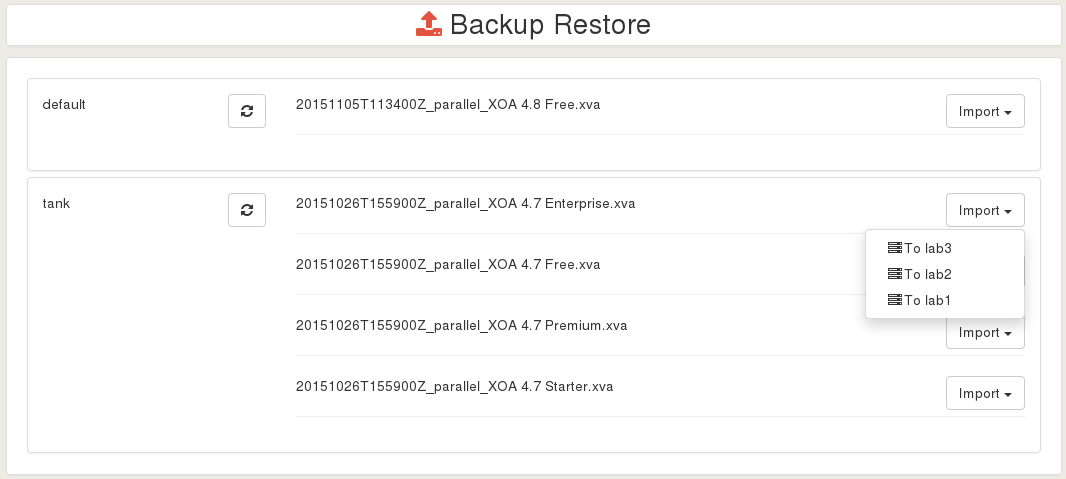
|
||||
|
||||
|
||||
### Backup compression
|
||||
|
||||
By default, Backup are compressed (using GZIP, done in XenServer side). There is no absolute rule about using compression or not, but there is some rules.
|
||||
|
||||
Gzip compression is:
|
||||
|
||||
* slow
|
||||
* space efficient
|
||||
* consume less bandwidth (if your NFS share is far)
|
||||
- slow
|
||||
- space efficient
|
||||
- consume less bandwidth (if your NFS share is far)
|
||||
|
||||
If you have compression on your NFS share (or destination file-system like ZFS), you can disable compression in Xen Orchestra.
|
||||
|
||||
@@ -45,4 +44,4 @@ This feature is close to Backups, but it creates a snapshot when planned to do s
|
||||
|
||||
**Warning**: snapshots are not backups. They help to rollback to a previous state, but all snapshots are on the same Storage than their original disk. If you lose the original VDI (or the SR), you'll **lose all your snapshots**.
|
||||
|
||||
[Read more about it](https://xen-orchestra.com/blog/xen-orchestra-4-2/#schedulerollingsnapshots).
|
||||
[Read more about it](https://xen-orchestra.com/blog/xen-orchestra-4-2/#schedulerollingsnapshots).
|
||||
|
||||
@@ -3,8 +3,8 @@
|
||||
This is the default method. Creating a user is very simple:
|
||||
|
||||
1. Go into the Settings view, select "Users"
|
||||
2. You can create a *user* or an *admin*, with their password (or generate one)
|
||||
2. You can create a _user_ or an _admin_, with their password (or generate one)
|
||||
|
||||

|
||||
|
||||
By default, a *user* won't have any permissions. At the opposite, an *admin* will have all rights.
|
||||
By default, a _user_ won't have any permissions. At the opposite, an _admin_ will have all rights.
|
||||
|
||||
@@ -2,11 +2,11 @@
|
||||
|
||||
Cloud-init is a program "that handles the early initialization of a cloud instance"[^n]. In other words, you can, on a "cloud-init"-ready template VM, pass a lot of data at first boot:
|
||||
|
||||
* setting the hostname
|
||||
* add ssh keys
|
||||
* automatically grow the file system
|
||||
* create users
|
||||
* and a lot more!
|
||||
- setting the hostname
|
||||
- add ssh keys
|
||||
- automatically grow the file system
|
||||
- create users
|
||||
- and a lot more!
|
||||
|
||||
This tool is pretty standard and used everywhere. A lot of existing cloud templates are using it.
|
||||
|
||||
@@ -40,19 +40,19 @@ Finally, create the VM:
|
||||
|
||||
Now start the VM and SSH to its IP:
|
||||
|
||||
* **the system has the right VM hostname** (from VM name)
|
||||
* you don't need to use a password to access it (thanks to your SSH key):
|
||||
- **the system has the right VM hostname** (from VM name)
|
||||
- you don't need to use a password to access it (thanks to your SSH key):
|
||||
|
||||
```
|
||||
$ ssh centos@192.168.100.226
|
||||
[centos@tmp-app1 ~]$
|
||||
[centos@tmp-app1 ~]$
|
||||
```
|
||||
|
||||
The default `cloud-init` configuration can allow you to be to be a sudoer directly:
|
||||
|
||||
```
|
||||
[centos@tmp-app1 ~]$ sudo -s
|
||||
[root@tmp-app1 centos]#
|
||||
[root@tmp-app1 centos]#
|
||||
```
|
||||
|
||||
Check the root file system size: indeed, **it was automatically increased** to what you need:
|
||||
|
||||
@@ -1,6 +1,5 @@
|
||||
# Backup Concurrency
|
||||
|
||||
|
||||
Xen Orchestra 5.20 introduces new tools to manage backup concurrency. Below is an overview of the backup process and ways you can control concurrency in your own environment.
|
||||
|
||||
## Backup process
|
||||
@@ -21,8 +20,8 @@ When it's done exporting, we'll remove the snapshot. Note: this operation will t
|
||||
|
||||
Let's say you want to backup 50 VMs (each with 1x disk) at 3:00 AM. There are **2 different strategies**:
|
||||
|
||||
1. backup VM #1 (snapshot, export, delete snapshots) **then** backup VM #2 -> *fully sequential strategy*
|
||||
2. snapshot all VMs, **then** export all snapshots, **then** delete all snapshots for finished exports -> *fully parallel strategy*
|
||||
1. backup VM #1 (snapshot, export, delete snapshots) **then** backup VM #2 -> _fully sequential strategy_
|
||||
2. snapshot all VMs, **then** export all snapshots, **then** delete all snapshots for finished exports -> _fully parallel strategy_
|
||||
|
||||
The first purely sequential strategy will lead to a big problem: **you can't predict when a snapshot of your data will occur**. Because you can't predict the first VM export time (let's say 3 hours), then your second VM will have its snapshot taken 3 hours later, at 6 AM. We assume that's not what you meant when you specified "backup everything at 3 AM". You would end up with data from 6 AM (and later) for other VMs.
|
||||
|
||||
@@ -32,19 +31,18 @@ So what's the best choice? Continue below to learn how to best configure concurr
|
||||
|
||||
### Best choice
|
||||
|
||||
By default the *parallel strategy* is, on paper, the most logical one. But we need to give it some limits on concurrency.
|
||||
By default the _parallel strategy_ is, on paper, the most logical one. But we need to give it some limits on concurrency.
|
||||
|
||||
> Note: Xen Orchestra can be connected to multiple pools at once. So the concurrency number applies **per pool**.
|
||||
|
||||
Each step has its own concurrency to fit its requirements:
|
||||
|
||||
* **snapshot process** needs to be performed with the lowest concurrency possible. 2 is a good compromise: one snapshot is fast, but a stuck snapshot won't block the whole job. That's why a concurrency of 2 is not too bad on your storage. Basically, at 3 AM, we'll do all the VM snapshots needed, 2 at a time.
|
||||
* **disk export process** is bottlenecked by XCP-ng/XenServer - so to get the most of it, you can use up to 12 in parallel. As soon a snapshot is done, the export process will start, until reaching 12 at once. Then as soon as one in those 12 is finished, another one will appear until there is nothing more to export.
|
||||
* **snapshot deletion** can't happen all at once because the previous step durations are random - no need to implement concurrency on this one.
|
||||
|
||||
This is how it currently works in Xen Orchestra. But sometimes, you also want to have *sequential* backups combined with the *parallel strategy*. That's why we introduced a sequential option in the advanced section of backup-ng:
|
||||
- **snapshot process** needs to be performed with the lowest concurrency possible. 2 is a good compromise: one snapshot is fast, but a stuck snapshot won't block the whole job. That's why a concurrency of 2 is not too bad on your storage. Basically, at 3 AM, we'll do all the VM snapshots needed, 2 at a time.
|
||||
- **disk export process** is bottlenecked by XCP-ng/XenServer - so to get the most of it, you can use up to 12 in parallel. As soon a snapshot is done, the export process will start, until reaching 12 at once. Then as soon as one in those 12 is finished, another one will appear until there is nothing more to export.
|
||||
- **snapshot deletion** can't happen all at once because the previous step durations are random - no need to implement concurrency on this one.
|
||||
|
||||
This is how it currently works in Xen Orchestra. But sometimes, you also want to have _sequential_ backups combined with the _parallel strategy_. That's why we introduced a sequential option in the advanced section of backup-ng:
|
||||
|
||||
> Note: 0 means it will be fully **parallel** for all VMs.
|
||||
|
||||
If you job contains 50 VMs for example, you could specify a sequential backup with a limit of "25 at once" (enter 25 in the concurrency field). This means at 3 AM, we'll do 25 snapshots (2 at a time), then exports. As soon as the first VM backup is completely finished (snapshot removed), then we'll start the 26th and so on, to always keep a max of 25x VM backups going in parallel.
|
||||
If you job contains 50 VMs for example, you could specify a sequential backup with a limit of "25 at once" (enter 25 in the concurrency field). This means at 3 AM, we'll do 25 snapshots (2 at a time), then exports. As soon as the first VM backup is completely finished (snapshot removed), then we'll start the 26th and so on, to always keep a max of 25x VM backups going in parallel.
|
||||
|
||||
@@ -15,14 +15,14 @@ user = 'nobody'
|
||||
group = 'nogroup'
|
||||
```
|
||||
|
||||
**Warning!** A non-privileged user requires the use of ``sudo`` to mount NFS shares. See [installation from the sources](from_the_sources.md).
|
||||
**Warning!** A non-privileged user requires the use of `sudo` to mount NFS shares. See [installation from the sources](from_the_sources.md).
|
||||
|
||||
### HTTP listen address and port
|
||||
|
||||
By default, XO-server listens on all addresses (0.0.0.0) and runs on port 80. If you need to, you can change this in the `# Basic HTTP` section:
|
||||
|
||||
```toml
|
||||
host = '0.0.0.0'
|
||||
hostname = '0.0.0.0'
|
||||
port = 80
|
||||
```
|
||||
|
||||
@@ -31,7 +31,7 @@ port = 80
|
||||
XO-server can also run in HTTPS (you can run HTTP and HTTPS at the same time) - just modify what's needed in the `# Basic HTTPS` section, this time with the certificates/keys you need and their path:
|
||||
|
||||
```toml
|
||||
host = '0.0.0.0'
|
||||
hostname = '0.0.0.0'
|
||||
port = 443
|
||||
certificate = './certificate.pem'
|
||||
key = './key.pem'
|
||||
@@ -43,10 +43,10 @@ key = './key.pem'
|
||||
|
||||
If you want to redirect everything to HTTPS, you can modify the configuration like this:
|
||||
|
||||
```
|
||||
```toml
|
||||
# If set to true, all HTTP traffic will be redirected to the first HTTPs configuration.
|
||||
|
||||
redirectToHttps: true
|
||||
redirectToHttps = true
|
||||
```
|
||||
|
||||
This should be written just before the `mount` option, inside the `http:` block.
|
||||
|
||||
@@ -2,17 +2,17 @@
|
||||
|
||||
> WARNING: it works only with XenServer 6.5 or later
|
||||
|
||||
This feature is a continuous replication system for your XenServer VMs **without any storage vendor lock-in**. You can replicate a VM every *X* minutes/hours to any storage repository. It could be to a distant XenServer host or just another local storage target.
|
||||
This feature is a continuous replication system for your XenServer VMs **without any storage vendor lock-in**. You can replicate a VM every _X_ minutes/hours to any storage repository. It could be to a distant XenServer host or just another local storage target.
|
||||
|
||||
This feature covers multiple objectives:
|
||||
|
||||
* no storage vendor lock-in
|
||||
* no configuration (agent-less)
|
||||
* low Recovery Point Objective, from 10 minutes to 24 hours (or more)
|
||||
* flexibility
|
||||
* no intermediate storage needed
|
||||
* atomic replication
|
||||
* efficient DR (disaster recovery) process
|
||||
- no storage vendor lock-in
|
||||
- no configuration (agent-less)
|
||||
- low Recovery Point Objective, from 10 minutes to 24 hours (or more)
|
||||
- flexibility
|
||||
- no intermediate storage needed
|
||||
- atomic replication
|
||||
- efficient DR (disaster recovery) process
|
||||
|
||||
If you lose your main pool, you can start the copy on the other side, with very recent data.
|
||||
|
||||
@@ -36,14 +36,13 @@ To protect the replication, we removed the possibility to boot your copied VM di
|
||||
|
||||
## Manual initial seed
|
||||
|
||||
**If you can't transfer the first backup through your network because it's too large**, you can make a seed locally. In order to do this, follow this procedure (until we make it accessible directly in XO).
|
||||
**If you can't transfer the first backup through your network because it's too large**, you can make a seed locally. In order to do this, follow this procedure (until we make it accessible directly in XO).
|
||||
|
||||
> This is **only** if you need to make the initial copy without making the whole transfer through your network. Otherwise, **you don't need this**. These instructions are for Backup-NG jobs, and will not work to seed a legacy backup job. Please migrate any legacy jobs to Backup-NG!
|
||||
|
||||
|
||||
### Job creation
|
||||
|
||||
Create the Continuous Replication backup job, and leave it disabled for now. On the main Backup-NG page, copy the job's `backupJobId` by hovering to the left of the shortened ID and clicking the copy to clipboard button:
|
||||
Create the Continuous Replication backup job, and leave it disabled for now. On the main Backup-NG page, copy the job's `backupJobId` by hovering to the left of the shortened ID and clicking the copy to clipboard button:
|
||||
|
||||

|
||||
|
||||
@@ -87,7 +86,9 @@ Usage: xo-cr-seed <source XAPI URL> <source snapshot UUID> <target XAPI URL> <ta
|
||||
|
||||
xo-cr-seed v0.2.0
|
||||
```
|
||||
|
||||
Putting it altogether and putting our values and UUID's into the command, it will look like this (it is a long command):
|
||||
|
||||
```
|
||||
xo-cr-seed https://root:password@xen1.company.tld 4a21c1cd-e8bd-4466-910a-f7524ecc07b1 https://root:password@xen2.company.tld 5aaf86ca-ae06-4a4e-b6e1-d04f0609e64d 90d11a94-a88f-4a84-b7c1-ed207d3de2f9 369a26f0-da77-41ab-a998-fa6b02c69b9a
|
||||
```
|
||||
|
||||
@@ -11,8 +11,9 @@ You can [open bug reports here](https://github.com/vatesfr/xen-orchestra/issues)
|
||||
Using the GitHub fork/pull-request feature, you may send us fixes or enhancements.
|
||||
|
||||
Please, do explain:
|
||||
* what you are fixing (issue number if available);
|
||||
* how you did it.
|
||||
|
||||
- what you are fixing (issue number if available);
|
||||
- how you did it.
|
||||
|
||||
### Pull requests
|
||||
|
||||
@@ -22,7 +23,6 @@ to create a [GitHub pull request](https://help.github.com/articles/using-pull-re
|
||||
> Your pull request should always be against the `master`
|
||||
> branch and not against `stable` which is the stable branch!
|
||||
|
||||
|
||||
1. Create a branch for your work
|
||||
2. Add a summary of your changes to `CHANGELOG.md` under the `next` section, if your changes do not relate to an existing changelog item
|
||||
3. Create a pull request for this branch against the `master` branch
|
||||
|
||||
@@ -2,7 +2,7 @@
|
||||
|
||||
> WARNING: Delta backups are only available on XenServer 6.5 or later
|
||||
|
||||
You can export only the delta (difference) between your current VM disks and a previous snapshot (called here the *reference*). They are called *continuous* because you'll **never export a full backup** after the first one.
|
||||
You can export only the delta (difference) between your current VM disks and a previous snapshot (called here the _reference_). They are called _continuous_ because you'll **never export a full backup** after the first one.
|
||||
|
||||
## Introduction
|
||||
|
||||
@@ -10,16 +10,16 @@ Full backups can be represented like this:
|
||||
|
||||

|
||||
|
||||
It means huge files for each backups. Delta backups will only export the difference between the previous backup:
|
||||
It means huge files for each backup. Delta backups will only export the difference between the previous backup:
|
||||
|
||||

|
||||
|
||||
You can imagine making your first initial full backup during a weekend, and then only delta backups every night. It combines the flexibility of snapshots and the power of full backups, because:
|
||||
|
||||
* delta are stored somewhere else than the current VM storage
|
||||
* they are small
|
||||
* quick to create
|
||||
* easy to restore
|
||||
- delta are stored somewhere else than the current VM storage
|
||||
- they are small
|
||||
- quick to create
|
||||
- easy to restore
|
||||
|
||||
So, if you want to rollback your VM to a previous state, the cost is only one snapshot on your SR (far less than the [rolling snapshot](rolling_snapshot.md) mechanism).
|
||||
|
||||
@@ -41,6 +41,10 @@ This way we can go "forward" and remove this oldest VHD after the merge:
|
||||
|
||||
Just go into your "Backup" view, and select Delta Backup. Then, it's the same as a normal backup.
|
||||
|
||||
## Snapshots
|
||||
|
||||
Unlike other types of backup jobs which delete the associated snapshot when the job is done and it has been exported, delta backups always keep a snapshot of every VM in the backup job, and uses it for the delta. Do not delete these snapshots!
|
||||
|
||||
## Exclude disks
|
||||
|
||||
During a delta backup job, you can avoid saving all disks of the VM. To do that is trivial: just edit the VM disk name and add `[NOBAK]` before the current name, eg: `data-disk` will become `[NOBAK] data-disk` (with a space or not, doesn't matter).
|
||||
|
||||
@@ -6,9 +6,8 @@ This is the easiest purchase option: you can buy XOA with your registered email
|
||||
|
||||
You can choose the edition you want in two places:
|
||||
|
||||
* [the pricing page](https://xen-orchestra.com/#!/pricing)
|
||||
* [your account/purchases page](https://xen-orchestra.com/#!/purchases)
|
||||
|
||||
- [the pricing page](https://xen-orchestra.com/#!/pricing)
|
||||
- [your account/purchases page](https://xen-orchestra.com/#!/purchases)
|
||||
|
||||
> You need to be logged in to make a purchase. If you don't have an account, please [register here](https://xen-orchestra.com/#!/signup).
|
||||
|
||||
@@ -18,7 +17,7 @@ From your account page, click on the purchase menu, then select the edition you
|
||||
|
||||
## Purchase options
|
||||
|
||||
The second step is to select your purchase option:
|
||||
The second step is to select your purchase option:
|
||||
|
||||
- Subscription: only available with a credit card payment. Choose this option for a monthly payment or a yearly payment **renewed automatically** each year.
|
||||
|
||||
@@ -32,16 +31,17 @@ Then you need to fill in your information and select **"Buy for my own use"** (d
|
||||

|
||||
|
||||
## Billing information
|
||||
You need to complete all the required information on this page in order to move forward.
|
||||
|
||||
> Note: If you are part of the Eurozone, you will need to provide a valid EU VAT number in order to proceed to payment. Transactions between companies inside the Eurozone are VAT free.
|
||||
Transactions outside the Eurozone are VAT free.
|
||||
You need to complete all the required information on this page in order to move forward.
|
||||
|
||||
> Note: If you are part of the Eurozone, you will need to provide a valid EU VAT number in order to proceed to payment. Transactions between companies inside the Eurozone are VAT free.
|
||||
> Transactions outside the Eurozone are VAT free.
|
||||
|
||||

|
||||
|
||||
## Select your payment mode
|
||||
|
||||
Credit Card, Wire transfer or Bank check are the three payment methods available on our store. Some methods can be unavailable regarding the purchase option you have selected during step one.
|
||||
Credit Card, Wire transfer or Bank check are the three payment methods available on our store. Some methods can be unavailable regarding the purchase option you have selected during step one.
|
||||
|
||||
> Wire transfer is not available for monthly and yearly subscription - Credit Card is not available for paid period.
|
||||
|
||||
|
||||
@@ -8,10 +8,10 @@ This category is dedicated to creating a VM with Docker support.
|
||||
|
||||
## Prerequisites
|
||||
|
||||
* XenServer 6.5 or higher
|
||||
* Plugin installation (see below)
|
||||
* CoreOS ISO ([download it here](http://stable.release.core-os.net/amd64-usr/current/coreos_production_iso_image.iso)) for CoreOS installations
|
||||
* Xen Orchestra 4.10 or newer
|
||||
- XenServer 6.5 or higher
|
||||
- Plugin installation (see below)
|
||||
- CoreOS ISO ([download it here](http://stable.release.core-os.net/amd64-usr/current/coreos_production_iso_image.iso)) for CoreOS installations
|
||||
- Xen Orchestra 4.10 or newer
|
||||
|
||||
## Docker plugin installation
|
||||
|
||||
@@ -49,8 +49,8 @@ That's it! You can now enjoy Docker support!
|
||||
|
||||
There are two ways to use the newly exposed Docker features:
|
||||
|
||||
* Install a CoreOS VM
|
||||
* Transform an existing VM into a supported Docker VM
|
||||
- Install a CoreOS VM
|
||||
- Transform an existing VM into a supported Docker VM
|
||||
|
||||
### CoreOS
|
||||
|
||||
@@ -80,7 +80,6 @@ And replace it with your actual SSH public key:
|
||||
|
||||
`- ssh-rsa AAAA....kuGgQ me@mypc`
|
||||
|
||||
|
||||
The rest of the configuration is identical to any other VM. Just click on "Create VM" and you are done. After a few seconds, your VM will be ready. Nothing else to do!
|
||||
|
||||
You can see it thanks to the docker logo in the main view:
|
||||
@@ -165,10 +164,10 @@ During the VM creation, the XSContainer plugin will create an extra disk: "Autom
|
||||
|
||||
Basically, it reads configuration during the boot, allowing:
|
||||
|
||||
* SSH key management for newly created VM/instances
|
||||
* Root disk filesystem growing
|
||||
* User/group management
|
||||
* Arbitrary command execution (system update, custom scripts etc.)
|
||||
- SSH key management for newly created VM/instances
|
||||
- Root disk filesystem growing
|
||||
- User/group management
|
||||
- Arbitrary command execution (system update, custom scripts etc.)
|
||||
|
||||
In our case, it's used by the XSContainer plugin to allow host communication to the Docker daemon running in the VM, thus exposing Docker commands outside of the VM.
|
||||
|
||||
@@ -178,9 +177,9 @@ You can also use the XSContainer plugin to "transform" an existing VM into a "Do
|
||||
|
||||
You need to have the following installed inside the VM:
|
||||
|
||||
* Docker
|
||||
* openssh-server
|
||||
* ncat
|
||||
- Docker
|
||||
- openssh-server
|
||||
- ncat
|
||||
|
||||
For Debian/Ubuntu like distro: `apt-get install docker.io openssh-server nmap`. For RHEL and derived (CentOS...): `yum install docker openssh-server nmap-ncat`.
|
||||
|
||||
|
||||
@@ -2,10 +2,10 @@
|
||||
|
||||
There are 4 **editions** of the Xen Orchestra Appliance (XOA):
|
||||
|
||||
* Free
|
||||
* Starter
|
||||
* Enterprise
|
||||
* Premium
|
||||
- Free
|
||||
- Starter
|
||||
- Enterprise
|
||||
- Premium
|
||||
|
||||
**Also, you can try all features in the Premium Edition for free (without any commitment) for 15 days by registering a trial. [Read here for trial instructions](trial.md).**
|
||||
|
||||
@@ -13,11 +13,11 @@ There are 4 **editions** of the Xen Orchestra Appliance (XOA):
|
||||
|
||||
This is the basic edition, allowing you to perform administrator tasks on a virtualized infrastructure. It's "like" XenCenter. You can:
|
||||
|
||||
* Create VMs, SRs etc.
|
||||
* Access to VM consoles (HTML5 web based!)
|
||||
* Edit resources (VM, pools etc.)
|
||||
* Make snapshots
|
||||
* Migrate VMs
|
||||
- Create VMs, SRs etc.
|
||||
- Access to VM consoles (HTML5 web based!)
|
||||
- Edit resources (VM, pools etc.)
|
||||
- Make snapshots
|
||||
- Migrate VMs
|
||||
|
||||
That's more or less the same features you can see on the [administration page](administration.md).
|
||||
|
||||
@@ -27,10 +27,10 @@ The Starter Edition is intended for system administrators who want to do more wi
|
||||
|
||||
In addition to the free edition, you get:
|
||||
|
||||
* [Scheduled backups](full_backups.md)
|
||||
* [Scheduled snapshots](rolling_snapshots.md)
|
||||
* Patch detection and application in one click (even to whole pools at once!)
|
||||
* XenServer Docker management via XenServer plugin
|
||||
- [Scheduled backups](full_backups.md)
|
||||
- [Scheduled snapshots](rolling_snapshots.md)
|
||||
- Patch detection and application in one click (even to whole pools at once!)
|
||||
- XenServer Docker management via XenServer plugin
|
||||
|
||||
You'll also have access to our ticket system to report issues and be helped in less than 72h.
|
||||
|
||||
@@ -38,10 +38,10 @@ You'll also have access to our ticket system to report issues and be helped in l
|
||||
|
||||
The Enterprise Edition allows you to access a lot more features than Starter:
|
||||
|
||||
* Disaster Recovery
|
||||
* Continuous Delta Backup
|
||||
* Live stats
|
||||
* ACLs + LDAP/SSO
|
||||
- Disaster Recovery
|
||||
- Continuous Delta Backup
|
||||
- Live stats
|
||||
- ACLs + LDAP/SSO
|
||||
|
||||
In addition, you'll have faster support to answer your issues/questions (48h or less).
|
||||
|
||||
@@ -49,10 +49,10 @@ In addition, you'll have faster support to answer your issues/questions (48h or
|
||||
|
||||
Premium is the highest edition, with all features included without any limitations. This means:
|
||||
|
||||
* Dataviz
|
||||
* Infrastructure health check
|
||||
* Job Manager
|
||||
* Continuous Replication
|
||||
* Self Service
|
||||
- Dataviz
|
||||
- Infrastructure health check
|
||||
- Job Manager
|
||||
- Continuous Replication
|
||||
- Self Service
|
||||
|
||||
Along with the fastest guaranteed support - 24 hours or less (typically much less).
|
||||
Along with the fastest guaranteed support - 24 hours or less (typically much less).
|
||||
|
||||
@@ -3,11 +3,12 @@
|
||||
If you have a UPS for your hosts, and lose power, you may have a limited amount of time to shut down all of your VM infrastructure before the batteries run out. If you find yourself in this situation, or any other situation requiring the fast shutdown of everything, you can use the **Emergency Shutdown** feature.
|
||||
|
||||
## How to activate
|
||||
On the host view, clicking on this button will trigger the _Emergency Shutdown_ procedure:
|
||||
|
||||
On the host view, clicking on this button will trigger the _Emergency Shutdown_ procedure:
|
||||
|
||||

|
||||
|
||||
1. **All running VMs will be suspended** (think of it like "hibernate" on your laptop: the RAM will be stored in the storage repository).
|
||||
1. **All running VMs will be suspended** (think of it like "hibernate" on your laptop: the RAM will be stored in the storage repository).
|
||||
2. Only after this is complete, the host will be halted.
|
||||
|
||||
Here, you can see the running VMs are being suspended:
|
||||
@@ -21,6 +22,7 @@ And finally, that's it. They are cleanly shut down with the RAM saved to disk to
|
||||
Now the host is halted automatically.
|
||||
|
||||
## Powering back on
|
||||
|
||||
When the power outage is over, all you need to do is:
|
||||
|
||||
1. Start your host.
|
||||
|
||||
@@ -4,17 +4,17 @@ All the following features are exposed through the web client, XO-Web, which is
|
||||
|
||||
We've made multiple categories to help you to find what you need:
|
||||
|
||||
* [XenServer Administration](administration.html)
|
||||
* [Docker Support](docker_support.html)
|
||||
* [Backups](backups.html)
|
||||
* [Disaster Recovery](disaster_recovery.html)
|
||||
* [Resources delegation](resources_delegation.html)
|
||||
* [CloudInit](cloudinit.md)
|
||||
* [Self Service](self_service.html)
|
||||
* [Visualizations](visualizations.html)
|
||||
* [Job Manager](scheduler.html)
|
||||
* [Alerts](alerts.html)
|
||||
* [Load balancing](load_balancing.html)
|
||||
* [SDN Controller](sdn_controller.html)
|
||||
- [XenServer Administration](administration.html)
|
||||
- [Docker Support](docker_support.html)
|
||||
- [Backups](backups.html)
|
||||
- [Disaster Recovery](disaster_recovery.html)
|
||||
- [Resources delegation](resources_delegation.html)
|
||||
- [CloudInit](cloudinit.md)
|
||||
- [Self Service](self_service.html)
|
||||
- [Visualizations](visualizations.html)
|
||||
- [Job Manager](scheduler.html)
|
||||
- [Alerts](alerts.html)
|
||||
- [Load balancing](load_balancing.html)
|
||||
- [SDN Controller](sdn_controller.html)
|
||||
|
||||

|
||||
|
||||
@@ -18,4 +18,4 @@ Then, click on the VM where your files are, and follow the instructions:
|
||||
|
||||
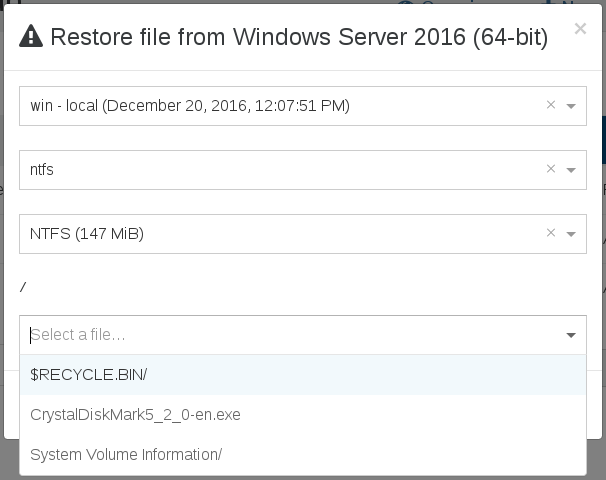
|
||||
|
||||
That's it! Your chosen file will be restored.
|
||||
That's it! Your chosen file will be restored.
|
||||
|
||||
@@ -20,7 +20,7 @@ We'll consider at this point that you've got a working node on your box. E.g:
|
||||
|
||||
```
|
||||
$ node -v
|
||||
v8.12.0
|
||||
v8.16.2
|
||||
```
|
||||
|
||||
If not, see [this page](https://nodejs.org/en/download/package-manager/) for instructions on how to install Node.
|
||||
@@ -65,17 +65,13 @@ Now you have to create a config file for `xo-server`:
|
||||
|
||||
```
|
||||
$ cd packages/xo-server
|
||||
$ cp sample.config.toml .xo-server.toml
|
||||
$ mkdir -p ~/.config/xo-server
|
||||
$ cp sample.config.toml ~/.config/xo-server/config.toml
|
||||
```
|
||||
|
||||
Edit and uncomment it to have the right path to serve `xo-web`, because `xo-server` embeds an HTTP server (we assume that `xen-orchestra` and `xo-web` are in the same directory):
|
||||
> Note: If you're installing `xo-server` as a global service, you may want to copy the file to `/etc/xo-server/config.toml` instead.
|
||||
|
||||
```toml
|
||||
[http.mounts]
|
||||
'/' = '../xo-web/dist/'
|
||||
```
|
||||
|
||||
In this config file, you can also change default ports (80 and 443) for xo-server. If you are running the server as a non-root user, you will need to set the port to 1024 or higher.
|
||||
In this config file, you can change default ports (80 and 443) for xo-server. If you are running the server as a non-root user, you will need to set the port to 1024 or higher.
|
||||
|
||||
You can try to start xo-server to see if it works. You should have something like this:
|
||||
|
||||
@@ -92,6 +88,7 @@ The only part you need to launch is xo-server, which is quite easy to do. From t
|
||||
```
|
||||
$ yarn start
|
||||
```
|
||||
|
||||
That's it! Use your browser to visit the xo-server IP address, and it works! :)
|
||||
|
||||
## Updating
|
||||
@@ -106,6 +103,7 @@ $ git pull --ff-only
|
||||
$ yarn
|
||||
$ yarn build
|
||||
```
|
||||
|
||||
Then restart Xen Orchestra if it was running.
|
||||
|
||||
## Always Running
|
||||
@@ -118,7 +116,7 @@ yarn global add forever
|
||||
forever start bin/xo-server
|
||||
```
|
||||
|
||||
- Or you can use [forever-service](https://github.com/zapty/forever-service) to install XO as a system service, so it starts automatically at boot. Run the following as root:
|
||||
- Or you can use [forever-service](https://github.com/zapty/forever-service) to install XO as a system service, so it starts automatically at boot. Run the following as root:
|
||||
|
||||
```
|
||||
yarn global add forever
|
||||
@@ -186,7 +184,7 @@ service redis start
|
||||
|
||||
## SUDO
|
||||
|
||||
If you are running `xo-server` as a non-root user, you need to use `sudo` to be able to mount NFS remotes. You can do this by editing `xo-server/.xo-server.toml` and setting `useSudo = true`. It's near the end of the file:
|
||||
If you are running `xo-server` as a non-root user, you need to use `sudo` to be able to mount NFS remotes. You can do this by editing `xo-server` configuration file and setting `useSudo = true`. It's near the end of the file:
|
||||
|
||||
```
|
||||
useSudo = true
|
||||
|
||||
@@ -1,7 +1,8 @@
|
||||
# Common errors and troubleshooting
|
||||
|
||||
## Recommendation
|
||||
If you think you have a problem with your XOA, start by typing`xoa check`command in your terminal:
|
||||
|
||||
If you think you have a problem with your XOA, start by typing`xoa check`command in your terminal:
|
||||
|
||||
```
|
||||
$ xoa check
|
||||
@@ -12,27 +13,29 @@ $ xoa check
|
||||
✔ xo-server config syntax
|
||||
✔ Appliance registration
|
||||
✔ Internet connectivity
|
||||
```
|
||||
```
|
||||
|
||||
If the result you have is completely different from that, or if error messages are displayed, lost packets, etc., you have, indeed, a problem. The next step should be to check in this document if there is an existing troubleshooting for the problem you have.
|
||||
|
||||
> You can also access the log by using this command: `$ tail -f /var/log/syslog` ([learn more](https://xen-orchestra.com/docs/logs.html))
|
||||
|
||||
## General
|
||||
|
||||
* [Empty page after login](https://xen-orchestra.com/docs/troubleshooting.html#empty-page-after-login)
|
||||
* [Can't migrate XOA](https://xen-orchestra.com/docs/troubleshooting.html#xoa-migration-issues)
|
||||
* [Can't boot XOA](https://xen-orchestra.com/docs/troubleshooting.html#xoa-boot-issues)
|
||||
* [Network issues](https://xen-orchestra.com/docs/troubleshooting.html#network-issues)
|
||||
* [Out of memory](https://xen-orchestra.com/docs/troubleshooting.html#memory)
|
||||
* [Transparent proxy and updater](https://xen-orchestra.com/docs/troubleshooting.html#behind-a-transparent-proxy)
|
||||
* [SSL self-signed certificate expired](https://xen-orchestra.com/docs/troubleshooting.html#updating-ssl-self-signed-certificate)
|
||||
* [User authentication](https://xen-orchestra.com/docs/authentication.html#debugging)
|
||||
- [Empty page after login](https://xen-orchestra.com/docs/troubleshooting.html#empty-page-after-login)
|
||||
- [Can't migrate XOA](https://xen-orchestra.com/docs/troubleshooting.html#xoa-migration-issues)
|
||||
- [Can't boot XOA](https://xen-orchestra.com/docs/troubleshooting.html#xoa-boot-issues)
|
||||
- [Network issues](https://xen-orchestra.com/docs/troubleshooting.html#network-issues)
|
||||
- [Out of memory](https://xen-orchestra.com/docs/troubleshooting.html#memory)
|
||||
- [Transparent proxy and updater](https://xen-orchestra.com/docs/troubleshooting.html#behind-a-transparent-proxy)
|
||||
- [SSL self-signed certificate expired](https://xen-orchestra.com/docs/troubleshooting.html#updating-ssl-self-signed-certificate)
|
||||
- [User authentication](https://xen-orchestra.com/docs/authentication.html#debugging)
|
||||
|
||||
## Backup troubleshooting
|
||||
|
||||
* [Unhealthy VDI chain](https://xen-orchestra.com/docs/backup_troubleshooting.html#unhealthy-vdi-chain)
|
||||
* [SR_backend_failure_44](https://xen-orchestra.com/docs/backup_troubleshooting.html#srbackendfailure44-insufficient-space)
|
||||
* [Could not find the base VM](https://xen-orchestra.com/docs/backup_troubleshooting.html#could-not-find-the-base-vm)
|
||||
- [Unhealthy VDI chain](https://xen-orchestra.com/docs/backup_troubleshooting.html#unhealthy-vdi-chain)
|
||||
- [SR_backend_failure_44](https://xen-orchestra.com/docs/backup_troubleshooting.html#srbackendfailure44-insufficient-space)
|
||||
- [Could not find the base VM](https://xen-orchestra.com/docs/backup_troubleshooting.html#could-not-find-the-base-vm)
|
||||
|
||||
## You haven't found a solution here?
|
||||
|
||||
Open a ticket concerning your issue on your personal space [here](https://xen-orchestra.com/#!/member/support)
|
||||
|
||||
@@ -1,16 +1,16 @@
|
||||
# Glossary
|
||||
|
||||
* CPU: Processor
|
||||
* HA: High Availability
|
||||
* HVM: Hardware virtualization
|
||||
* MTU: largest size packet that can be sent in the network
|
||||
* OS: Operating System
|
||||
* PIF: Physical Network Interface
|
||||
* PVM: Paravirtualization
|
||||
* SR: Storage Repository
|
||||
* vCPU: Virtual Processor
|
||||
* VDI: Virtual Disk Image
|
||||
* VIF: Virtual Network Interface
|
||||
* VM: Virtual Machine
|
||||
* XO: Xen Orchestra
|
||||
* XOA: Xen Orchestra Appliance
|
||||
- CPU: Processor
|
||||
- HA: High Availability
|
||||
- HVM: Hardware virtualization
|
||||
- MTU: largest size packet that can be sent in the network
|
||||
- OS: Operating System
|
||||
- PIF: Physical Network Interface
|
||||
- PVM: Paravirtualization
|
||||
- SR: Storage Repository
|
||||
- vCPU: Virtual Processor
|
||||
- VDI: Virtual Disk Image
|
||||
- VIF: Virtual Network Interface
|
||||
- VM: Virtual Machine
|
||||
- XO: Xen Orchestra
|
||||
- XOA: Xen Orchestra Appliance
|
||||
|
||||
@@ -4,7 +4,6 @@ This plugin allows Google users to authenticate to Xen-Orchestra.
|
||||
|
||||
The first time a user signs in, XO will create a new XO user with the same identifier, without any permissions.
|
||||
|
||||
|
||||
## Creating the Google project
|
||||
|
||||
[Create a new project](https://console.developers.google.com/project):
|
||||
@@ -24,9 +23,9 @@ Add OAuth 2.0 credentials:
|
||||
|
||||
In Settings, then Plugins, expand the Google plugin detail and provide:
|
||||
|
||||
* a `clientID` e.g `326211154583-nt2s112d3t7f4f1hh49oo9164nivvbnu.apps.googleusercontent.com`
|
||||
* a `clientSecret`, e.g `HTDb8I4jXiLRMaRL15qCffQ`
|
||||
* the `callbackURL`, e.g `http://xo.company.net/signin/google/callback`
|
||||
- a `clientID` e.g `326211154583-nt2s112d3t7f4f1hh49oo9164nivvbnu.apps.googleusercontent.com`
|
||||
- a `clientSecret`, e.g `HTDb8I4jXiLRMaRL15qCffQ`
|
||||
- the `callbackURL`, e.g `http://xo.company.net/signin/google/callback`
|
||||
|
||||

|
||||
|
||||
|
||||
@@ -1,4 +1,3 @@
|
||||
|
||||
# Installation
|
||||
|
||||
Log in to your account and use the deploy form available on [this page](https://xen-orchestra.com/#!/xoa)
|
||||
|
||||
@@ -1,8 +1,8 @@
|
||||
# LDAP
|
||||
|
||||
XO currently supports connections to LDAP directories, like *Open LDAP* or *Active Directory*.
|
||||
XO currently supports connections to LDAP directories, like _Open LDAP_ or _Active Directory_.
|
||||
|
||||
To configure your LDAP, you need to go into the *Plugins* section in the "Settings" view. Then configure it:
|
||||
To configure your LDAP, you need to go into the _Plugins_ section in the "Settings" view. Then configure it:
|
||||
|
||||

|
||||
|
||||
@@ -12,8 +12,8 @@ Don't forget to save the configuration, and also check if the plugin is activate
|
||||
|
||||
LDAP Filters allow you to properly match your user. It's not an easy task to always find the right filter, and it entirely depends on your LDAP configuration. Still, here is a list of common filters:
|
||||
|
||||
* `'(uid={{name}})'` is usually the default filter for *Open LDAP*
|
||||
* `'(cn={{name}})'`, `'(sAMAccountName={{name}})'`, `'(sAMAccountName={{name}}@<domain>)'` or even `'(userPrincipalName={{name}})'` are widely used for *Active Directory*. Please check with your AD Admin to find the right one.
|
||||
- `'(uid={{name}})'` is usually the default filter for _Open LDAP_
|
||||
- `'(cn={{name}})'`, `'(sAMAccountName={{name}})'`, `'(sAMAccountName={{name}}@<domain>)'` or even `'(userPrincipalName={{name}})'` are widely used for _Active Directory_. Please check with your AD Admin to find the right one.
|
||||
|
||||
After finishing the configuration, you can try to log in with your LDAP username and password. Finally, right after your initial successful log in, your account will be visible in the user list of Xen Orchestra.
|
||||
|
||||
|
||||
@@ -12,18 +12,18 @@ In this coming new view, you'll be able to configure a new load balancing plan,
|
||||
|
||||
A plan has:
|
||||
|
||||
* a name
|
||||
* pool(s) where to apply the policy
|
||||
* a mode (see paragraph below)
|
||||
* a behavior (aggressive, normal, low)
|
||||
- a name
|
||||
- pool(s) where to apply the policy
|
||||
- a mode (see paragraph below)
|
||||
- a behavior (aggressive, normal, low)
|
||||
|
||||
### Plan modes
|
||||
|
||||
There are 3 modes possible:
|
||||
|
||||
* performance
|
||||
* density
|
||||
* mixed
|
||||
- performance
|
||||
- density
|
||||
- mixed
|
||||
|
||||
#### Performance
|
||||
|
||||
@@ -37,8 +37,8 @@ This time, the objective is to use the least hosts possible, and to concentrate
|
||||
|
||||
This mode allows you to use both performance and density, but alternatively, depending of a schedule. E.g:
|
||||
|
||||
* **performance** from 6:00 AM to 7:00 PM
|
||||
* **density** from 7:01 PM to 5:59 AM
|
||||
- **performance** from 6:00 AM to 7:00 PM
|
||||
- **density** from 7:01 PM to 5:59 AM
|
||||
|
||||
In this case, you'll have the best of both when needed (energy saving during the night and performance during the day).
|
||||
|
||||
@@ -46,8 +46,8 @@ In this case, you'll have the best of both when needed (energy saving during the
|
||||
|
||||
In a plan, you can configure various thresholds:
|
||||
|
||||
* CPU threshold
|
||||
* Free memory
|
||||
- CPU threshold
|
||||
- Free memory
|
||||
|
||||
If the CPU threshold is set to 90%, the load balancer will be only triggered if the average CPU usage on a host is more than 90%.
|
||||
|
||||
|
||||
@@ -1,4 +1,3 @@
|
||||
|
||||
# Logs
|
||||
|
||||
This section will explain how to check the XOA logs, and use them to detect issues.
|
||||
|
||||
@@ -8,8 +8,8 @@ XCP-ng and Citrix Hypervisor (Xenserver) hosts use a database to store metadata
|
||||
|
||||
In Xen Orchestra, Metadata backup is divided into two different options:
|
||||
|
||||
* Pool metadata backup
|
||||
* XO configuration backup
|
||||
- Pool metadata backup
|
||||
- XO configuration backup
|
||||
|
||||
### Performing a backup
|
||||
|
||||
@@ -28,7 +28,6 @@ Once created, the job is displayed with the other classic jobs.
|
||||
|
||||

|
||||
|
||||
|
||||
### Performing a restore
|
||||
|
||||
> WARNING: restoring pool metadata completely overwrites the XAPI database of a host. Only perform a metadata restore if it is a new server with nothing running on it (eg replacing a host with new hardware).
|
||||
@@ -45,4 +44,4 @@ You can see both our Xen Orchestra config backup, and our pool metadata backup.
|
||||
|
||||

|
||||
|
||||
That's it!
|
||||
That's it!
|
||||
|
||||
@@ -1,20 +1,19 @@
|
||||
|
||||
# Others
|
||||
|
||||
We already have other modules in place, e.g for authentication, like a LDAP, SAML, Google or GitHub as external providers.
|
||||
|
||||
If you want to understand how modules work, have a look here:
|
||||
|
||||
* [LDAP plugin](https://github.com/vatesfr/xen-orchestra/tree/master/packages/xo-server-auth-ldap)
|
||||
* [GitHub authentication](https://github.com/vatesfr/xen-orchestra/tree/master/packages/xo-server-auth-github)
|
||||
- [LDAP plugin](https://github.com/vatesfr/xen-orchestra/tree/master/packages/xo-server-auth-ldap)
|
||||
- [GitHub authentication](https://github.com/vatesfr/xen-orchestra/tree/master/packages/xo-server-auth-github)
|
||||
|
||||
XO's API can be explored through the `xo-cli` client (please refer to the previous section for details).
|
||||
|
||||
There are modules for a lot of various tasks, like:
|
||||
|
||||
* performance analysis
|
||||
* reporting
|
||||
* load management
|
||||
* various authentication providers
|
||||
- performance analysis
|
||||
- reporting
|
||||
- load management
|
||||
- various authentication providers
|
||||
|
||||
Check your Settings/Plugins view in XOA to see them.
|
||||
|
||||
@@ -6,18 +6,18 @@ Patching a host manually can be time consuming (and boring). That's why we provi
|
||||
|
||||
Your XOA will check the official Citrix servers for missing patches. They will be displayed if any:
|
||||
|
||||
* in dashboard view
|
||||
* in pool view (plus the number of missing patches in a red box)
|
||||
* in host view (in patching tab, same red pill)
|
||||
- in dashboard view
|
||||
- in pool view (plus the number of missing patches in a red box)
|
||||
- in host view (in patching tab, same red pill)
|
||||
|
||||
### Installing patches
|
||||
|
||||
When you click on "Install all patches", XOA will do all of the following automatically:
|
||||
|
||||
* fetch all missing patches from Citrix servers
|
||||
* unzip them
|
||||
* upload them
|
||||
* apply them in the correct order
|
||||
- fetch all missing patches from Citrix servers
|
||||
- unzip them
|
||||
- upload them
|
||||
- apply them in the correct order
|
||||
|
||||
You can see more screenshots here: https://xen-orchestra.com/blog/hotfix-xs70e004-for-xenserver-7-0/
|
||||
|
||||
@@ -25,8 +25,8 @@ You can see more screenshots here: https://xen-orchestra.com/blog/hotfix-xs70e00
|
||||
|
||||
## Notes on patching
|
||||
|
||||
* Xen Orchestra won't reboot your hosts automatically. That's your call to choose when to do it.
|
||||
* Patching doesn't always require rebooting. Check the "Guidance" row: if "restartHost" is displayed, it means you need to reboot to have the patch fully applied (see screenshot below)
|
||||
* XO will install all patches without rebooting: that's not an issue. Even applying patches manually, **it's not mandatory to reboot after each patch**.
|
||||
- Xen Orchestra won't reboot your hosts automatically. That's your call to choose when to do it.
|
||||
- Patching doesn't always require rebooting. Check the "Guidance" row: if "restartHost" is displayed, it means you need to reboot to have the patch fully applied (see screenshot below)
|
||||
- XO will install all patches without rebooting: that's not an issue. Even applying patches manually, **it's not mandatory to reboot after each patch**.
|
||||
|
||||

|
||||
|
||||
@@ -1,4 +1,3 @@
|
||||
|
||||
# Plugins
|
||||
|
||||
Xen Orchestra plugins allow you to extend features without rewriting the core of the application.
|
||||
@@ -13,6 +12,6 @@ All plugin configuration should be done in the web interface:
|
||||
|
||||
A plugin can be:
|
||||
|
||||
* activated/deactivated
|
||||
* loaded on start of the application
|
||||
* configured (extend the plugin settings by clicking on the "+" icon
|
||||
- activated/deactivated
|
||||
- loaded on start of the application
|
||||
- configured (extend the plugin settings by clicking on the "+" icon
|
||||
|
||||
@@ -2,9 +2,9 @@
|
||||
|
||||
You can buy XOA in multiple ways, depending on your needs. Click on the following links for more documentation:
|
||||
|
||||
* [for your company (direct purchase)](directpurchase.md)
|
||||
* [through your purchase department (purchaser)](through_purchase_department.md)
|
||||
* [for your own client (reseller)](reseller.md)
|
||||
- [for your company (direct purchase)](directpurchase.md)
|
||||
- [through your purchase department (purchaser)](through_purchase_department.md)
|
||||
- [for your own client (reseller)](reseller.md)
|
||||
|
||||
## XOA Editions
|
||||
|
||||
@@ -16,16 +16,16 @@ Invoices are available in PDF format. [Details here](invoices.md).
|
||||
|
||||
## Receiving a quote
|
||||
|
||||
You can ask for an automatic quote on our website via the pricing page or directly from you personal account page.
|
||||
You can ask for an automatic quote on our website via the pricing page or directly from you personal account page.
|
||||
|
||||

|
||||
|
||||
Choose the plan you want, the years of commitment that suits you, then fill out the information required (it should be prefilled with your account information).
|
||||
Choose the plan you want, the years of commitment that suits you, then fill out the information required (it should be prefilled with your account information).
|
||||
|
||||
If you want to purchase XO using the quote you receive, you just have to enter the quote number into the purchase menu, on your personal account page.
|
||||
If you want to purchase XO using the quote you receive, you just have to enter the quote number into the purchase menu, on your personal account page.
|
||||
|
||||
## Edit your card information
|
||||
|
||||
If you choose a Stripe payment, you can always edit the credit card information in case it changes. To do so, you only have to login to your personal account page and access the *profile* menu.
|
||||
If you choose a Stripe payment, you can always edit the credit card information in case it changes. To do so, you only have to login to your personal account page and access the _profile_ menu.
|
||||
|
||||

|
||||
|
||||
@@ -1,8 +1,8 @@
|
||||
# Xen Orchestra Partner Program
|
||||
|
||||
The Xen Orchestra partner program is designed to offer you the opportunity to become a reseller of Xen Orchestra and deliver a full stack solution to your customers.
|
||||
The Xen Orchestra partner program is designed to offer you the opportunity to become a reseller of Xen Orchestra and deliver a full stack solution to your customers.
|
||||
|
||||
> Becoming a reseller will grant you a standard discount. However, **the reseller status is designed for companies that want to actively prospect for new Xen Orchestra users**. That's why we are asking our partners to **resell Xen Orchestra at least two times a year**. If you are acting as a third party purchaser answering to a specific request from one of your customers, you don't need to apply to the reseller program - you can follow [this process](https://xen-orchestra.com/docs/through_purchase_department.html) instead.
|
||||
> Becoming a reseller will grant you a standard discount. However, **the reseller status is designed for companies that want to actively prospect for new Xen Orchestra users**. That's why we are asking our partners to **resell Xen Orchestra at least two times a year**. If you are acting as a third party purchaser answering to a specific request from one of your customers, you don't need to apply to the reseller program - you can follow [this process](https://xen-orchestra.com/docs/through_purchase_department.html) instead.
|
||||
|
||||
## Apply to the program
|
||||
|
||||
@@ -22,7 +22,7 @@ Now that you can see the reseller interface:
|
||||
|
||||

|
||||
|
||||
You can follow these steps to purchase an XOA edition for your customer.
|
||||
You can follow these steps to purchase an XOA edition for your customer.
|
||||
|
||||
1. choose the edition you want to purchase for your customer
|
||||
2. Buy it on your reseller page (the discount is automatically applied - once it's done, a new line appears on your reseller page)
|
||||
|
||||
@@ -4,11 +4,11 @@ This chapter covers how to delegate resources (VM, hosts, etc) to users.
|
||||
|
||||
The idea is to allow external users (not admins) to:
|
||||
|
||||
* interact only with their objects
|
||||
* delegate VMs to your dev teams...
|
||||
* ... or to your clients
|
||||
- interact only with their objects
|
||||
- delegate VMs to your dev teams...
|
||||
- ... or to your clients
|
||||
|
||||
> Remember: admins can do everything, thus permissions don't apply on them. It's only for *users*.
|
||||
> Remember: admins can do everything, thus permissions don't apply on them. It's only for _users_.
|
||||
|
||||
## Groups
|
||||
|
||||
|
||||
@@ -2,8 +2,7 @@
|
||||
|
||||
## Apache
|
||||
|
||||
As XO-web and XO-server communicate with *WebSockets*, you need to have the [`mod_proxy`](http://httpd.apache.org/docs/2.4/mod/mod_proxy.html), [`mod_proxy_http`](http://httpd.apache.org/docs/2.4/mod/mod_proxy_http.html), [`mod_proxy_wstunnel`](http://httpd.apache.org/docs/2.4/mod/mod_proxy_wstunnel.html) and [`mod_rewrite`](http://httpd.apache.org/docs/2.4/mod/mod_rewrite.html) modules enabled.
|
||||
|
||||
As XO-web and XO-server communicate with _WebSockets_, you need to have the [`mod_proxy`](http://httpd.apache.org/docs/2.4/mod/mod_proxy.html), [`mod_proxy_http`](http://httpd.apache.org/docs/2.4/mod/mod_proxy_http.html), [`mod_proxy_wstunnel`](http://httpd.apache.org/docs/2.4/mod/mod_proxy_wstunnel.html) and [`mod_rewrite`](http://httpd.apache.org/docs/2.4/mod/mod_rewrite.html) modules enabled.
|
||||
|
||||
Please use this configuration in this order or it will not work. Do not forget the trailing slashes!:
|
||||
|
||||
@@ -16,12 +15,10 @@ ProxyPass /[<path>]/ http://<xo-server ip>:<xo-server port>/
|
||||
ProxyPassReverse /[<path>]/ http://<xo-server ip>:<xo-server port>/
|
||||
```
|
||||
|
||||
|
||||
## NGINX
|
||||
|
||||
Just configure your VirtualHost as usual (or your default site), with a `location` section like this one:
|
||||
|
||||
|
||||
```nginx
|
||||
location /[<path>] {
|
||||
# Add some headers
|
||||
|
||||
@@ -1,13 +1,12 @@
|
||||
# Roadmap
|
||||
|
||||
> Our roadmap is very flexible - you can check the **milestones** repository for a complete overview of all the features we are currently working on.
|
||||
> Our roadmap is very flexible - you can check the **milestones** repository for a complete overview of all the features we are currently working on.
|
||||
|
||||
## Features
|
||||
|
||||
- [Milestones](https://github.com/vatesfr/xen-orchestra/milestones)
|
||||
- [Alerts and reports](alerts.md)
|
||||
|
||||
|
||||
## Fixes
|
||||
|
||||
- [Known bugs](https://github.com/vatesfr/xen-orchestra/issues?q=is%3Aopen+is%3Aissue+label%3A%22type%3A+bug%22)
|
||||
|
||||
@@ -12,6 +12,6 @@ This feature is similar to Backups, but it creates a snapshot when planned to do
|
||||
|
||||
Example:
|
||||
|
||||
* Schedule a nightly snapshot for a group of VMs, let's say at 4:30 in the morning. With a max snapshot of 7, you'll have a week of revert possibility
|
||||
* Schedule a snapshot every week, but precisely Sunday at 11 PM, with 4 snapshots max. This will give you a month max of revert
|
||||
* And so forth!
|
||||
- Schedule a nightly snapshot for a group of VMs, let's say at 4:30 in the morning. With a max snapshot of 7, you'll have a week of revert possibility
|
||||
- Schedule a snapshot every week, but precisely Sunday at 11 PM, with 4 snapshots max. This will give you a month max of revert
|
||||
- And so forth!
|
||||
|
||||
@@ -35,20 +35,20 @@ The possibilities are infinite! You can schedule a **lot** of things (any action
|
||||
|
||||
### Save on your electric bill
|
||||
|
||||
* plan a live migration of your VMs at 11:00PM to a less powerful host, then shutdown the big one
|
||||
* start the big server at 6:00AM and migrate the VMs back 15 minutes later
|
||||
- plan a live migration of your VMs at 11:00PM to a less powerful host, then shutdown the big one
|
||||
- start the big server at 6:00AM and migrate the VMs back 15 minutes later
|
||||
|
||||
### Scale when needed
|
||||
|
||||
* schedule the boot of extra VMs during your usual activity spikes (horizontal scaling)
|
||||
* also add more vCPUs or RAM to these VMs at the same time
|
||||
* go back to the previous state when your planned load is low (e.g: during the night)
|
||||
- schedule the boot of extra VMs during your usual activity spikes (horizontal scaling)
|
||||
- also add more vCPUs or RAM to these VMs at the same time
|
||||
- go back to the previous state when your planned load is low (e.g: during the night)
|
||||
|
||||
### Planned reboot
|
||||
|
||||
* For example: your client app is not very stable, or you need to reboot every month after kernel updates: schedule this during the weekend!
|
||||
- For example: your client app is not very stable, or you need to reboot every month after kernel updates: schedule this during the weekend!
|
||||
|
||||
### Add or Remove ACLs
|
||||
|
||||
* revoke your user ACLs Friday at 11:00PM (e.g: no access on the weekend)
|
||||
* restore them Monday at 6:00AM
|
||||
- revoke your user ACLs Friday at 11:00PM (e.g: no access on the weekend)
|
||||
- restore them Monday at 6:00AM
|
||||
|
||||
@@ -15,6 +15,7 @@ Please read the [dedicated devblog on the SDN Controller](https://xen-orchestra.
|
||||
### Network creation
|
||||
|
||||
In the network creation view:
|
||||
|
||||
- Select a `pool`
|
||||
- Select `Private network`
|
||||
- Select an interface on which to create the network's tunnels
|
||||
@@ -25,9 +26,10 @@ In the network creation view:
|
||||
- Create the network
|
||||
- Have fun! ☺
|
||||
|
||||
***NB:***
|
||||
**_NB:_**
|
||||
|
||||
- All hosts in a private network must be able to reach the other hosts' management interface.
|
||||
> The term ‘management interface’ is used to indicate the IP-enabled NIC that carries the management traffic.
|
||||
> The term ‘management interface’ is used to indicate the IP-enabled NIC that carries the management traffic.
|
||||
- Only 1 encrypted GRE network and 1 encrypted VxLAN network per pool can exist at a time due to Open vSwitch limitation.
|
||||
|
||||
### Configuration
|
||||
@@ -36,8 +38,9 @@ Like all other xo-server plugins, it can be configured directly via
|
||||
the web interface, see [the plugin documentation](https://xen-orchestra.com/docs/plugins.html).
|
||||
|
||||
The plugin's configuration contains:
|
||||
|
||||
- `cert-dir`: The path where the plugin will look for the certificates to create SSL connections with the hosts.
|
||||
If none is provided, the plugin will create its own self-signed certificates.
|
||||
If none is provided, the plugin will create its own self-signed certificates.
|
||||
- `override-certs`: Enable to uninstall the existing SDN controller CA certificate in order to replace it with the plugin's one.
|
||||
|
||||
## Requirements
|
||||
@@ -57,4 +60,4 @@ If none is provided, the plugin will create its own self-signed certificates.
|
||||
- `systemctl enable ipsec`
|
||||
- `systemctl enable openvswitch-ipsec`
|
||||
- `systemctl start ipsec`
|
||||
- `systemctl start openvswitch-ipsec`
|
||||
- `systemctl start openvswitch-ipsec`
|
||||
|
||||
@@ -2,10 +2,10 @@
|
||||
|
||||
The idea is not just to provide a good search engine, but also a complete solution for managing all your XenServer infrastructure. Ideally:
|
||||
|
||||
* less clicks to see or do what you need
|
||||
* find a subset of interesting objects
|
||||
* perform bulk actions on all results found
|
||||
* sort your results for more pertinent insight
|
||||
- less clicks to see or do what you need
|
||||
- find a subset of interesting objects
|
||||
- perform bulk actions on all results found
|
||||
- sort your results for more pertinent insight
|
||||
|
||||
> Pro Tip: the URL of Xen Orchestra contains the search string, eg `home?s=power_state%3Arunning+`. You can share these URLs to your colleagues to share your search!
|
||||
|
||||
@@ -112,10 +112,9 @@ Postfix the name of a property by a question mark `?`:
|
||||
|
||||
You can use the search field/filter with number comparisons:
|
||||
|
||||
* `snapshots:length:>2` (to display VMs with more than 2 snapshots)
|
||||
* `$VBDs:length:>=4` (VMs with more 4 or more disks attached)
|
||||
* `VIFs:length:>=2` (number of network interfaces)
|
||||
|
||||
- `snapshots:length:>2` (to display VMs with more than 2 snapshots)
|
||||
- `$VBDs:length:>=4` (VMs with more 4 or more disks attached)
|
||||
- `VIFs:length:>=2` (number of network interfaces)
|
||||
|
||||
## Available properties
|
||||
|
||||
|
||||
@@ -12,15 +12,15 @@ To create a new set of resources to delegate, go to the "Self Service" section i
|
||||
|
||||
> Only an admin can create a set of resources
|
||||
|
||||
To allow people to create VMs as they want, we need to give them a *part* of your XenServer resources (disk space, CPUs, RAM). You can call this "general quotas" if you like. But you first need to decide which resources will be used.
|
||||
To allow people to create VMs as they want, we need to give them a _part_ of your XenServer resources (disk space, CPUs, RAM). You can call this "general quotas" if you like. But you first need to decide which resources will be used.
|
||||
|
||||
In this example below, we'll create a set called **"sandbox"** with:
|
||||
|
||||
* "devs" is the group that can use this set (all users in the group)
|
||||
* "Lab Pool" is the pool where they can play
|
||||
* "Debian 8 Cloud Ready" is the only template they can use
|
||||
* "SSD NFS" is the only SR where they can create VMs
|
||||
* "Pool-wide network with eth0" is the only available network for them
|
||||
- "devs" is the group that can use this set (all users in the group)
|
||||
- "Lab Pool" is the pool where they can play
|
||||
- "Debian 8 Cloud Ready" is the only template they can use
|
||||
- "SSD NFS" is the only SR where they can create VMs
|
||||
- "Pool-wide network with eth0" is the only available network for them
|
||||
|
||||

|
||||
|
||||
@@ -32,11 +32,11 @@ As you can see, only compatible hosts are shown and can be used for this resourc
|
||||
|
||||
Then, you can define quotas on this set:
|
||||
|
||||
* max vCPUs
|
||||
* max RAM
|
||||
* max disk usage
|
||||
- max vCPUs
|
||||
- max RAM
|
||||
- max disk usage
|
||||
|
||||
> Note: Snapshotting a VM within a self-service will use the quota from the resource set. The same rule applies for backups and replication.
|
||||
> Note: Snapshotting a VM within a self-service will use the quota from the resource set. The same rule applies for backups and replication.
|
||||
|
||||
When you click on create, you can see the resource set and remove or edit it:
|
||||
|
||||
@@ -44,7 +44,7 @@ When you click on create, you can see the resource set and remove or edit it:
|
||||
|
||||
## Usage (user side)
|
||||
|
||||
As soon as a user is granted a resource set, it displays a new button in their main view: "new".
|
||||
As soon as a user is granted a resource set, it displays a new button in their main view: "new".
|
||||
|
||||

|
||||
|
||||
@@ -60,14 +60,13 @@ If the "Create" button is disabled, it means the user requested more resources t
|
||||
|
||||
Finally, if a user has been granted access to multiple resource sets, they can be switched in the top right of the screen.
|
||||
|
||||
|
||||
## Toward the Cloud
|
||||
|
||||
Self-service is a major step in the Cloud. Combine it with our [Cloudinit compatible VM creation](cloudinit.md) for a full experience:
|
||||
|
||||
* create a Cloud ready template
|
||||
* create a set and put Cloud templates inside
|
||||
* delegate this set to a group of users
|
||||
- create a Cloud ready template
|
||||
- create a set and put Cloud templates inside
|
||||
- delegate this set to a group of users
|
||||
|
||||
Now, your authorized users can create VMs with their SSH keys, grow template disks if needed, etc. Everything is inside a "sandbox" (the resource set) you defined earlier!
|
||||
|
||||
|
||||
@@ -7,7 +7,7 @@ There are two ways to select which VMs will be backed up:
|
||||
|
||||
Picking VMs manually can be a limitation if your environment moves fast (i.e. having new VMs you need to backup often). In that situation you would previously need to constantly go back and edit the backup job to add new VM's.
|
||||
|
||||
But thanks to *smart backup*, you now have more flexibility: you won't select specific VMs, but VMs status/tag/placement **at the time backup job will be executed**. Let's see some examples!
|
||||
But thanks to _smart backup_, you now have more flexibility: you won't select specific VMs, but VMs status/tag/placement **at the time backup job will be executed**. Let's see some examples!
|
||||
|
||||
## Backup all VMs on a pool
|
||||
|
||||
@@ -25,8 +25,8 @@ Want to narrow the job a bit? See below.
|
||||
|
||||
You can also:
|
||||
|
||||
* backup only running (or halted) VMs when the job is executed
|
||||
* backup only VMs with a specific tag
|
||||
- backup only running (or halted) VMs when the job is executed
|
||||
- backup only VMs with a specific tag
|
||||
|
||||
Remember the Prod VMs? I added a tag "prod" to each of them:
|
||||
|
||||
|
||||
@@ -4,10 +4,10 @@ Xen Orchestra will run in a controlled/tested environment thanks to XOA ([Xen Or
|
||||
|
||||
XOA is available in multiple plans:
|
||||
|
||||
* Free
|
||||
* Starter
|
||||
* Enterprise
|
||||
* Premium
|
||||
- Free
|
||||
- Starter
|
||||
- Enterprise
|
||||
- Premium
|
||||
|
||||
Higher tier support plans include faster ticket response times (and cover more features). Paid support plans and response times are based on the plan you have, plans can be [reviewed here](https://xen-orchestra.com/#!/xo-pricing).
|
||||
|
||||
@@ -19,8 +19,8 @@ With the free version of the Xen Orchestra Appliance (XOA free), you can open su
|
||||
|
||||
If you are using Xen Orchestra via the source and not XOA, you can ask questions and try to recieve help through a number of different ways:
|
||||
|
||||
* In our [forum](https://xcp-ng.org/forum/category/12/xen-orchestra)
|
||||
* In our IRC - `#xen-orchestra` on `Freenode`
|
||||
- In our [forum](https://xcp-ng.org/forum/category/12/xen-orchestra)
|
||||
- In our IRC - `#xen-orchestra` on `Freenode`
|
||||
|
||||
We encourage you to give back to the community by assisting other users via these two avenues as well.
|
||||
|
||||
|
||||
@@ -6,20 +6,20 @@ Xen Orchestra is designed to work exclusively on [XCP-ng](https://xcp-ng.org/) a
|
||||
|
||||
Backup restore for large VM disks (>1TiB usage) is [broken on all XenServer versions](https://bugs.xenserver.org/browse/XSO-868) until Citrix release a fix.
|
||||
|
||||
* XenServer 7.6
|
||||
* XenServer 7.5
|
||||
* [VDI I/O error](https://bugs.xenserver.org/browse/XSO-873), waiting for Citrix to release our fix
|
||||
* XenServer 7.4
|
||||
* XenServer 7.3
|
||||
* XenServer 7.2
|
||||
* XenServer 7.1
|
||||
* XenServer 7.0
|
||||
* XenServer 6.5
|
||||
* Random Delta backup issues
|
||||
* XenServer 6.1 and 6.2
|
||||
* No Delta backup and CR support
|
||||
* XenServer 5.x
|
||||
* Basic administration features
|
||||
- XenServer 7.6
|
||||
- XenServer 7.5
|
||||
- [VDI I/O error](https://bugs.xenserver.org/browse/XSO-873), waiting for Citrix to release our fix
|
||||
- XenServer 7.4
|
||||
- XenServer 7.3
|
||||
- XenServer 7.2
|
||||
- XenServer 7.1
|
||||
- XenServer 7.0
|
||||
- XenServer 6.5
|
||||
- Random Delta backup issues
|
||||
- XenServer 6.1 and 6.2
|
||||
- No Delta backup and CR support
|
||||
- XenServer 5.x
|
||||
- Basic administration features
|
||||
|
||||

|
||||
|
||||
@@ -27,8 +27,8 @@ Backup restore for large VM disks (>1TiB usage) is [broken on all XenServer vers
|
||||
|
||||
All the pending fixes are already integrated in the latest XCP-ng version. We strongly suggest people to keep using the latest XCP-ng version as far as possible.
|
||||
|
||||
* XCP-ng 7.6
|
||||
* XCP-ng 7.5
|
||||
* XCP-ng 7.4.1
|
||||
- XCP-ng 7.6
|
||||
- XCP-ng 7.5
|
||||
- XCP-ng 7.4.1
|
||||
|
||||

|
||||
|
||||
@@ -4,29 +4,25 @@ If you can't purchase using your own account, usually because you need to go thr
|
||||
|
||||
Typically, you will provide two contacts:
|
||||
|
||||
* The "billing contact" (in general, the purchaser email). This account will have access to invoices. This is the account doing the purchase. Once purchased, the license needs to be bound to the second contact account, the technical contact.
|
||||
* The "technical contact", the email of the system administrator using the solution and making support requests.
|
||||
- The "billing contact" (in general, the purchaser email). This account will have access to invoices. This is the account doing the purchase. Once purchased, the license needs to be bound to the second contact account, the technical contact.
|
||||
- The "technical contact", the email of the system administrator using the solution and making support requests.
|
||||
|
||||
## As "billing contact"
|
||||
|
||||
1. First of all, you need to create an account as a purchaser (eg: "purchase.dept@example.com"). Once it's done, you need to go inside the member page, in the **purchases** menu.
|
||||
|
||||
|
||||

|
||||
|
||||
|
||||
Now, you just have to pick the edition of Xen Orchestra you want to purchase for your IT team.
|
||||
|
||||
2. On the first payment screen, after you choose the plan and the subscription method. You can select the option "Buy for another account"
|
||||
|
||||
|
||||

|
||||
|
||||
3. Once the payment is completed, you will have to bind the plan with the end-user account (technical contact). If the end-user doesn't have an account yet, the system will create one and send an e-mail to your end user.
|
||||
|
||||
3. Once the payment is completed, you will have to bind the plan with the end-user account (technical contact). If the end-user doesn't have an account yet, the system will create one and send an e-mail to your end user.
|
||||
|
||||

|
||||
|
||||
That's it, you have now completed the purchase.
|
||||
That's it, you have now completed the purchase.
|
||||
|
||||
**⚠ Once you have bound the plan to your end user account, you cannot change it. Double check the spelling of the e-mail before binding the account.**
|
||||
|
||||
@@ -1,13 +1,12 @@
|
||||
|
||||
# Trial activation
|
||||
|
||||
A trial will allow you to test all available features in XOA, for 15 days.
|
||||
|
||||
The procedure is very simple:
|
||||
|
||||
* register, then download a Free Edition [on our website](https://xen-orchestra.com/#/member)
|
||||
* [deploy the virtual appliance](xoa.md)
|
||||
* activate the trial via the "Update" view (details below)
|
||||
- register, then download a Free Edition [on our website](https://xen-orchestra.com/#/member)
|
||||
- [deploy the virtual appliance](xoa.md)
|
||||
- activate the trial via the "Update" view (details below)
|
||||
|
||||
## Activate the trial
|
||||
|
||||
|
||||
@@ -12,10 +12,9 @@ It means you don't have a default SR set on the pool you are importing XOA on. T
|
||||
|
||||
XOA uses HVM mode. If your physical host doesn't support virtualization extensions, XOA won't work. To check if your XenServer supports hardware assisted virtualization (HVM), you can enter this command in your host: `grep --color vmx /proc/cpuinfo`. If you don't have any result, it means XOA won't work on this hardware.
|
||||
|
||||
|
||||
## Recover XOA Web-UI login password
|
||||
|
||||
If you have lost your password to log in to the XOA webpage, you can reset it. From the XOA CLI (for login/access info for the CLI, [see here](xoa.md#first-console-connection)), use the following command and insert the email/account you wish to recover:
|
||||
If you have lost your password to log in to the XOA webpage, you can reset it. From the XOA CLI (for login/access info for the CLI, [see here](xoa.md#first-console-connection)), use the following command and insert the email/account you wish to recover:
|
||||
|
||||
`xo-server-recover-account youremail@here.com`
|
||||
|
||||
@@ -69,7 +68,7 @@ If you have something completely different than that, or error messages, lost pa
|
||||
|
||||
You can see your current network configuration by running `ifconfig eth0`. If you have an external firewall, please check that you allow the XOA's IP.
|
||||
|
||||
You can modify the IP configuration with `xoa network static` (for a static IP address) or ` xoa network dhcp` to use DHCP.
|
||||
You can modify the IP configuration with `xoa network static` (for a static IP address) or `xoa network dhcp` to use DHCP.
|
||||
|
||||
### Memory
|
||||
|
||||
@@ -120,6 +119,7 @@ $ echo NODE_TLS_REJECT_UNAUTHORIZED=0 >> /etc/xo-appliance/env
|
||||
$ npm config -g set strict-ssl=false
|
||||
$ systemctl restart xoa-updater
|
||||
```
|
||||
|
||||
Now try running an update again.
|
||||
|
||||
### Updating SSL self-signed certificate
|
||||
|
||||
@@ -1,4 +1,3 @@
|
||||
|
||||
# Updater
|
||||
|
||||
The updater is the central piece that keeps your XO Appliance running the latest Xen Orchestra code.
|
||||
@@ -42,9 +41,11 @@ However, if you want to start a manual check, you can do it by clicking on the "
|
||||

|
||||
|
||||
#### Release channel
|
||||
|
||||
In Xen Orchestra, you can make a choice between two different release channels.
|
||||
|
||||
##### Stable
|
||||
|
||||
The stable channel is intended to be a version of Xen Orchestra that is already **one month old** (and therefore will benefit from one month of community feedback and various fixes). This way, users more concerned with the stability of their appliance will have the option to stay on a slightly older (and tested) version of XO (still supported by our pro support).
|
||||
|
||||
##### Latest
|
||||
@@ -119,7 +120,7 @@ If your updater is down, you can restart it with `systemctl restart xoa-updater`
|
||||
|
||||
If you can't fetch updates, perform a few checks from your XOA:
|
||||
|
||||
* you should be able to successfully `ping xen-orchestra.com`
|
||||
* if not, check your `/etc/resolv.conf` file and modify it if necessary (give a correct DNS server)
|
||||
* use `ifconfig` to check your network configuration
|
||||
* check your firewall(s) and allow XOA to reach xen-orchestra.com (port 443)
|
||||
- you should be able to successfully `ping xen-orchestra.com`
|
||||
- if not, check your `/etc/resolv.conf` file and modify it if necessary (give a correct DNS server)
|
||||
- use `ifconfig` to check your network configuration
|
||||
- check your firewall(s) and allow XOA to reach xen-orchestra.com (port 443)
|
||||
|
||||
@@ -1,34 +1,33 @@
|
||||
# How to uprade your active plan?
|
||||
|
||||
If you want to upgrade your active plan to a higher version of Xen Orchestra, you can do it from your **personal space**.
|
||||
If you want to upgrade your active plan to a higher version of Xen Orchestra, you can do it from your **personal space**.
|
||||
|
||||
### Step by step:
|
||||
|
||||
1. Connect on your personal account on the [website](https://xen-orchestra.com/#!/login?source=member.index).
|
||||
1. Connect on your personal account on the [website](https://xen-orchestra.com/#!/login?source=member.index).
|
||||
|
||||

|
||||
|
||||
2. Go on the purchase menu
|
||||
2. Go on the purchase menu
|
||||
|
||||

|
||||
|
||||
3. Pick the line corresponding to the account you want to upgrade. Click on the "upgrade" button on the right.
|
||||
3. Pick the line corresponding to the account you want to upgrade. Click on the "upgrade" button on the right.
|
||||
|
||||

|
||||
|
||||
4. At this point, you will see a standard subscription page. **Choose the same payment method you used to purchase the initial plan** and confirm the purchase.
|
||||
4. At this point, you will see a standard subscription page. **Choose the same payment method you used to purchase the initial plan** and confirm the purchase.
|
||||
|
||||

|
||||
|
||||
5. If you chosse wire transfer, you have now the possibility to download a quote. As you can see, the remaining period of your previous plan is now a credit note applied on this upgrade.
|
||||
5. If you chosse wire transfer, you have now the possibility to download a quote. As you can see, the remaining period of your previous plan is now a credit note applied on this upgrade.
|
||||
|
||||

|
||||
|
||||
6. As for a regular purchase, upload a proof of payment in order for us to activate your new plan as soon as possible.
|
||||
6. As for a regular purchase, upload a proof of payment in order for us to activate your new plan as soon as possible.
|
||||
|
||||

|
||||
|
||||
7. **Enjoy your new plan!**
|
||||
|
||||
|
||||
> As a reseller, the process is quite the same. The only difference is that you have to pick your customer line into you reseller space an not your personal space.
|
||||
> As a reseller, the process is quite the same. The only difference is that you have to pick your customer line into you reseller space an not your personal space.
|
||||
|
||||
@@ -26,9 +26,9 @@ By default, this view groups all **running VMs** on your connected server:
|
||||
|
||||
Let's take a quick tour:
|
||||
|
||||
* the global menu is on the left, you can collapse it by clicking on the icon 
|
||||
* the home view has a header with a type selector (VMs, hosts or pools), a filter zone and a button to create new VMs
|
||||
* the VM list also has a header (number of filtered VMs and total VMs) and assisted filters (by pool, host and tags) and a sort menu (by name, memory etc.). You can also expand all VMs details here with the icon 
|
||||
- the global menu is on the left, you can collapse it by clicking on the icon 
|
||||
- the home view has a header with a type selector (VMs, hosts or pools), a filter zone and a button to create new VMs
|
||||
- the VM list also has a header (number of filtered VMs and total VMs) and assisted filters (by pool, host and tags) and a sort menu (by name, memory etc.). You can also expand all VMs details here with the icon 
|
||||
|
||||
> Pro Tip: you can edit a VM name, description and even current host by long clicking on the field
|
||||
|
||||
|
||||
@@ -36,7 +36,7 @@ These values can be changed anytime after your VM is created.
|
||||
|
||||
#### Multiple VMs
|
||||
|
||||
You can create multiple VMs at once by toggling the *Multiple VMs* option. The `{name}` pattern is the "Name" field of the VM. By default, it will start with number 1 and increment up. You can change this via the "First index" field.
|
||||
You can create multiple VMs at once by toggling the _Multiple VMs_ option. The `{name}` pattern is the "Name" field of the VM. By default, it will start with number 1 and increment up. You can change this via the "First index" field.
|
||||
|
||||
Click on the refresh icon to see the change:
|
||||
|
||||
@@ -70,7 +70,7 @@ These templates will use PV configuration in order to boot: either from the righ
|
||||
|
||||
#### Template with existing disks
|
||||
|
||||
Because there is already disks installed, you shouldn't have "Install settings" *per se*. But you can use our `config drive` setup if your template already has CloudInit installed!
|
||||
Because there is already disks installed, you shouldn't have "Install settings" _per se_. But you can use our `config drive` setup if your template already has CloudInit installed!
|
||||
|
||||
Please refer to the [XenServer CloudInit section](cloudinit.md) for more.
|
||||
|
||||
|
||||
@@ -12,8 +12,8 @@ In the advanced tab, you have extra options:
|
||||
|
||||
### XenServer limitations
|
||||
|
||||
* Each VM has a maximum vCPU number. This value can't be changed while the VM is running. You can reduce the number of vCPUs, but you can't assign more than the set max. In XO, while your VM is halted, set the max vCPUs you would need, then boot it. Now you can reduce it and then expand it later to this maximum.
|
||||
* The same limitation applies to static RAM.
|
||||
- Each VM has a maximum vCPU number. This value can't be changed while the VM is running. You can reduce the number of vCPUs, but you can't assign more than the set max. In XO, while your VM is halted, set the max vCPUs you would need, then boot it. Now you can reduce it and then expand it later to this maximum.
|
||||
- The same limitation applies to static RAM.
|
||||
|
||||
You can learn more about XenServer [resource management on the Citrix Website](https://docs.citrix.com/de-de/xencenter/6-5/xs-xc-vms-configuring/xs-xc-vms-memory/xs-xc-dmc-about.html).
|
||||
|
||||
@@ -53,11 +53,11 @@ If you pool supports HA (must have shared storage), you can activate "HA". Read
|
||||
|
||||
You can change the CPU Weight in the VM advanced view. The values are:
|
||||
|
||||
* Default
|
||||
* Quarter (64)
|
||||
* Half (128)
|
||||
* Normal (256)
|
||||
* Double (512)
|
||||
- Default
|
||||
- Quarter (64)
|
||||
- Half (128)
|
||||
- Normal (256)
|
||||
- Double (512)
|
||||
|
||||
By default, each VM has a weight of 256.
|
||||
|
||||
@@ -71,8 +71,8 @@ VM copy allows you to make an export and an import via streaming. You can target
|
||||
|
||||
You can create a snapshot with one click. It will be named automatically. After the snapshot is created, you can either:
|
||||
|
||||
* export it on your computer
|
||||
* revert your VM to this snapshot (it will restart the VM)
|
||||
* delete this snapshot
|
||||
- export it on your computer
|
||||
- revert your VM to this snapshot (it will restart the VM)
|
||||
- delete this snapshot
|
||||
|
||||
> By default, XOA will try to make a snapshot with quiesce. If the VM does not support it, it will fallback to the default snapshot system.
|
||||
|
||||
76
docs/web-hooks.md
Normal file
76
docs/web-hooks.md
Normal file
@@ -0,0 +1,76 @@
|
||||
# Web hooks
|
||||
|
||||
⚠ This feature is experimental!
|
||||
|
||||
## Configuration
|
||||
|
||||
The plugin "web-hooks" needs to be installed and loaded for this feature to work.
|
||||
|
||||
You can trigger an HTTP POST request to a URL when a Xen Orchestra API method is called.
|
||||
|
||||
- Go to Settings > Plugins > Web hooks
|
||||
- Add new hooks
|
||||
- For each hook, configure:
|
||||
- Method: the XO API method that will trigger the HTTP request when called
|
||||
- Type:
|
||||
- pre: the request will be sent when the method is called
|
||||
- post: the request will be sent after the method action is completed
|
||||
- pre/post: both
|
||||
- URL: the full URL which the requests will be sent to
|
||||
- Save the plugin configuration
|
||||
|
||||
From now on, a request will be sent to the corresponding URLs when a configured method is called by an XO client.
|
||||
|
||||
## Request content
|
||||
|
||||
```
|
||||
POST / HTTP/1.1
|
||||
Content-Type: application/json
|
||||
```
|
||||
|
||||
The request's body is a JSON string representing an object with the following properties:
|
||||
|
||||
- `type`: `"pre"` or `"post"`
|
||||
- `callId`: unique ID for this call to help match a pre-call and a post-call
|
||||
- `userId`: unique internal ID of the user who performed the call
|
||||
- `userName`: login/e-mail address of the user who performed the call
|
||||
- `method`: name of the method that was called (e.g. `"vm.start"`)
|
||||
- `params`: call parameters (object)
|
||||
- `timestamp`: epoch timestamp of the beginning ("pre") or end ("post") of the call in ms
|
||||
- `duration`: duration of the call in ms ("post" hooks only)
|
||||
- `result`: call result on success ("post" hooks only)
|
||||
- `error`: call result on error ("post" hooks only)
|
||||
|
||||
## Request handling
|
||||
|
||||
_Quick Node.js example of how you may want to handle the requests_
|
||||
|
||||
```js
|
||||
const http = require('http')
|
||||
const { exec } = require('child_process')
|
||||
|
||||
http
|
||||
.createServer((req, res) => {
|
||||
let body = ''
|
||||
req.on('data', chunk => {
|
||||
body += chunk
|
||||
})
|
||||
req.on('end', () => handleHook(body))
|
||||
res.end()
|
||||
})
|
||||
.listen(3000)
|
||||
|
||||
const handleHook = data => {
|
||||
const { method, params, type, result, error, timestamp } = JSON.parse(data)
|
||||
|
||||
// Log it
|
||||
console.log(
|
||||
`${new Date(
|
||||
timestamp
|
||||
).toISOString()} [${method}|${type}] ${params} → ${result || error}`
|
||||
)
|
||||
|
||||
// Run scripts
|
||||
exec(`./hook-scripts/${method}-${type}.sh`)
|
||||
}
|
||||
```
|
||||
@@ -35,7 +35,6 @@ Usage:
|
||||
|
||||
```
|
||||
|
||||
|
||||
#### Register your XO instance
|
||||
|
||||
```
|
||||
@@ -74,8 +73,7 @@ Commands can be filtered using patterns:
|
||||
|
||||
#### Execute a command
|
||||
|
||||
The same syntax is used for all commands: `xo-cli <command> <param
|
||||
name>=<value>...`
|
||||
The same syntax is used for all commands: `xo-cli <command> <param name>=<value>...`
|
||||
|
||||
E.g., adding a new server:
|
||||
|
||||
@@ -102,7 +100,8 @@ encoding by prefixing with `json:`:
|
||||
|
||||
##### VM import
|
||||
|
||||
```
|
||||
```
|
||||
> xo-cli vm.import sr=60a6939e-8b0a-4352-9954-5bde44bcdf7d @=vm.xva
|
||||
```
|
||||
|
||||
> Note: `xo-cli` only supports the import of XVA files. It will not import OVA files. To import OVA images, you must use the XOA web UI.
|
||||
|
||||
@@ -1,7 +1,6 @@
|
||||
|
||||
# xo-server
|
||||
|
||||
XO-Server is the core of Xen Orchestra. Its central role opens a lot of possibilities versus other solutions - let's see why.
|
||||
XO-Server is the core of Xen Orchestra. Its central role opens a lot of possibilities versus other solutions - let's see why.
|
||||
|
||||
### Daemon mode
|
||||
|
||||
@@ -57,7 +56,6 @@ Thanks to our architecture, it's now far easier:
|
||||
|
||||
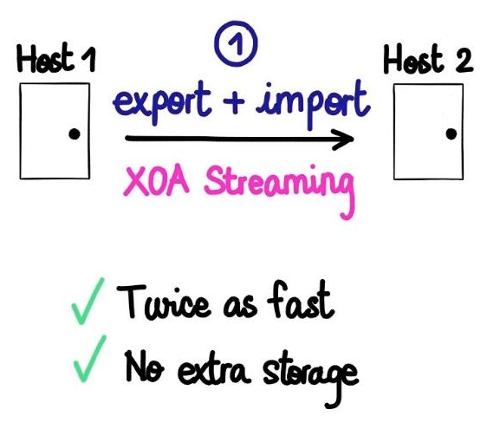
|
||||
|
||||
|
||||
#### Patching on the fly
|
||||
|
||||
To install a patch manually, it requires a lot of steps: find, download, extract and apply the patch, sequentially.
|
||||
@@ -68,7 +66,6 @@ To install a patch manually, it requires a lot of steps: find, download, extract
|
||||
2. unzip it and upload it on the fly to your host
|
||||
3. apply it as soon it's done
|
||||
|
||||
|
||||
### Pluggable
|
||||
|
||||
It's really easy to connect other modules to XO-server, and extend or adapt the solution to your needs (see XO-web and XO-cli for real examples).
|
||||
|
||||
@@ -1,4 +1,3 @@
|
||||
|
||||
# xo-web
|
||||
|
||||
This is probably the first part of Xen Orchestra you'll see. The Web interface allows you to interact with your virtual infrastructure. As a module of XO-Web it facilitates everyday Xen administrator work, but also provides a solution to delegate parts of your infrastructure to other people.
|
||||
|
||||
110
docs/xoa.md
110
docs/xoa.md
@@ -2,19 +2,19 @@
|
||||
|
||||
XOA is the Xen Orchestra Appliance. XOA is a Debian VM with:
|
||||
|
||||
* Xen Orchestra already installed (nothing to do!)
|
||||
* Tested with all bundled dependencies (QA)
|
||||
* The web updater (update in one click)
|
||||
* Support (+SSH support, tooling)
|
||||
* Secured system (sudo, firewall)
|
||||
- Xen Orchestra already installed (nothing to do!)
|
||||
- Tested with all bundled dependencies (QA)
|
||||
- The web updater (update in one click)
|
||||
- Support (+SSH support, tooling)
|
||||
- Secured system (sudo, firewall)
|
||||
|
||||
## Specifications
|
||||
|
||||
By default, the VM is configured with:
|
||||
|
||||
* 2 vCPUs
|
||||
* 2GB of RAM
|
||||
* 15GB of disk (10GB for `/` and 5GB for `/var`)
|
||||
- 2 vCPUs
|
||||
- 2GB of RAM
|
||||
- 15GB of disk (10GB for `/` and 5GB for `/var`)
|
||||
|
||||
For use on huge infrastructure (more than 500+ VMs), feel free to increase the RAM.
|
||||
|
||||
@@ -22,9 +22,9 @@ For use on huge infrastructure (more than 500+ VMs), feel free to increase the R
|
||||
|
||||
### The quickest way
|
||||
|
||||
The **fastest and most secure way** to install Xen Orchestra is to use our web deploy page. Go on https://xen-orchestra.com/#!/xoa and follow instructions.
|
||||
The **fastest and most secure way** to install Xen Orchestra is to use our web deploy page. Go to https://xen-orchestra.com/#!/xoa and follow the instructions.
|
||||
|
||||
> **Note:** no data will be sent to our servers, it's running only between your browser and your host!
|
||||
> **Note:** no data will be sent to our servers, the deployment only runs between your browser and your host!
|
||||
|
||||

|
||||
|
||||
@@ -33,49 +33,89 @@ The **fastest and most secure way** to install Xen Orchestra is to use our web d
|
||||
Alternatively, you can deploy it by connecting to your XenServer host and executing the following:
|
||||
|
||||
```
|
||||
bash -c "$(curl -s http://xoa.io/deploy)"
|
||||
curl -sS https://xoa.io/deploy | bash
|
||||
```
|
||||
|
||||
> **Note:** This won't write or modify anything on your XenServer host: it will just import the XOA VM into your default storage repository.
|
||||
> **Note 1:** This won't write or modify anything on your XenServer host: it will just import the XOA VM into your default storage repository.
|
||||
|
||||
> **Note 2:** If you are using an old XenServer version, you may get a `curl` error:
|
||||
>
|
||||
> ```
|
||||
> curl: (35) error:1407742E:SSL routines:SSL23_GET_SERVER_HELLO:tlsv1 alert protocol version
|
||||
> ```
|
||||
|
||||
````
|
||||
>
|
||||
> It means that the secure HTTPS protocol is not supported, you can bypass this using the unsecure command instead:
|
||||
> ```
|
||||
> curl -sS http://xoa.io/deploy | bash
|
||||
````
|
||||
|
||||
Follow the instructions:
|
||||
|
||||
* Your IP configuration will be requested: it's set to **DHCP by default**, otherwise you can enter a fixed IP address (eg `192.168.0.10`)
|
||||
* If DHCP is selected, the script will continue automatically. Otherwise a netmask, gateway, and DNS should be provided.
|
||||
* XOA will be deployed on your default storage repository. You can move it elsewhere anytime after.
|
||||
- Your IP configuration will be requested: it's set to **DHCP by default**, otherwise you can enter a fixed IP address (eg `192.168.0.10`)
|
||||
- If DHCP is selected, the script will continue automatically. Otherwise a netmask, gateway, and DNS server should be provided.
|
||||
- XOA will be deployed on your default storage repository. You can move it elsewhere anytime after.
|
||||
|
||||
### Via download the XVA
|
||||
### Via a manual XVA download
|
||||
|
||||
Download XOA from xen-orchestra.com. Once you've got the XVA file, you can import it with `xe vm-import filename=xoa_unified.xva` or via XenCenter.
|
||||
You can also download XOA from xen-orchestra.com in an XVA file. Once you've got the XVA file, you can import it with `xe vm-import filename=xoa_unified.xva` or via XenCenter.
|
||||
|
||||
After the VM is imported, you just need to start it with `xe vm-start vm="XOA"` or with XenCenter.
|
||||
|
||||
## First Login
|
||||
|
||||
Once you have started the VM, you can access the web UI by putting the IP you configured during deployment into your web browser. If you did not configure an IP or are unsure, try one of the following methods to find it:
|
||||
Once you have started the VM, you can access the web UI by putting the IP you configured during deployment into your web browser. If you did not configure an IP or are unsure, try one of the following methods to find it:
|
||||
|
||||
* Run `xe vm-list params=name-label,networks | grep -A 1 XOA` on your host
|
||||
* Check your router's DHCP leases for an `xoa` lease
|
||||
- Run `xe vm-list params=name-label,networks | grep -A 1 XOA` on your host
|
||||
- Check your router's DHCP leases for an `xoa` lease
|
||||
|
||||
**Note:** The default Web UI credentials are `admin@admin.net` / `admin`
|
||||
|
||||
|
||||
## Registration
|
||||
|
||||
**The first thing** you need to do with your XOA is register. [Read the documentation on the page dedicated to the updater/register inferface](updater.md).
|
||||
|
||||
## Technical Support
|
||||
|
||||
In your appliance, you can access the support section in the XOA menu. In this section you can:
|
||||
|
||||
- launch an `xoa check` command
|
||||
|
||||
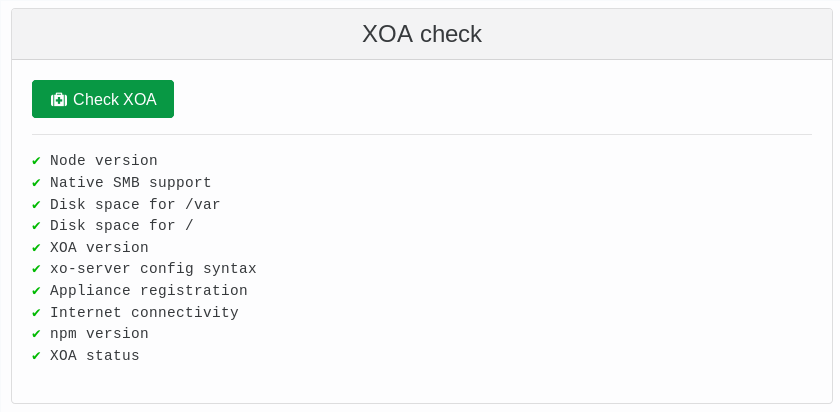
|
||||
|
||||
- Open a secure support tunnel so our team can remotely investigate
|
||||
|
||||

|
||||
|
||||
<a id="ssh-pro-support"></a>
|
||||
|
||||
If your web UI is not working, you can also open the secure support tunnel from the CLI. To open a private tunnel (we are the only one with the private key), you can use the command `xoa support tunnel` like below:
|
||||
|
||||
```
|
||||
$ xoa support tunnel
|
||||
The support tunnel has been created.
|
||||
|
||||
Do not stop this command before the intervention is over!
|
||||
Give this id to the support: 40713
|
||||
```
|
||||
|
||||
Give us this number, and we'll be able to access your XOA in a secure manner. Then, close the tunnel with `Ctrl+C` after your issue has been solved by support.
|
||||
|
||||
> The tunnel utilizes the user `xoa-support`. If you want to deactivate this bundled user, you can run `chage -E 0 xoa-support`. To re-activate this account, you must run `chage -E 1 xoa-support`.
|
||||
|
||||
### First console connection
|
||||
|
||||
If you connect via SSH or console, the default credentials are:
|
||||
|
||||
* user: xoa
|
||||
* password: xoa
|
||||
- user: xoa
|
||||
- password: xoa
|
||||
|
||||
During your first connection, the system will ask you to:
|
||||
|
||||
* enter the current password again (`xoa`)
|
||||
* enter your new password
|
||||
* retype your new password
|
||||
- enter the current password again (`xoa`)
|
||||
- enter your new password
|
||||
- retype your new password
|
||||
|
||||
When it's done, you'll be disconnected, so reconnect again with your new password.
|
||||
|
||||
@@ -150,28 +190,12 @@ $ xoa network static
|
||||
? IP of the DNS server 192.168.100.254
|
||||
```
|
||||
|
||||
Xen Orchestra is now accessible in your browser at ` https://your-vm-ip`.
|
||||
Xen Orchestra is now accessible in your browser at `https://your-vm-ip`.
|
||||
|
||||
You can access the VM console through XenCenter or using VNC through a SSH tunnel.
|
||||
|
||||
If you want to go back in DHCP, just run `xoa network dhcp`
|
||||
|
||||
### SSH Pro Support
|
||||
|
||||
By default, if you need support, there is a dedicated user named `xoa-support`. We are the only one with the private key. If you want our assistance on your XOA, you can open a private tunnel with the command `xoa support tunnel` like below:
|
||||
|
||||
```
|
||||
$ xoa support tunnel
|
||||
The support tunnel has been created.
|
||||
|
||||
Do not stop this command before the intervention is over!
|
||||
Give this id to the support: 40713
|
||||
```
|
||||
|
||||
Give us this number, we'll be able to access your XOA in a secure manner. Then, close the tunnel with `Ctrl+C` after your issue has been solved by support.
|
||||
|
||||
> If you want to deactivate this bundled user, you can type `chage -E 0 xoa-support`. To re-activate this account, you must use the `chage -E 1 xoa-support`.
|
||||
|
||||
### Firewall
|
||||
|
||||
By default XOA is firewalled, with only ports 22, 80 and 443 opened. You can see the current status of the firewall using the `sudo ufw status verbose` command:
|
||||
|
||||
@@ -16,10 +16,10 @@ XOSAN will "gather" all your local disks into a shared SR, that XenServer will j
|
||||
|
||||
The objectives are to:
|
||||
|
||||
* protect your data thanks to replication of data on multiple hosts
|
||||
* provide XenServer high availability without buying a NAS nor a SAN
|
||||
* give you flexibility to grow your storage by adding new nodes
|
||||
* work on all kind of hardware, from HDDs to SSDs, with hardware RAID or not
|
||||
- protect your data thanks to replication of data on multiple hosts
|
||||
- provide XenServer high availability without buying a NAS nor a SAN
|
||||
- give you flexibility to grow your storage by adding new nodes
|
||||
- work on all kind of hardware, from HDDs to SSDs, with hardware RAID or not
|
||||
|
||||
## Beta access - Phase II
|
||||
|
||||
@@ -34,8 +34,8 @@ To activate you XOSAN beta, just go in the **"XOSAN"** menu in your (up-to-date)
|
||||
|
||||
To deploy XOSAN, please follow the rest of the documentation:
|
||||
|
||||
* [XOSAN Requirements](xosan_requirements.md)
|
||||
* [Types of XOSAN](xosan_types.md)
|
||||
* [How to create a new XOSAN Storage](xosan_create.md)
|
||||
* [XOSAN management](xosan_management.md)
|
||||
* [Get a free XOSAN trial](xosan_trial.md)
|
||||
- [XOSAN Requirements](xosan_requirements.md)
|
||||
- [Types of XOSAN](xosan_types.md)
|
||||
- [How to create a new XOSAN Storage](xosan_create.md)
|
||||
- [XOSAN management](xosan_management.md)
|
||||
- [Get a free XOSAN trial](xosan_trial.md)
|
||||
|
||||
@@ -4,33 +4,32 @@
|
||||
|
||||
XOSAN will need a pool with:
|
||||
|
||||
* XenServer 7 or higher
|
||||
* Local LVM SR with at lease 15GiB of free space on **each** host
|
||||
* 2 GiB of free RAM on each host for the XOSAN VM
|
||||
* A working connection with the updater (same way as the XO trial)
|
||||
* Our XOSAN pack installed on each hosts (it's automatically deployed during the first XOSAN install)
|
||||
- XenServer 7 or higher
|
||||
- Local LVM SR with at lease 15GiB of free space on **each** host
|
||||
- 2 GiB of free RAM on each host for the XOSAN VM
|
||||
- A working connection with the updater (same way as the XO trial)
|
||||
- Our XOSAN pack installed on each hosts (it's automatically deployed during the first XOSAN install)
|
||||
|
||||
> The pack will install user-space packages and add a new SR type: "xosan". Their will be no other modification. The tool stack has to be restarted to be able to deal with XOSAN (no VM or service interruption). It's also fully automated in the XOSAN install process.
|
||||
|
||||
### Optional
|
||||
|
||||
* An extra/dedicated physical network for storage to deliver high performances
|
||||
* 10G networks will deliver higher throughput
|
||||
- An extra/dedicated physical network for storage to deliver high performances
|
||||
- 10G networks will deliver higher throughput
|
||||
|
||||
## Creation
|
||||
|
||||
After the completion of all the requirements, you can install XOSAN itself.
|
||||
|
||||
1. Go in your XOSAN panel in Xen Orchestra.
|
||||
1. Go in your XOSAN panel in Xen Orchestra.
|
||||
|
||||

|
||||
|
||||
2. Click on `new` and select the pool on which you want to create a shared cluster. Click on `install it now` to install the XOSAN package on every hosts in the pool.
|
||||
2. Click on `new` and select the pool on which you want to create a shared cluster. Click on `install it now` to install the XOSAN package on every hosts in the pool.
|
||||
|
||||

|
||||
|
||||
|
||||
3. Select the PIF on which you want to create the XOSAN network.
|
||||
3. Select the PIF on which you want to create the XOSAN network.
|
||||
|
||||
4. Select all the SR you want to use in your shared cluster.
|
||||
|
||||
@@ -46,22 +45,23 @@ After the completion of all the requirements, you can install XOSAN itself.
|
||||
|
||||
### Advanced options
|
||||
|
||||
With the advanced option, you can:
|
||||
With the advanced option, you can:
|
||||
|
||||
* use a VLAN
|
||||
> If you want to use a VLAN, don't forget to configure your switch as well!
|
||||
- use a VLAN
|
||||
|
||||
* use a custom IP network
|
||||
> If you want to use a VLAN, don't forget to configure your switch as well!
|
||||
|
||||
* change the total size you want for your shared storage
|
||||
- use a custom IP network
|
||||
|
||||
* increase the memory allocated to XOSAN
|
||||
> 2GiB is the minimum to allocate to XOSAN. You will get better result with 4GiB and if you have a lot of memory available, 8GiB is the best.
|
||||
- change the total size you want for your shared storage
|
||||
|
||||
- increase the memory allocated to XOSAN
|
||||
> 2GiB is the minimum to allocate to XOSAN. You will get better result with 4GiB and if you have a lot of memory available, 8GiB is the best.
|
||||
|
||||

|
||||
|
||||
Once you are ready, you can click on `Create`. XOSAN will automatically deploy itself and create the virtual shared storage you have selected.
|
||||
|
||||
> The process can take a few minutes to complete.
|
||||
> The process can take a few minutes to complete.
|
||||
|
||||

|
||||
|
||||
@@ -4,15 +4,15 @@ Data are **chunked and dispersed** on multiple nodes. There is a kind of "parity
|
||||
|
||||
Pros:
|
||||
|
||||
* good capacity (perfect for **HDD storage**)
|
||||
* simple to setup
|
||||
* simple to maintain
|
||||
* various level of protection
|
||||
- good capacity (perfect for **HDD storage**)
|
||||
- simple to setup
|
||||
- simple to maintain
|
||||
- various level of protection
|
||||
|
||||
Cons:
|
||||
|
||||
* not all configrations possible (3, 5, 6 nodes and more)
|
||||
* limited performances on SSDs (replication is better in this case)
|
||||
- not all configrations possible (3, 5, 6 nodes and more)
|
||||
- limited performances on SSDs (replication is better in this case)
|
||||
|
||||
![pictore disperse principle]()
|
||||
|
||||
@@ -44,7 +44,7 @@ It's very similar to **RAID6**. You can lose up to 2 nodes, it will continue to
|
||||
|
||||
You can grow a replicated XOSAN by adding extra disperse volumes, in other words a new disperse will be like in RAID 0 with the old one. It's a **distributed-disperse** type. Some examples:
|
||||
|
||||
* To grow a disperse 3, you need 3 new nodes. You'll add the total capacity of each disperse to make a distributed-disperse on 2x3 dispersed nodes.
|
||||
* To grow a disperse 6, you need 6 new nodes.
|
||||
- To grow a disperse 3, you need 3 new nodes. You'll add the total capacity of each disperse to make a distributed-disperse on 2x3 dispersed nodes.
|
||||
- To grow a disperse 6, you need 6 new nodes.
|
||||
|
||||

|
||||
|
||||
@@ -4,13 +4,13 @@ Data are replicated from a node to another.
|
||||
|
||||
Pros:
|
||||
|
||||
* fast (**must be used for SSDs**)
|
||||
* relatively flexible
|
||||
- fast (**must be used for SSDs**)
|
||||
- relatively flexible
|
||||
|
||||
Cons:
|
||||
|
||||
* lower capacity (so higher cost, better for SSDs)
|
||||
* a bit more complex to maintain in distributed-replicated (see "RAID 10 like")
|
||||
- lower capacity (so higher cost, better for SSDs)
|
||||
- a bit more complex to maintain in distributed-replicated (see "RAID 10 like")
|
||||
|
||||
### 2-way replication
|
||||
|
||||
@@ -48,8 +48,8 @@ This is a kind of special mode. On a 2 nodes setup, one node must know what's ha
|
||||
|
||||
Thanks to this arbiter, you'll have 3 nodes running on 2 XenServer hosts:
|
||||
|
||||
* if the host with 1 node is down, the other host will continue to provide a working XOSAN
|
||||
* if the host with 2 nodes (1 normal and 1 arbiter) id down, the other node will go into read only mode, to avoid split brain scenario.
|
||||
- if the host with 1 node is down, the other host will continue to provide a working XOSAN
|
||||
- if the host with 2 nodes (1 normal and 1 arbiter) id down, the other node will go into read only mode, to avoid split brain scenario.
|
||||
|
||||
This way, in all cases, you are protected.
|
||||
|
||||
@@ -84,5 +84,5 @@ There is more fault tolerance on mode 2, but less space usable. It's up to you!
|
||||
|
||||
You can grow a replicated XOSAN by adding pairs, in other words "RAID 1"-like mirrors to the existing setup, like you would adds mirrored disks in "RAID 10" setup. Examples:
|
||||
|
||||
* on a 2 hosts setup, going for 4 hosts by adding 2 mirrored nodes
|
||||
* on a 3 hosts setup using 3-way replication, by adding 3 mirrored nodes
|
||||
- on a 2 hosts setup, going for 4 hosts by adding 2 mirrored nodes
|
||||
- on a 3 hosts setup using 3-way replication, by adding 3 mirrored nodes
|
||||
|
||||
Some files were not shown because too many files have changed in this diff Show More
Reference in New Issue
Block a user