 95252be5f0
* Clarification, update links, organize

* add nfs warning, fix debian version

* add ENOSPC troubleshooting

* add more enospc detail

* add note on editing username

* Documentation typo/grammar cleanup part 9

* grammar cleanup v10

* grammar editing v10

* grammar updates v11

* Grammar updates v11
1.5 KiB
Smart backup
There are two ways to select which VMs will be backed up:
- Manually selecting multiple VM's
- Smart backup
Picking VMs manually can be a limitation if your environment moves fast (i.e. having new VMs you need to backup often). In that situation you would previously need to constantly go back and edit the backup job to add new VM's.
But thanks to smart backup, you now have more flexibility: you won't select specific VMs, but VMs status/tag/placement at the time backup job will be executed. Let's see some examples!
Backup all VMs on a pool
This job will backup all VMs on a pool "Lab Pool" when scheduled:
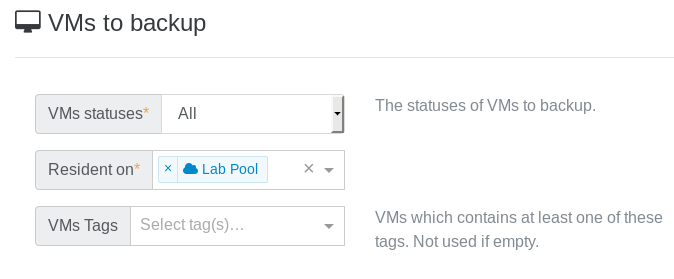
It means: every VM existing on this pool at the time of the backup job will be backed up. Doesn't matter if you create a new VM, it will be backed up too without editing any backup job.
You now have the ability to intelligently backup VM's in production pools!
Want to narrow the job a bit? See below.
Backup filters
You can also:
- backup only running (or halted) VMs when the job is executed
- backup only VMs with a specific tag
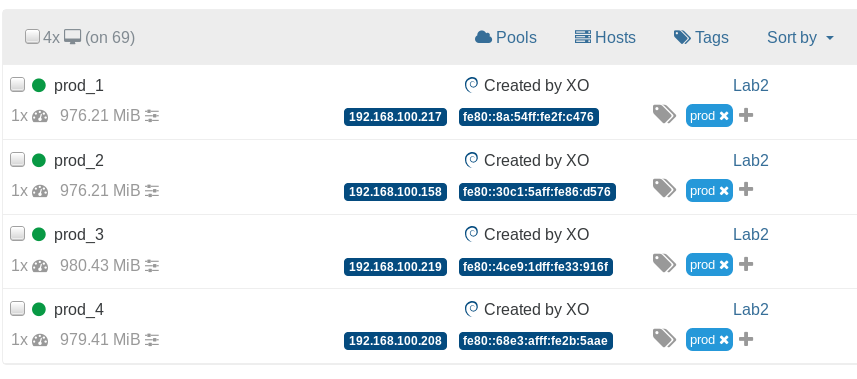
Remember the Prod VMs? I added a tag "prod" to each of them:
Now if you do this:
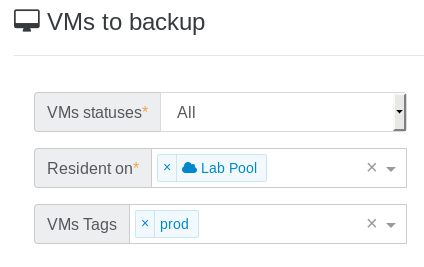
It means any VMs on "Lab Pool" with the "prod" tag will be backed up.