 8b06049bf8
* Clarification, update links, organize

* add nfs warning, fix debian version

* add ENOSPC troubleshooting

* add more enospc detail

* add note on editing username

* Documentation typo/grammar cleanup part 9

* grammar cleanup v10

* grammar editing v10

* grammar updates v11

* Grammar updates v11

* Lucky #13 (grammar updates)

* grammar updates v14
20 lines
973 B
Markdown
20 lines
973 B
Markdown
# GitHub
|
|
|
|
This plugin allows GitHub users to authenticate to Xen-Orchestra.
|
|
|
|
The first time a user signs in, XO will create a new XO user with the same identifier, without any permissions.
|
|
|
|
First you need to configure a new app in your GitHub account:
|
|
|
|
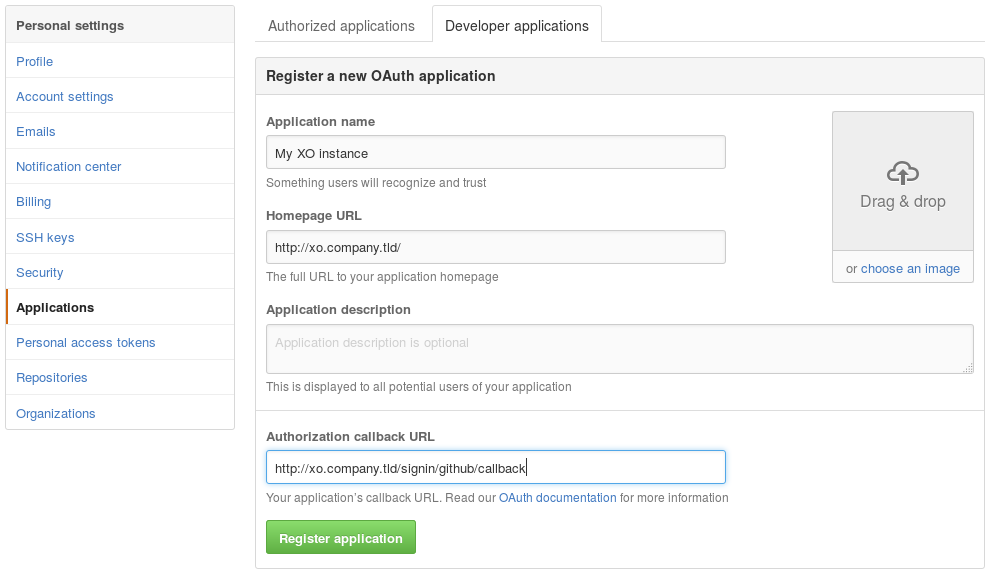
|
|
|
|
When you get your `clientID` and your `clientSecret`, you can configure them in the GitHub Plugin inside the "Settings/Plugins" view of Xen Orchestra.
|
|
|
|
Be sure to activate the plugin after you save the configuration (button on top). When it's done, you'll see a link in the login view, this is where you'll go to authenticate:
|
|
|
|

|
|
|
|
## Debugging
|
|
|
|
If you can't log in with your GitHub settings, please check the logs of `xo-server` while you attempt to connect. It will give you hints about the error encountered. You can do that with a `tail -f /var/log/syslog -n 100` on your XOA.
|