 95252be5f0
* Clarification, update links, organize

* add nfs warning, fix debian version

* add ENOSPC troubleshooting

* add more enospc detail

* add note on editing username

* Documentation typo/grammar cleanup part 9

* grammar cleanup v10

* grammar editing v10

* grammar updates v11

* Grammar updates v11
839 B
839 B
File level restore
You can also restore individual files inside a VM. It works with all your existing delta backups.
You must use the latest XOA release. When you connect with the console, you should see
Build number: 16.12.20. If you have this or higher (eg17.*), it means that's OK! Otherwise, please update your XOA.
Restoring individual files from an SMB remote is not yet possible, but it's planned for the future!
File level restore is only possible on delta backups
Restore a file
Go into the Backup/File restore section:
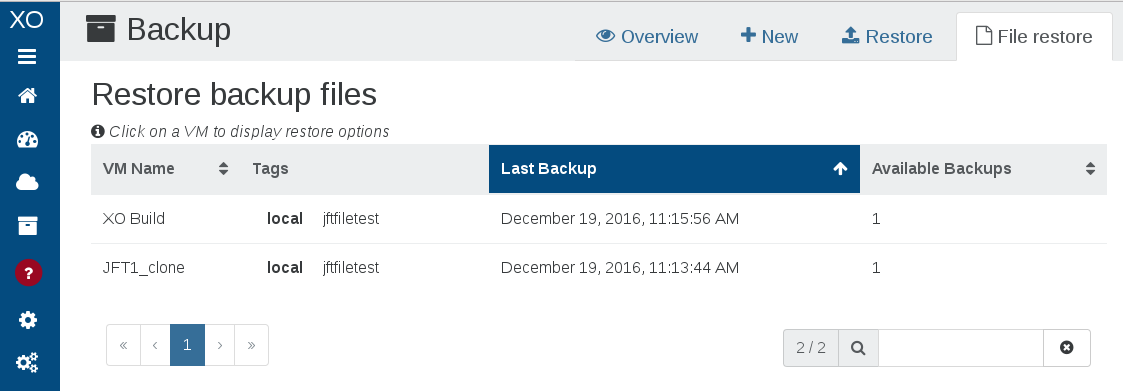
Then, click on the VM where your files are, and follow the instructions:
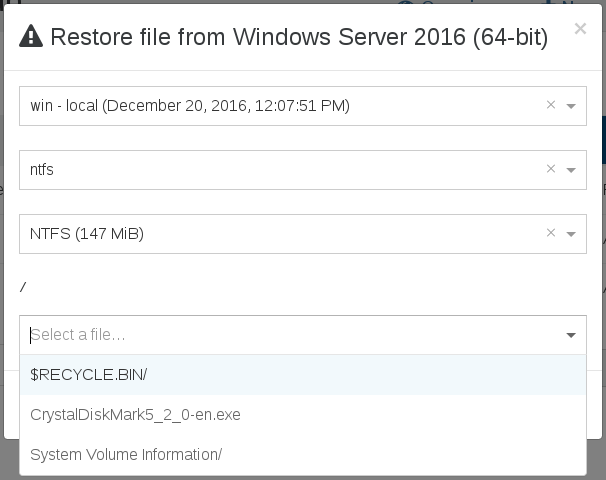
That's it! Your chosen file will be restored.