 2e74f87ae0
* Clarification, update links, organize

* add nfs warning, fix debian version

* add ENOSPC troubleshooting

* add more enospc detail

* add note on editing username

* Documentation typo/grammar cleanup part 9

* grammar cleanup v10

* grammar editing v10

* grammar updates v11
2.2 KiB
Continuous Delta backups
WARNING: Delta backups are only available on XenServer 6.5 or later
You can export only the delta (difference) between your current VM disks and a previous snapshot (called here the reference). They are called continuous because you'll never export a full backup after the first one.
Introduction
Full backups can be represented like this:

It means huge files for each backups. Delta backups will only export the difference between the previous backup:

You can imagine making your first initial full backup during a weekend, and then only delta backups every night. It combines the flexibility of snapshots and the power of full backups, because:
- delta are stored somewhere else than the current VM storage
- they are small
- quick to create
- easy to restore
So, if you want to rollback your VM to a previous state, the cost is only one snapshot on your SR (far less than the rolling snapshot mechanism).
Even if you lost your whole SR or VM, XOA will restore your VM entirely and automatically, at any date of backup.
You can even imagine using this to backup more often! Because deltas will be smaller, and will always be deltas.
Continuous
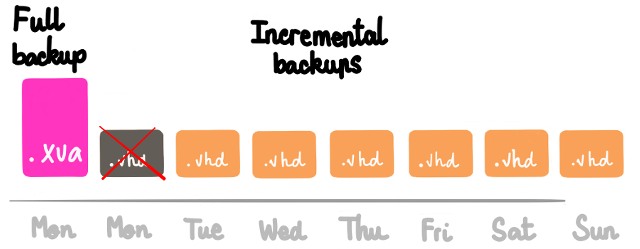
They are called continuous because you'll never export a full backup after the first one. We'll merge the oldest delta into the full:

This way we can go "forward" and remove this oldest VHD after the merge:
Create Delta backup
Just go into your "Backup" view, and select Delta Backup. Then, it's the same as a normal backup.
Exclude disks
During a delta backup job, you can avoid saving all disks of the VM. To do that is trivial: just edit the VM disk name and add [NOBAK] before the current name, eg: data-disk will become [NOBAK] data-disk (with a space or not, doesn't matter).
The disks marked with [NOBAK] will be now ignored in all following backups.